
Let’s grab a coffee and talk about the elephant in the room. You’ve probably noticed that everyone is browsing the web on their phones while standing in line, sitting on the couch, or even walking down the street. If you are planning to build a web app, launch a SaaS, or redesign your business site, you might be drowning in technical jargon right now.
You’re hearing terms like frontend, backend, frameworks, and mobile optimization. But the biggest question I hear from founders every single week is exactly this: what is responsive web design and why it matters 2026?
Look, building a web application today isn’t like it was five years ago. Users have zero patience for pinching, zooming, or waiting for a clunky desktop site to load on an iPhone. If your app doesn’t look and feel like magic on a six-inch screen, your customers will bounce straight to your competitors.
In this guide, I’m going to skip the textbook definitions. Instead, I’ll explain what is responsive web design and why it matters 2026 using plain English. We’re going to cover development costs, the best frameworks to use, how to avoid expensive hiring mistakes, and exactly what tech stack you need to build a successful, scalable web application today. Let’s dive in.
Why This Matters for Small Businesses
A few months ago, I was sitting down with a client let’s call him Dave. Dave runs a growing local delivery startup. He spent $15,000 having an agency build a custom web app for his dispatchers and customers. On his giant desktop monitor in the office, it looked incredible. But when his drivers tried to use the app on their phones out in the field, the buttons overlapped, the text was tiny, and the whole system was essentially useless.
Dave learned the hard way how responsive design impacts conversion rates for small businesses. Because the app wasn’t responsive, his drivers were frustrated, and his customers were abandoning their orders midway through the checkout process.
Understanding what is responsive web design and why it matters 2026 is critical because we live in a mobile-first world. In fact, search engines now use mobile-first indexing. This means Google looks at the mobile version of your web app to decide where you should rank in search results. If you don’t have a responsive application, you are virtually invisible.
When you understand how responsive design impacts conversion rates for small businesses, you stop seeing it as a “nice-to-have” feature and start seeing it as your primary sales engine. If you want to know why non-responsive websites lose search engine rankings on mobile, the answer is simple: search engines want to provide a good user experience. If your app requires users to squint and scroll sideways, you get penalized. It’s that simple.
Understanding the Basics
To really grasp what is responsive web design and why it matters 2026, we need to strip away the buzzwords and look at the foundation of how web applications are built.
Think of your web application like a modern restaurant.
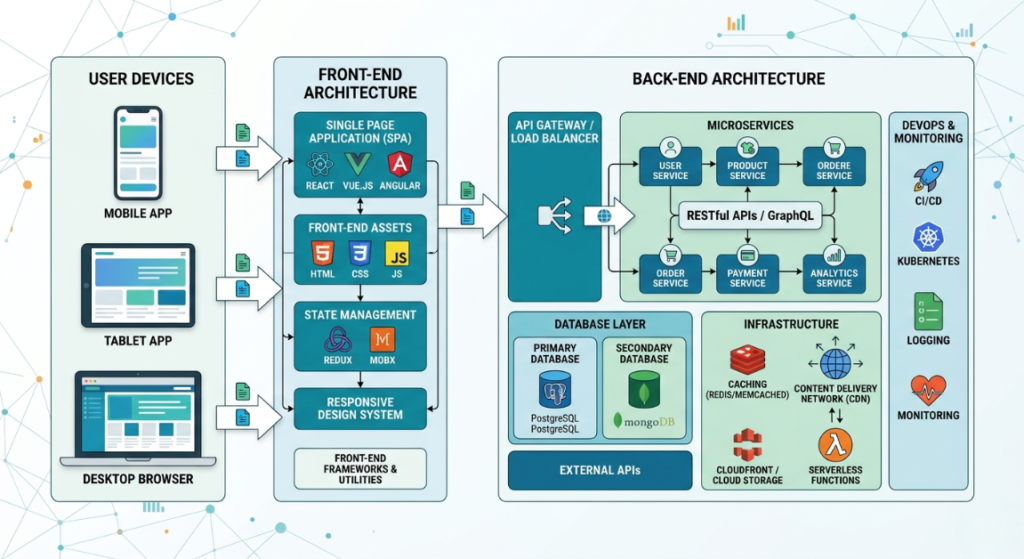
The frontend is your dining area. It’s the tables, the menus, the lighting, and everything the customer interacts with directly.
The backend is the kitchen. It’s where the heavy lifting happens, where data is processed, and where the “food” is prepared before being brought out to the customer.
The database is your pantry, storing all your ingredients (user data, inventory, passwords).
APIs are the waiters running back and forth, taking orders from the frontend (the customer) to the backend (the kitchen).
Finally, hosting is the physical building you rent to keep your restaurant open to the public 24/7.
When we talk about responsive design, we are strictly talking about the frontend the dining area. A responsive frontend uses fluid grid layouts. Instead of defining a table as exactly 500 pixels wide, fluid grid layouts use percentages. The table takes up 50% of the screen, what is responsive web design and why it matters whether that screen is a massive desktop monitor or a tiny smartphone.
This is combined with flexible image scaling, which ensures that a large hero image shrinks automatically so it doesn’t break the layout on a mobile device. Flexible image scaling is what keeps your web app looking sharp across all devices. We also use adaptive user interfaces (UI), which might completely change how a menu works depending on the device. For example, a horizontal navigation bar on a desktop turns into a “hamburger” dropdown menu on a phone. That is the essence of adaptive user interfaces (UI) smart, context-aware design.
Key Options / Technologies Explained
When you hire a developer or an agency to build your web app, they are going to pitch you different “tech stacks” and frameworks to handle the frontend and ensure the app is fully responsive. To help you make an informed decision on what is responsive web design and why it matters 2026, let’s break down the most popular options you’ll encounter. Web App vs Mobile App in 2026: Which to Choose?
Tailwind CSS
Overview
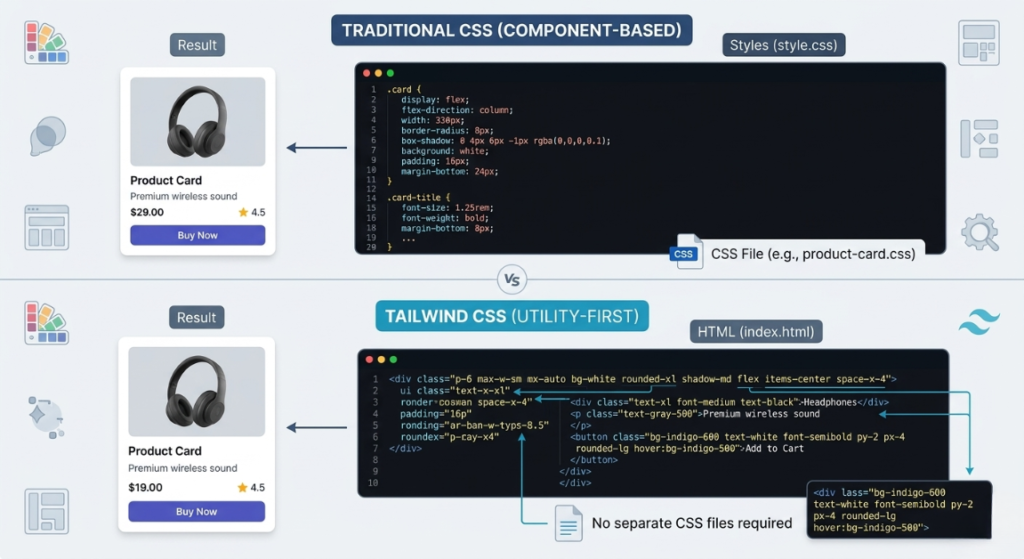
Tailwind is what we call a “utility-first” CSS framework. Instead of giving developers pre-designed, rigid templates, it gives them tiny building blocks (utilities) to build custom designs directly inside their code. It has become the gold standard for creating fluid grid layouts and highly custom, responsive web apps.
Best For
Startups and small businesses building custom SaaS platforms, complex web applications, or highly unique brand experiences where performance is critical.
Pros: what is responsive web design and why it matters
- Incredibly fast performance and loading times.
- Highly customizable (you don’t look like a generic template).
- Makes implementing flexible image scaling incredibly easy.
Cons: what is responsive web design and why it matters
- Code can look messy to untrained eyes.
- Requires a skilled developer who understands modern CSS.
Estimated Cost
Free to use, but developer rates range from $50 – $150/hour to implement properly.
Learning Curve
Moderate to Advanced
Real-World Use Case
A SaaS startup building a custom dashboard for real estate agents. They need adaptive user interfaces (UI) where the data tables automatically collapse into mobile-friendly cards when an agent views the app on their phone during a house tour. Tailwind makes this seamless.
React & Next.js
Overview
React is a frontend library created by Facebook, and Next.js is a powerful framework built on top of it. Together, they allow developers to build incredibly fast, interactive user interfaces. Next.js is particularly famous for its rendering capabilities, which make apps lightning fast.
Best For
Ambitious startups, e-commerce stores, and web apps that require high interactivity, fast page loads, and excellent SEO.
Pros: what is responsive web design and why it matters
- Perfect for mobile-first indexing because it loads incredibly fast.
- Huge community, making it easy to find and hire developers.
- Highly scalable as your business grows.
Cons: what is responsive web design and why it matters
- Overkill for a simple 5-page informational website.
- Hosting and backend integration require more technical setup.
Estimated Cost
$5,000 – $25,000+ for a custom Next.js web application build.
Learning Curve
Advanced
Real-World Use Case
An online marketplace connecting local freelancers with small businesses. The app needs to update in real-time, handle messaging, and load instantly on mobile devices. Next.js ensures the site aces its Core Web Vitals, keeping search engines and users happy.
Webflow
Overview
Webflow is a visual development platform. It allows designers and developers to build custom, responsive websites visually, without writing code by hand. However, it outputs clean, production-ready code in the background.
Best For
Small business owners, marketing teams, and agencies who need custom, high-end marketing websites without the cost of a full-stack engineering team.
Pros: what is responsive web design and why it matters
- Visual editor makes it easy to see how the site looks on all devices.
- Very fast development timeline.
- Great built-in hosting and security.
Cons: what is responsive web design and why it matters
- Not meant for complex web applications with heavy backend logic (like a SaaS).
- Monthly subscription fees can add up for higher traffic tiers.
Estimated Cost
$20 – $40/month for hosting, plus $2,000 – $8,000 for a freelancer to design and build it.
Learning Curve
Moderate
Real-World Use Case
A boutique consulting firm needs a high-end, animated website to attract corporate clients. They need to ensure it meets the best practices for mobile-first responsive web design in 2026 so they rank well on Google, but they don’t have a complex database. Webflow is the perfect fit. The Complete Web Application Development Guide for Small Businesses (2026)
Bootstrap
Overview
Bootstrap is one of the oldest and most famous CSS frameworks. Originally created by Twitter, it provides pre-built components (like buttons, navigation bars, and forms) that are responsive right out of the box.
Best For
Internal business tools, admin dashboards, or beginner developers who need to get a prototype up and running very quickly.
Pros: what is responsive web design and why it matters
- Very fast to build with using pre-made components.
- Huge amount of documentation and tutorials.
- Naturally uses fluid grid layouts.
Cons: what is responsive web design and why it matters
- Websites built with Bootstrap tend to look very generic (the “Bootstrap look”).
- Can be bulky and slow if not optimized, hurting Core Web Vitals.
Estimated Cost
Free to use; developer costs are generally lower since it’s a legacy framework ($1,000 – $5,000 for simple projects).
Learning Curve
Beginner
Real-World Use Case
A logistics company needs a simple internal dashboard for warehouse workers to track inventory. It doesn’t need to be visually stunning; it just needs to work on the workers’ tablets. Bootstrap gets the job done cheaply and quickly.
Headless CMS + Jamstack Approach
Overview
A “headless” approach means decoupling your frontend (what the user sees) from your backend database (where the content lives). You might use a system like Sanity or Contentful to store blog posts, and React/Next.js to display them.
Best For
Content-heavy web apps, massive e-commerce sites, or media publications that need blazing speed and top-tier security.
Pros: what is responsive web design and why it matters
- Incredible speed, making it the best option for passing Core Web Vitals.
- High security (no database exposed directly to the frontend).
- Total freedom to design adaptive user interfaces (UI) without platform restrictions.
Cons: what is responsive web design and why it matters
- Highly complex to set up.
- Requires multiple subscriptions (one for frontend hosting, one for the CMS).
Estimated Cost
$10,000 – $40,000+ for agency development, plus $50–$200/month in specialized hosting and CMS fees.
Learning Curve
Advanced
Real-World Use Case
A fast-growing online magazine. They need their editorial team to write articles easily (the CMS), but they need the articles to load in milliseconds on mobile to capture ad revenue. This approach nails the best practices for mobile-first responsive web design in 2026.
Options to Avoid (Common Mistakes)
When business owners are first learning what is responsive web design and why it matters 2026, they often fall into a few expensive traps. Here are the common mistakes I see every year, and how to avoid them.
1. Building a Separate “M-Dot” Mobile Site
Ten years ago, it was common to have www.yourwebsite.com for desktop and m.yourwebsite.com for mobile. Do not do this in 2026. It splits your SEO power in half, requires maintaining two separate codebases, and creates a nightmare for your developers. This is exactly why non-responsive websites lose search engine rankings on mobile. Always use a single responsive codebase.
2. Ignoring Core Web Vitals
Google looks closely at your Core Web Vitals metrics that measure how fast your page loads, how quickly it becomes interactive, and how much the layout shifts as images load. If you use massive, uncompressed images instead of proper flexible image scaling, your Core Web Vitals will tank. A poor score means Google will bury your web app on page 10 of the search results.
3. Over-Engineering with Complex Frameworks
If you are running a local landscaping business and just need a place for customers to request quotes, you do not need a custom Next.js web application with a headless CMS. That is overkill. Using complex tech for simple needs results in massive maintenance bills. Stick to simpler builders like Webflow or standard WordPress for simple needs, and save the heavy tech stacks for true web applications and SaaS products.
4. Forgetting About “Fat Finger” Design
A major part of the best practices for mobile-first responsive web design in 2026 is touch accessibility. If your buttons are too small or too close together, mobile users will accidentally click the wrong things. This directly ties back to how responsive design impacts conversion rates for small businesses. Frustrated users leave. Always design adaptive user interfaces (UI) with large, thumb-friendly tap targets.
Technology Comparison Table
To help you make a quick decision, here is a breakdown of the technologies we discussed based on my experience working with small businesses.
| Technology | Best For | Difficulty | Cost | Business Rating |
| Webflow | Small to Medium marketing sites | Medium | Low to Medium | ⭐⭐⭐⭐⭐ |
| Tailwind CSS | Custom web apps & SaaS | Hard | Medium to High | ⭐⭐⭐⭐⭐ |
| React / Next.js | Complex, scalable web apps | Hard | High | ⭐⭐⭐⭐ |
| Bootstrap | Internal tools & MVP prototypes | Easy | Low | ⭐⭐⭐ |
| Headless CMS | Content-heavy, high-traffic apps | Hard | High | ⭐⭐⭐ |
Sample Web App Tech Stacks
When my clients finally grasp what is responsive web design and why it matters 2026, the next question is always: “Okay, so what exact tools should I ask my developers to use?”
Here are three complete, modern tech stacks designed to deliver flawless responsive performance.
Stack 1: Startup MVP Stack
This stack is perfect for founders who need to get a product to market quickly to test an idea without spending a fortune. It relies on solid, reliable tech that natively handles mobile views well.
Frontend: React (with Tailwind CSS for responsive grids)
Backend: Node.js
Database: MongoDB
Hosting: Vercel
Estimated Cost: $20 – $50/month (Infrastructure only)
Best For: MVP startups, simple SaaS tools, and proof-of-concept web apps.
Stack 2: Small Business Website & Portal
If you run a service business (like a law firm, accounting agency, or consulting group) and need a blazing-fast marketing site connected to a secure client portal, this is the gold standard.
Frontend: Next.js
Backend: Node.js (Serverless functions)
Database: PostgreSQL
Hosting: AWS / DigitalOcean
Estimated Cost: $40 – $100/month (Infrastructure only)
Best For: Service businesses, B2B agencies, and companies needing secure client logins.
Stack 3: Scalable SaaS Platform
When you are building a massive application that needs to handle thousands of concurrent users, process complex data, and maintain perfect mobile-first indexing, you need heavy machinery.
Frontend: React (with a custom design system)
Backend: Python (Django)
Database: PostgreSQL
Hosting: AWS (Amazon Web Services)
Estimated Cost: $100+ /month (Infrastructure scales with usage)
Best For: SaaS startups, large e-commerce platforms, and data-heavy applications.
Cost Breakdown
So, how much is all of this going to cost? Understanding what is responsive web design and why it matters 2026 also means understanding how it impacts your wallet. Responsive design isn’t an “add-on” feature anymore; it is baked into the core cost of modern development.
Here is a realistic look at what you should expect to pay for a modern, responsive web application in 2026:
Developer Costs:
- Freelancer: $2,000 – $10,000. Great for simpler web apps, MVPs, and Webflow builds. You are trading money for a bit more risk in management.
- Agency: $10,000 – $50,000+. Best for complex SaaS products, Next.js builds, and applications requiring strict security and scalability. You pay for project management, QA testing, and guaranteed delivery.
Hosting & Infrastructure:
For a standard web application, hosting platforms like Vercel or AWS will cost anywhere from $20 to $100 a month initially. As you scale, these costs will increase based on your server usage.
Maintenance & APIs:
Expect to spend roughly 15% to 20% of your initial build cost annually on maintenance. This covers server updates, fixing bugs, and paying for third-party APIs (like Stripe for payments or Twilio for text messages).
Related Articles You Might Like
If you found this guide on what is responsive web design and why it matters 2026 useful, check out our related resources. We highly recommend reading our article on how to choose a tech stack for a web development project, where we break down specific backend frameworks and API tools for startups. You might also enjoy our deep dive into passing Core Web Vitals for e-commerce sites.
Frequently Asked Questions
How long does it take to build a web application?
For a simple MVP or a Webflow-based business site, expect 4 to 8 weeks. For a custom, complex web application (like a SaaS product built on React and Node.js), development typically takes 3 to 6 months. Timeline depends heavily on your feature requirements and how quickly you provide feedback to the development team.
What is the best framework for beginners?
If you are a business owner trying to DIY, Webflow is the best visual framework. If you are learning to code, Bootstrap is the easiest to pick up, but learning Tailwind CSS will make you much more competitive and yield better, more modern responsive designs.
How much does a small business web app cost?
A basic custom web app built by a freelance developer usually ranges from $5,000 to $15,000. If you require complex databases, user portals, and mobile-native features, expect to pay an agency closer to $20,000 to $40,000. Always factor in ongoing monthly hosting and maintenance costs.
Should I hire a developer or agency?
Hire a freelancer if you are on a tight budget (under $10,000) and have the time to project manage the build yourself. Hire an agency if you have a larger budget, need a complex scalable product, and want a full team handling design, coding, security, and quality assurance simultaneously.
What is the best database for web applications?
For most modern web applications, PostgreSQL is the gold standard. It is incredibly reliable, scales well, and is highly secure. If you are building a fast MVP that relies on unstructured data, MongoDB is an excellent and flexible alternative.
Final Thoughts
We’ve covered a lot of ground today. If you take away just one thing from our coffee chat, let it be this: understanding what is responsive web design and why it matters 2026 is no longer optional it is the baseline for digital survival.
Your customers are judging your business credibility the second your web app loads on their phone. If you utilize fluid grid layouts, prioritize flexible image scaling, and choose the right tech stack (like React or Tailwind), you will build an experience that users love and search engines reward. Don’t let your competitors steal your mobile traffic just because they invested in adaptive user interfaces (UI) and you didn’t.
Take the time to plan your tech stack carefully. Hire developers who understand mobile-first indexing and Core Web Vitals. If you keep these principles in mind, you won’t just build a web app; you’ll build a scalable asset that drives real revenue for your business. Now you know exactly what is responsive web design and why it matters 2026.
Call To Action
Have you ever lost customers because your web app or site wasn’t mobile-friendly? What tech stack are you leaning toward for your next project? Drop a comment below and share your experience with us! If you found this guide helpful, be sure to subscribe to our blog and follow us on social media for more weekly technical insights for startup founders and small business owners.
Leave a Reply