
Grab a coffee and let’s talk tech. If you’re a small business owner or a startup founder, you’ve probably sat in a meeting where a developer threw around the acronym “API” like it was common knowledge. You might have nodded along, secretly wondering how much this invisible piece of technology was going to cost you. Don’t worry, you aren’t alone. One of the most common questions I get from founders over coffee is: what is api integration in web development explained in plain English?
It’s a great question because understanding this concept is the absolute secret to building powerful apps without burning through your entire budget. Instead of building every single feature from scratch like a payment system, a map, or an email sender APIs let your app “borrow” those features from companies that have already perfected them.
In this guide, I’m going to break down exactly what is api integration in web development explained from a business perspective. We’ll cover the true development costs, the common mistakes to avoid, the best tools to use in 2026, and how connecting different software can save you thousands of dollars and months of development time. No textbook jargon, just real developer insights you can actually use.
Why This Matters for Small Businesses
Why should you, a business owner, care about APIs? Because ignoring them is one of the most expensive mistakes you can make in your startup journey.
I recently worked with a local restaurant owner who wanted a custom online ordering system. His previous developer had quoted him $30,000 to build a complete payment processor and a custom delivery routing system entirely from scratch. When he came to me for a second opinion, I asked him a simple question: “Why reinvent the wheel?”
By using third-party service integration, we connected his web app to Stripe for payments and Google Maps for routing. The cost? A tiny fraction of the original quote. This perfectly highlights the massive benefits of using third-party APIs vs building custom features. You save time, you save money, and you get enterprise-grade reliability without having to hire a massive team of engineers.
When you grasp what is api integration in web development explained in this practical way, you realize APIs are essentially digital Lego blocks. They let small teams build massive, powerful platforms fast. Whether you are building a SaaS product or a local booking website, third-party service integration is what allows your app to send text messages via Twilio, process credit cards, or sync with QuickBooks seamlessly.
However, jumping in without a plan is risky. If you don’t understand how these pieces fit together, you might end up paying monthly fees for tools you don’t need, or worse, expose your customer data due to poor security. Understanding the benefits of using third-party APIs vs building custom features is the first critical step toward smart, scalable web application development. Let’s make sure you get it right from day one.
Understanding the Basics
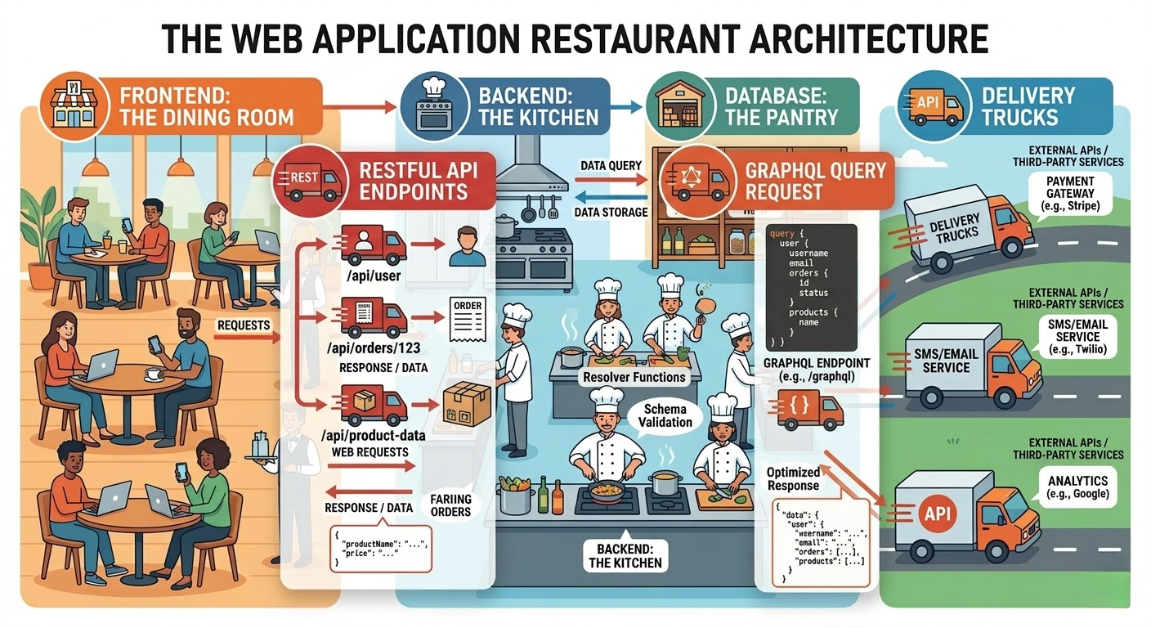
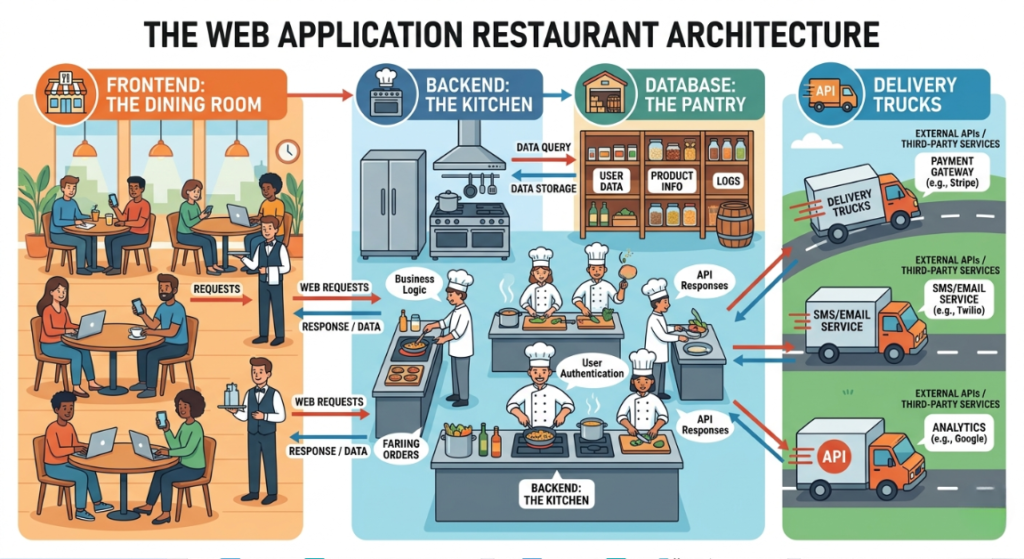
Let’s step out of the code for a minute and use a simple analogy. Imagine your web application is a busy restaurant.
The Frontend is the dining area. It’s what your customers see, touch, and interact with the menus, the tables, the decor.
The Backend is the kitchen. It’s where the heavy lifting happens, where data is processed, and where the “food” is actually prepared.
The Database is the pantry, securely storing all your ingredients (user data, passwords, product lists).
But what happens when your kitchen needs fresh fish delivered from the market down the street? You need a delivery driver. In the software world, that delivery driver is an API (Application Programming Interface).
So, what is api integration in web development explained in this context? It is the process of setting up these delivery routes so different software systems can talk to each other automatically. When your app needs to verify a customer’s address, it sends a request via an API to Google Maps. Google Maps processes it and sends the correct address back to your kitchen. This back-and-forth conversation happens through JSON data exchange a lightweight, easy-to-read text format that works like a universal language between completely different computers.
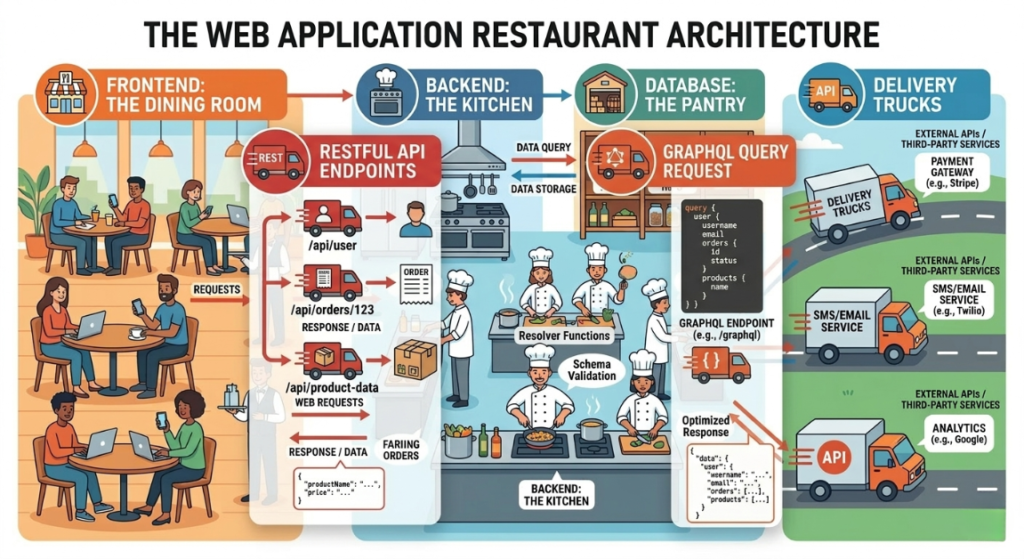
Most modern web applications rely on a RESTful API architecture. Think of RESTful API architecture as a strict set of standard traffic rules that ensures every digital “delivery driver” knows exactly where to go and how to behave. It keeps things predictable and scalable as your business grows.
Of course, you don’t want just anyone walking into your kitchen. That’s where API authentication and security come into play. Just like a bouncer at a nightclub, API authentication and security protocols (like API keys or OAuth tokens) ensure that only authorized services can access your data. When JSON data exchange happens securely behind these bouncers, your business runs smoothly, and your customers’ private data stays completely safe.
Key Options / Technologies Explained
Now that you know what is api integration in web development explained conceptually, let’s look at the actual tools and services we use to build modern apps. As a technical consultant, I always recommend leaning on established platforms rather than building from scratch. Here are the core API integrations and architectural options you need to know about in 2026.
Payment Processing APIs (Stripe / PayPal)
Overview
When founders ask me how to integrate payment gateways like Stripe into a web application, I tell them it’s much easier than they think. Stripe and PayPal provide APIs that handle the entire checkout process, securely processing credit cards so you don’t have to store sensitive financial data on your own servers.
Best For
E-commerce stores, SaaS subscriptions, and any business taking online payments.
Pros
- Extremely secure and compliant with complex banking laws.
- Handles recurring subscriptions automatically.
- Excellent developer documentation that saves coding time.
Cons
- Transaction fees (usually around 2.9% + 30¢ per swipe).
- Can be complex to set up highly custom billing logic.
Estimated Cost
$0 to integrate – you simply pay-per-transaction.
Learning Curve
Moderate.
Real-World Use Case
A local gym using Stripe’s API to automatically bill members every month, handle failed credit cards, and securely manage membership pauses without human intervention.
Communication APIs (Twilio / SendGrid)
Overview
Want your app to send an SMS confirmation when a user books an appointment? Or automated email receipts? Twilio (for SMS) and SendGrid (for emails) are the industry standards for third-party service integration in communications. You ping their API, and they send the message.
Best For
Service businesses needing appointment reminders, or platforms needing email verification.
Pros: what is api integration in web development explained
- Massive scale (you can send millions of messages easily).
- Extremely high deliverability rates compared to running your own mail server.
- Easy to track open rates, clicks, and bounces.
Cons: what is api integration in web development explained
- Costs can add up quickly if you send a high volume of SMS messages.
- Requires strict compliance with anti-spam laws.
Estimated Cost
$15 – $100+ per month depending on your message volume.
Learning Curve
Beginner.
Real-World Use Case
A hair salon web app that uses Twilio to send a text message reminder to clients exactly 24 hours before their scheduled haircut, drastically reducing no-shows.
Authentication APIs (Auth0 / Firebase Auth)
Overview
Building a secure login system from scratch is incredibly hard and highly risky. Auth0 and Firebase provide pre-built login, registration, and password reset screens. They handle API authentication and security out of the box, including social logins (like “Sign in with Google” or “Sign in with Apple”).
Best For
Any app requiring user accounts, especially SaaS startups handling sensitive data.
Pros
- Enterprise-grade security on day one.
- Saves weeks of expensive custom backend development.
- Built-in multi-factor authentication (MFA).
Cons
- You don’t entirely own the login flow interface.
- Auth0 can get expensive as your active user base grows into the thousands.
Estimated Cost
$0 – $35/month for early stages.
Learning Curve
Moderate.
Real-World Use Case
A startup building a project management tool uses Auth0 so users can log in securely using their existing Microsoft or Google work accounts without remembering a new password.
RESTful API vs GraphQL Architecture
Overview
When your frontend talks to your own backend, developers have to choose an architecture. RESTful API architecture is the traditional, highly reliable method where each type of data has its own specific URL endpoint. GraphQL is a newer approach developed by Facebook where the frontend asks for exactly the data it wants in one big, specific request.
Best For
Every custom web app needs one of these two architectures to function.
Pros: what is api integration in web development explained
- RESTful API architecture is universal, easy for beginners, and highly cacheable.
- GraphQL can be much faster for complex apps because it fetches less unnecessary data.
- Both utilize JSON data exchange effectively.
Cons: what is api integration in web development explained
- RESTful API architecture can cause over-fetching (getting too much data when you only need a little).
- GraphQL has a much steeper learning curve for junior developers.
Estimated Cost
$0 (This is a structural choice built into your developer’s hourly rate).
Learning Curve
Advanced (REST is Moderate).
Real-World Use Case
A real estate job board using RESTful API architecture to fetch a list of open jobs, and then making another separate request to fetch the company details when a user clicks a specific listing.
Webhooks and Real-Time Data (Pusher / Socket.io)
Overview
Traditional APIs make your app ask, “Are there any updates?” every few seconds. Webhooks and real-time data push the update to your app the exact instant it happens. Think of a WhatsApp chat or a live stock dashboard updating without you ever having to refresh the page.
Best For
Dashboards, chat applications, and live-tracking delivery tools.
Pros: what is api integration in web development explained
- Instantaneous user updates.
- Saves server resources because there is no constant polling.
- Crucial for modern, snappy user experiences.
Cons: what is api integration in web development explained
- Hard to debug when network things go wrong.
- Can cause issues if your server is suddenly overwhelmed by too many simultaneous events.
Estimated Cost
$0 – $50+ per month.
Learning Curve
Advanced.
Real-World Use Case
An Uber-style food delivery app where the map on the customer’s phone updates the driver’s location live using webhooks and real-time data from Stripe confirming a tip was just paid.
Options to Avoid (Common Mistakes)
As a technical consultant, I spend a lot of time fixing mistakes made by well-meaning developers or business owners who didn’t fully grasp what is api integration in web development explained correctly the first time around. Here are the costly mistakes you absolutely must avoid.
First, Over-Engineering with Microservices Too Early.
Founders often read tech blogs from Netflix or Spotify and think their startup needs 50 different microservices communicating via complex APIs. For a small business, this is a financial disaster. It’s incredibly expensive, impossible to maintain, and requires an entire team of senior engineers. Start with a simple monolith structure and add third-party service integration only when necessary. Don’t build for one million users when you currently have ten.
Second, Ignoring Best Practices for API Security in Small Business Web Development.
The absolute number one mistake I see is junior developers hardcoding API keys (which are essentially master passwords) directly into the frontend code. If you do this with an AWS or Stripe key, a hacker can easily inspect your website, steal the key, and rack up thousands of dollars in charges or steal your customer data overnight. Always store keys securely on your backend server. This is exactly why API authentication and security cannot be an afterthought it needs to be priority number one.
Third, Relying Exclusively on Free-Tier APIs for Core Business Functions.
It’s tempting to use a free API for weather data, currency conversion, or even sending emails. But free APIs often have incredibly strict rate limits. Imagine a customer trying to check out on Black Friday, and your free currency API blocks the request because you hit your limit of 100 requests per day. Your app breaks, and you lose money. If an API is critical to your revenue, pay the $20 a month for the premium tier. It’s the cheapest insurance policy you’ll ever buy.
Finally, Not Handling Webhooks and Real-Time Data Failures Properly.
If Stripe sends a webhook saying “Payment Successful,” but your server happens to crash at that exact millisecond, you might give a user access to a product without ever recording the sale in your database. Always ask your developer to build in retry mechanisms and fallback options when dealing with webhooks and real-time data, what is api integration in web development explained.
Technology Comparison Table
| Technology | Best For | Difficulty | Cost | Business Rating |
| Stripe API | E-commerce apps | Medium | Medium | ⭐⭐⭐⭐⭐ |
| Twilio API | SMS & Voice | Medium | Low | ⭐⭐⭐⭐ |
| Auth0 | SaaS Logins | Hard | Medium | ⭐⭐⭐⭐⭐ |
| GraphQL | Complex Apps | Hard | Medium | ⭐⭐⭐ |
| RESTful APIs | Standard Apps | Medium | Low | ⭐⭐⭐⭐⭐ |
Sample Web App Tech Stacks
Now that we’ve covered the individual pieces, how do they actually fit together? When clients ask me what is api integration in web development explained in practical, buildable terms, I show them these exact technology stacks. They are battle-tested, secure, and perfect for small to medium-sized businesses looking to scale in 2026.
Stack 1: Startup MVP Stack
Frontend: React
Backend: Node.js (with Express RESTful API architecture)
Database: MongoDB
Hosting: Vercel
Estimated Cost: $20 – $50/month
Best For: MVP startups and rapid prototyping.
This is the classic MERN stack. It’s entirely JavaScript-based, meaning you only need to hire one type of developer to build the whole thing. We use React to build a snappy frontend, Node.js to handle the backend logic, and MongoDB to store highly flexible JSON data exchange formats. Hosting on Vercel is incredibly cheap and scales automatically as your early-stage startup gets traction.
Stack 2: Small Business Service Website
Frontend: Next.js
Backend: Node.js
Database: PostgreSQL
Hosting: AWS / DigitalOcean
Estimated Cost: $40 – $100/month
Best For: Service businesses like agencies, salons, or booking platforms.
Next.js provides incredible SEO benefits because it pre-renders your pages. When someone searches for your local business on Google, your site loads instantly. PostgreSQL is a rock-solid, relational database perfect for keeping precise track of appointments, users, and payments. Here, we rely heavily on API authentication and security tools like NextAuth to manage client logins safely. We host it on DigitalOcean or AWS for robust, 24/7 performance.
Stack 3: Scalable SaaS Platform
Frontend: React
Backend: Python (Django)
Database: PostgreSQL
Hosting: AWS
Estimated Cost: $100+ / month
Best For: SaaS startups with complex data needs.
If your app is data-heavy, relies on complex math, or uses AI, Python (Django) is an incredible backend framework. It comes with a secure admin panel out-of-the-box and has excellent tools for creating secure, robust RESTful APIs. React handles the complex dashboard interfaces, and AWS manages the heavy lifting. This stack is built to scale from 100 users to 100,000 users without breaking a sweat, heavily leveraging webhooks and real-time data for instant dashboard updates across the globe. The Complete Web Application Development Guide for Small Businesses (2026)
Cost Breakdown
Let’s talk about the money. When a small business owner asks what is api integration in web development explained financially, they want to know the bottom line. It’s crucial to understand the true benefits of using third-party APIs vs building custom features because it directly impacts your runway and survival.
Building a highly secure, custom payment processor from scratch could cost $30,000+ in developer time, plus thousands more in mandatory security audits. Using Stripe’s API? It’s practically free to integrate, and you only pay a tiny percentage per transaction. This is the financial magic of third-party service integration.
Here are the realistic costs you should expect for a modern web app in 2026:
- Developer Cost: This is your biggest expense by far. A quality freelance developer might charge between $2,000 and $10,000 for a straightforward app using standard RESTful APIs. A dedicated, full-service agency building a complex SaaS platform will range from $10,000 to $50,000+.
- Hosting: Platforms like Vercel, AWS, or DigitalOcean will run you anywhere from $20 to $150+ per month, depending heavily on your traffic and database size.
- Third-Party APIs: Tools like Twilio, SendGrid, and Auth0 usually offer generous free tiers while you build. Once you scale and have real customers, budget $50 to $200 a month for these combined services.
- Maintenance: Expect to pay 15-20% of your initial development cost annually for routine updates, bug fixes, and maintaining your API connections as third-party services update their security rules.
By understanding what is api integration in web development explained properly, you can confidently allocate your budget toward marketing and growth rather than reinventing the digital wheel.
Related Articles You Might Like
If you found this guide useful, check out our article on how to choose a tech stack for your web development project, where we break down frameworks, languages, and deployment tools for startups. You might also enjoy our deep dive into the benefits of using third-party APIs vs building custom features for a closer look at the build-versus-buy debate. Finally, for those looking to start an online store, read our step-by-step tutorial on how to integrate payment gateways like Stripe into a web application to start accepting payments securely and quickly today.
Frequently Asked Questions
What is the best framework for beginners?
For beginners, I highly recommend React or Next.js for the frontend, and Node.js with Express for the backend. These tools rely entirely on JavaScript, meaning you only have to learn one programming language to build a full application. They also have massive developer communities, so if you get stuck figuring out what is api integration in web development explained in a specific tutorial, you’ll easily find answers on Stack Overflow or YouTube. Plus, they integrate seamlessly with JSON data exchange formats used by almost every major API today.
How long does it take to build a web application?
It entirely depends on the complexity of your idea. A simple MVP (Minimum Viable Product) utilizing off-the-shelf templates and standard RESTful API architecture can be built by a single developer in 4 to 8 weeks. A complex SaaS platform with custom dashboards, secure API authentication and security protocols, and real-time data syncing might take an agency 3 to 6 months. By utilizing existing APIs instead of building features from scratch, you can cut your development timeline in half.
How much does a small business web app cost?
A basic small business web app like an appointment booking system or a local service directory typically costs between $3,000 and $10,000 if you hire a solid freelancer. If you are building a more robust platform and hire a US-based agency, expect to pay between $15,000 and $40,000+. You also need to factor in monthly ongoing costs for hosting (around $30-$50), third-party service integration fees, and domain renewals. Understanding what is api integration in web development explained here helps you avoid overpaying.
Should I hire a developer or agency?
If you have a limited budget (under $10,000) and a very clear, simple idea of what you want, hiring a vetted freelance developer is usually the smartest move. Freelancers are agile, fast, and cost-effective. However, if your budget is larger and your project is complex requiring strict adherence to the best practices for API security in small business web development, custom UI/UX design, and long-term maintenance an agency is safer. Agencies provide an entire team, ensuring your app doesn’t fall apart if one person gets sick.
What is the best database for web applications?
For most small business web applications, PostgreSQL is the absolute gold standard in 2026. It is an open-source, highly reliable relational database that handles complex queries effortlessly. If your app handles massive amounts of unstructured data or relies heavily on rapid JSON data exchange without a strict schema, MongoDB is an excellent alternative. Ultimately, your developer should choose the database that best fits your specific data needs, but you rarely can go wrong starting with PostgreSQL.
Final Thoughts
Building a web application in 2026 doesn’t have to be a terrifying, budget-draining experience. By treating software development like assembling a highly customized set of Lego blocks, you can launch faster, spend less, and scale securely.
When you strip away the technical jargon, what is api integration in web development explained simply is just this: smart delegation. It’s letting Stripe handle your money, Twilio handle your text messages, and Google handle your maps, so you and your developers can focus exclusively on building the core features that actually make your business unique.
Remember, the goal isn’t to write the most complex code. The goal is to solve a real problem for your customers. Always follow the best practices for API security in small business web development, don’t over-engineer your initial MVP, and don’t be afraid to lean heavily on established third-party services. As a technical consultant, I promise you that the businesses that win are the ones that build smart, not hard.

Call To Action
Did this guide help clear up the confusion? I’d love to hear about the project you’re currently working on. Are you struggling to choose a tech stack, or wondering exactly how to integrate payment gateways like Stripe into a web application for your specific niche? Drop a comment below and share your experience, or ask any questions you have.
If you want more practical, developer-driven advice tailored for your startup, make sure to subscribe to our blog and follow us on Twitter and LinkedIn. Let’s build something great together!
Leave a Reply