
If you are a small business owner or a startup founder, you have probably realized that off-the-shelf software doesn’t always cut it. You might be dealing with spreadsheets that are falling apart, customers asking for a dedicated portal, or a brilliant idea for a new service. But when you start looking into how to actually build software, you hit a wall of confusing technical jargon, wildly different price quotes, and overwhelming choices. That is exactly why I put together this web application development guide for small businesses.
In my years working as a software architect, I’ve sat across the table from dozens of business owners over coffee. Almost all of them start with the same problems: cost confusion, not knowing which frameworks to choose, stress over hiring developers, and anxiety about building their first web app.
My goal is simple. I want this web application development guide for small businesses to translate complex tech into plain English. We are going to cover everything from understanding the basic plumbing of an app to figuring out realistic budgets. By the end of this read, you will have the clarity and confidence to make the right technical decisions for your company. Let’s dive in.
Why This Matters for Small Businesses
A few years ago, I worked with Sarah, who owned a thriving local meal-prep delivery business. She was managing 300 weekly orders using Google Forms, endless email chains, web application development guide for small businesses and a chaotic whiteboard. Mistakes were happening, and she was losing sleep. She needed a custom solution, which led her to explore Custom web app development.
But Sarah made a common mistake. She hired the cheapest overseas agency she could find, and they built an over-engineered monster using outdated technology. It was slow, it broke when more than ten people logged in, and she couldn’t afford to fix it. This happens far too often.
Understanding the contents of this web application development guide for small businesses matters because technology is an investment, not an expense. Whether you are looking at MVP development for startups or building an internal tool to save your team ten hours a week, the foundation you choose dictates your future success.
If you choose the right path, you get a tool that scales gracefully as you grow. If you choose the wrong path, you end up pouring money into a leaky bucket. Whether you are aiming for a massive SaaS application development project or just a simple customer dashboard, knowing the basics protects your budget and your sanity. You don’t need to learn how to code, web application development guide for small businesses, but you do need to know enough to manage the people who do.
Understanding the Basics
Before you spend a dime, let’s clear up some terminology. A common question I hear is: What is the difference between a website and a web application for business?
A website is primarily informational like a digital brochure, web application development guide for small businesses. A user reads it. A web application is interactive like a digital tool. A user does something with it, like logging in, making a payment, or modifying data.
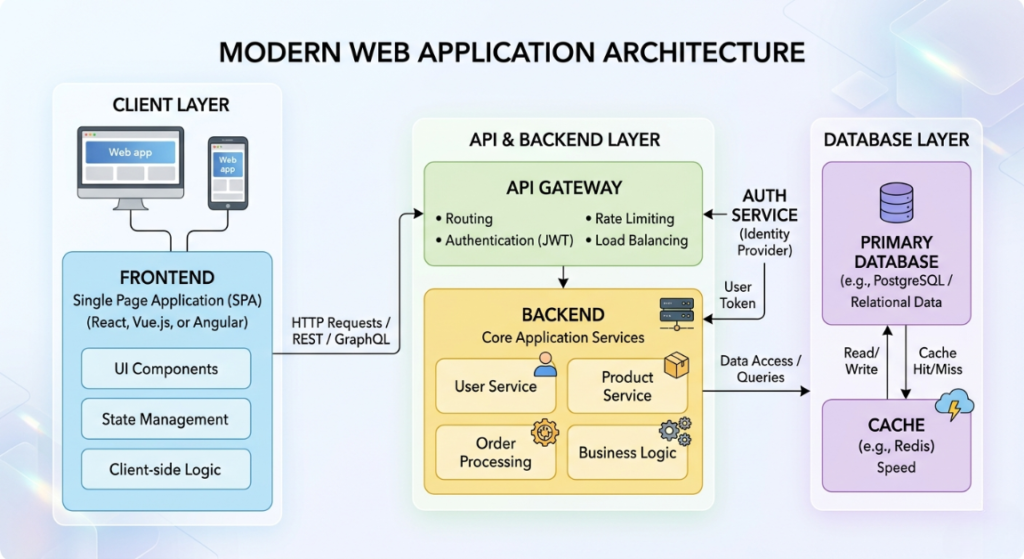
To explain how web apps work, let’s use a restaurant analogy.
The Frontend (The Dining Area)
This is what your customers see and interact with. It includes the buttons, the layout, and the colors. Excellent User experience (UX) design happens here. If the frontend is confusing, it’s like a restaurant with a messy, unreadable menu.
The Backend (The Kitchen)
This is where the real work happens. The backend processes the rules of your business. When a user clicks “Buy,” the backend checks if the item is in stock, calculates tax, and processes the credit card.
The Database (The Pantry)
This is where all your ingredients (data) are securely stored. User passwords, inventory numbers, and past order histories all live in the database.
APIs (The Waiter)
An API (Application Programming Interface) is the messenger. It takes the customer’s request from the frontend (the dining room), carries it to the backend (the kitchen), and brings the result back to the user’s screen.
Hosting (The Building)
Just like a restaurant needs a physical building, your web application needs a place to live on the internet. We rent space on massive computers (servers) in the cloud to keep the app online 24/7.
Understanding these components is step one in any web application development guide for small businesses. Now, let’s look at the actual tools used to build them.
Key Options / Technologies Explained
When you hire a developer or an agency, they are going to pitch you different “tech stacks” (the combination of tools used to build your app). As a business owner reading this web application development guide for small businesses, you should know what these options mean. Let’s break down the major players in the market today.
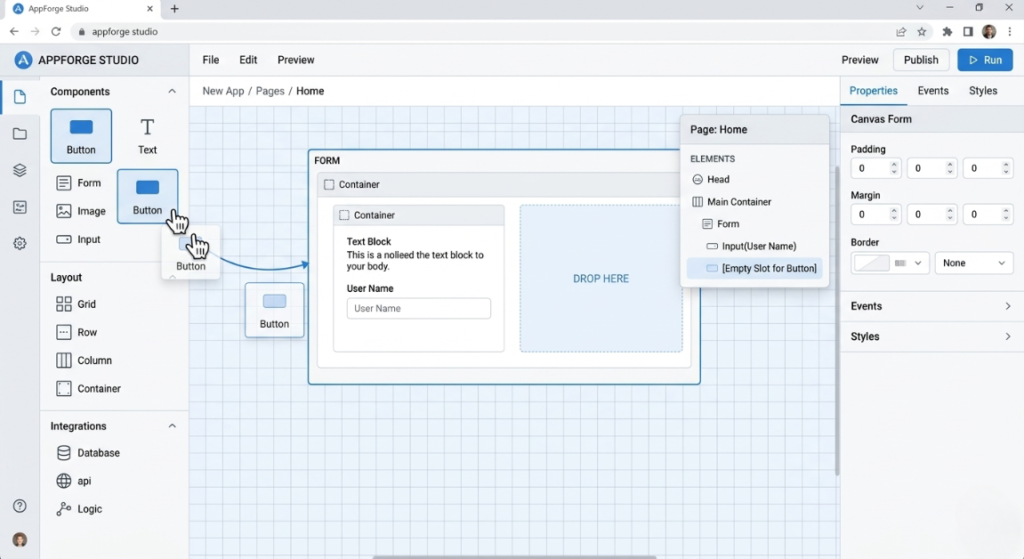
No-Code Web App Builders
Overview
Platforms like Bubble, FlutterFlow, and Webflow allow you to build functional applications using a visual, drag-and-drop interface instead of writing raw code. No-code web app builders generate the underlying code for you automatically.
Best For
Solo founders, small businesses with very tight budgets, and those who need to launch a prototype in days rather than months.
Pros
- Incredibly fast to build and launch.
- Drastically lowers development costs.
- Easy to make visual changes without a developer.
Cons
- You are locked into their platform.
- Complex, highly custom features are difficult or impossible to build.
- Can get expensive as your user base scales up.
Estimated Cost
$30 – $150 per month (subscription) + $1,000 – $5,000 if you hire a no-code expert to build it.
Learning Curve
Beginner to Moderate
Real-World Use Case
A local dog-walking business needs a portal for clients to book walks and pay invoices. Instead of spending $15,000 on custom code, the owner uses No-code web app builders to launch a working app in two weeks for a fraction of the cost.
Progressive Web Apps (PWA)
Overview
A PWA is a web application that looks and feels exactly like a native mobile app (the ones you download from the Apple App Store or Google Play) but is actually accessed through a web browser.
Best For
Businesses asking: Do small businesses need a mobile app or a web app? PWAs are perfect for companies that want a mobile-friendly experience without the massive expense of building separate iOS and Android apps.
Pros
- Works offline or on poor network connections.
- Can be installed directly to a user’s phone home screen.
- You only have to build one application, saving thousands of dollars.
Cons
- Limited access to some phone hardware features (like advanced camera controls or Bluetooth).
- Apple’s iOS still places some restrictions on Progressive Web Apps (PWA) compared to native apps.
Estimated Cost
$5,000 – $20,000+
Learning Curve
Moderate to Advanced
Real-World Use Case
A construction company wants their field workers to log their hours and material usage on site, even when cellular service is bad. A PWA allows workers to log data offline, which automatically syncs when they drive back into cellular range.
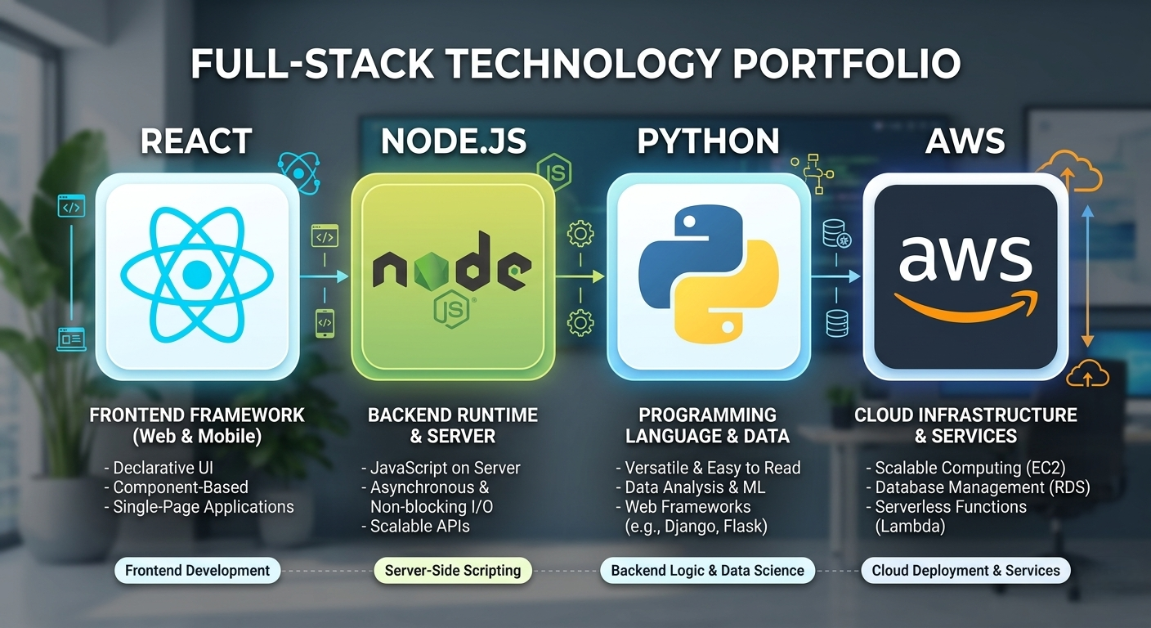
Modern Frontend Frameworks (React, Vue.js, Next.js)
Overview
These are the industry-standard tools developers use to build the “dining room” of your application. They allow developers to create lightning-fast, highly interactive user interfaces.
Best For
Any business investing in Custom web app development where speed, responsiveness, and premium User experience (UX) design are top priorities.
Pros
- Extremely fast performance for the end-user.
- Massive talent pool (it’s easy to find developers who know these tools).
- Great for building highly interactive dashboards.
Cons
- Requires experienced developers to set up correctly.
- Overkill for a simple informational website.
Estimated Cost
$8,000 – $30,000+ (for full app integration)
Learning Curve
Advanced
Real-World Use Case
A financial consulting firm is building a dashboard where clients can view live graphs of their investment portfolios. They use React to ensure the graphs update instantly without the page needing to reload, providing a premium feel, web application development guide for small businesses.
Robust Backend Frameworks (Node.js, Python/Django, Ruby on Rails)
Overview
This is the heavy machinery in your “kitchen”. These frameworks provide the structure for your developers to write the business logic, connect to databases, and secure user data.
Best For
Companies planning a scalable SaaS application development project, or businesses handling complex data, user roles, and security requirements.
Pros
- Highly secure and infinitely scalable.
- Can integrate with thousands of third-party tools (like Stripe for payments or Twilio for text messages).
- Built for the long term.
Cons
- Takes longer to build from scratch.
- Hosting and maintaining custom backend infrastructure requires ongoing technical support.
Estimated Cost
$10,000 – $40,000+
Learning Curve
Advanced
Real-World Use Case
An e-commerce startup is building a marketplace that connects local farmers with wholesale buyers. They use Python/Django because it securely handles complex user roles (buyers vs. sellers), inventory logic, and payment routing.
Full-Stack Development Services
Overview
When you hire an agency to handle the frontend, backend, database, and hosting all at once, you are utilizing Full-stack development services. They take your idea from a napkin sketch to a live, breathing application.
Best For
Founders looking for affordable web application development services for small businesses who want a single point of accountability rather than managing multiple freelance specialists.
Pros
- Seamless integration between the frontend and backend.
- Easier project management (one team handles everything).
- Strategic technical guidance from start to finish.
Cons
- Higher upfront financial commitment compared to patching together freelancers.
- Requires thorough vetting to ensure the agency actually understands your business goals.
Estimated Cost
$15,000 – $50,000+ depending on the agency and scope.
Learning Curve
Beginner (for the business owner, as the agency handles the tech).
Real-World Use Case
A healthcare clinic wants a custom patient portal. They hire an agency providing Full-stack development services to ensure the app is HIPAA compliant, visually appealing, and properly integrated with their existing internal scheduling software.

Options to Avoid (Common Mistakes)
Any good web application development guide for small businesses must warn you about the potholes. Over my career, I’ve seen business owners lose tens of thousands of dollars by making a few entirely preventable mistakes.
Mistake 1: Over-Engineering
I once consulted for a startup that wanted to build a simple directory for local gyms. They insisted on using complex microservices and enterprise-grade architecture meant for companies like Netflix. It took them a year to build, drained their budget, and they launched to zero customers.
Why it’s risky: It burns your cash before you even prove people want your product.
What to do instead: Focus on MVP development for startups. Build the Minimum Viable Product. Solve the core problem as simply as possible, launch, and add fancy tech later when your revenue justifies it.
Mistake 2: Ignoring Scalability Entirely
The opposite of over-engineering is duct-taping an app together so poorly that it shatters when you get a spike in traffic. If you build your app on an obscure, outdated framework just because a cheap freelancer recommended it, you will end up rewriting the whole thing in a year.
Why it’s risky: Technical debt. You will eventually have to pay a professional twice as much to fix the mess.
What to do instead: Stick to mainstream, proven technologies (like React, Node.js, Python) that have large developer communities.
Mistake 3: Treating UX as an Afterthought
Business owners often focus so much on making the app work that they forget to make it easy to use.
Why it’s risky: If your app requires a 10-page manual for your customers or employees to understand, they will simply refuse to use it. Bad User experience (UX) design kills perfectly good code.
What to do instead: Budget time and money specifically for design. Test the app with real, non-technical users before you launch it.
Technology Comparison Table
To help you digest this web application development guide for small businesses, here is a cheat sheet summarizing the paths you can take.
| Technology | Best For | Difficulty | Cost | Business Rating |
| No-Code (Bubble, Webflow) | Small apps | Easy | Low | ⭐⭐⭐⭐⭐ |
| Frontend (React, Next.js) | Medium projects | Medium | Medium | ⭐⭐⭐⭐ |
| Custom Backend (Node, Python) | Complex apps | Hard | High | ⭐⭐⭐ |
| PWA (Progressive Web App) | Mobile alternative | Medium | Medium | ⭐⭐⭐⭐ |
| Enterprise Architecture | Massive scale | Hard | High | ⭐ |
Rating meaning:
⭐⭐⭐⭐⭐ = excellent for small business
⭐⭐⭐⭐ = good choice
⭐⭐⭐ = situational
⭐⭐ = limited use
⭐ = avoid for beginners
Sample Web App Tech Stacks
When looking at affordable web application development services for small businesses, developers will quote you based on the “stack” they use. Here are three realistic examples of what a tech stack looks like depending on your business goals.
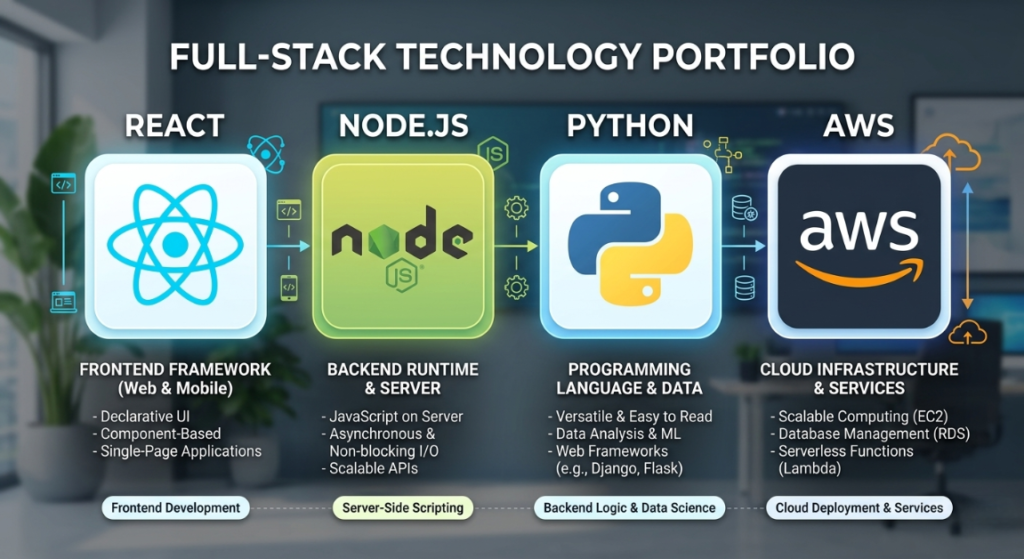
Stack 1: Startup MVP Stack
If you are doing MVP development for startups, speed and low overhead are your best friends. This stack gets you to market fast.
- Frontend: React (fast and industry standard)
- Backend: Node.js (keeps everything in JavaScript)
- Database: MongoDB (flexible and easy to change as your app evolves)
- Hosting: Vercel (almost zero setup required)
- Estimated Cost: $20 – $50/month in hosting
- Best For: MVP startups trying to validate their idea with early customers.
Stack 2: Small Business Internal Tool
When considering What is the difference between a website and a web application for business, internal tools are the perfect example of a web app. This stack is great for managing inventory or staff scheduling.
- Frontend: Next.js (robust and highly performant)
- Backend: Node.js (fast API processing)
- Database: PostgreSQL (highly structured, perfect for relational business data)
- Hosting: DigitalOcean or AWS (reliable and cost-effective)
- Estimated Cost: $40 – $100/month in hosting
- Best For: Service businesses streamlining their internal operations.
Stack 3: Scalable SaaS Platform
If you are entering the world of serious SaaS application development, you need a stack that won’t buckle under pressure when thousands of users log in.
- Frontend: React (highly interactive)
- Backend: Python (Django) (incredible security and data processing)
- Database: PostgreSQL (industry standard for complex data)
- Hosting: AWS (Amazon Web Services for infinite scale)
- Estimated Cost: $100+ per month in hosting
- Best For: SaaS startups aiming for rapid user growth.
Cost Breakdown
You can’t have a web application development guide for small businesses without talking about money. One of the most frustrating parts of building an app is that one developer will quote you $3,000, and an agency will quote you $40,000 for what sounds like the exact same thing.
Here is what you are actually paying for:
- Developer Cost: The bulk of your budget. You are paying for their time, expertise, and problem-solving skills.
- Infrastructure & Hosting: The monthly rent you pay to servers (AWS, Google Cloud) to keep your app alive.
- APIs & Third-Party Services: Paying to use tools like Stripe (for credit cards) or SendGrid (to send automated emails).
- Maintenance: Code is like a car; it needs oil changes. Browsers update, APIs change, and security patches need to be applied. Expect to pay 15-20% of your initial build cost annually in maintenance.
Realistic Price Ranges:
- Freelancer: $2,000 – $10,000. Great for simple projects, but you carry the risk if they disappear or get overwhelmed.
- Boutique Agency: $10,000 – $50,000+. This provides you with project managers, designers, and developers. Highly recommended for business-critical software.
- Large Agency: $50,000 – $150,000+. For massive, enterprise-level applications.
Related Articles You Might Like
If you found this guide useful, check out our article on How to Choose the Right Tech Stack for Your Web Development Project, where we break down specific frameworks and tools for startups. You might also enjoy our deep dive on UX Principles for Non-Designers, which will help you map out your application visually before handing it over to a development team.
Frequently Asked Questions
A web application development guide for small businesses wouldn’t be complete without answering the rapid-fire questions I get asked over coffee.
How long does it take to build a web application?
A basic Custom web app development project takes about 2 to 3 months. A highly complex platform can take 6 months or more. If you use No-code web app builders, you can often launch a functional version in 2 to 4 weeks. Timeline heavily depends on how clear your initial requirements are.
What is the best framework for beginners?
For business owners, the “best framework” is the one the largest pool of developers knows how to use. React (for the frontend) and Node.js or Python (for the backend) are the gold standards. They are heavily supported, meaning if your current developer quits, you can easily hire another one to take over.
How much does a small business web app cost?
If you are looking for affordable web application development services for small businesses, building a simple app with a freelancer might cost $5,000 to $10,000. For a robust, professional application built by a reliable agency, you should budget between $15,000 and $40,000.
Should I hire a developer or agency?
If you have a very tight budget and the technical knowledge to manage the project, a freelancer is fine. However, if this software is going to run your daily operations or generate revenue, hire an agency that offers Full-stack development services. They provide project management and quality assurance that freelancers rarely offer.
Do small businesses need a mobile app or a web app?
In 90% of cases, small businesses should start with a web app, specifically Progressive Web Apps (PWA). Native mobile apps are incredibly expensive to build and maintain for both Apple and Android. A well-designed web app works perfectly on mobile browsers and saves you thousands of dollars in development costs.
Final Thoughts
Building software doesn’t have to be a nightmare of blown budgets and confusing code. I hope this web application development guide for small businesses has pulled back the curtain on how developers think and how these projects actually come together.
The most important takeaway is this: start small. Don’t try to build the next Amazon on day one. Focus on your core business problem, choose reliable, mainstream technologies, prioritize the user experience, and hire communicators, not just coders. A successful web application development guide for small businesses is ultimately about making smart, pragmatic choices. Your technology should serve your business, not the other way around.
Take a breath, map out exactly what you need your software to do, and step confidently into your development journey. You’ve got this.

Call To Action
Have you ever tried building a custom app for your business? What was your biggest challenge? Share your experience with us in the comments below, or reach out to me directly if you have specific questions about your project! If you found this web application development guide for small businesses helpful, don’t forget to subscribe to our blog for more practical tech insights and follow us on LinkedIn for weekly tips.
Leave a Reply