
So, you’ve finally built it. Your web app is live, the UI looks slick, and the first few users are clicking around. Then, someone asks: “Is this thing GDPR compliant?” or “Have you checked the new 2026 CCPA neural data rules?” Suddenly, that celebratory coffee tastes a bit like anxiety.
I’ve been there. I’ve sat across from founders who spent $50k on a beautiful platform only to realize they can’t legally launch in California or Europe because their “Contact Us” form doesn’t meet Web Application Compliance: GDPR, CCPA, and Accessibility standards.
In this guide, we’re going to strip away the legal jargon. Think of me as your lead architect giving you the “no-nonsense” version of what you actually need to do this year. We’ll talk about why the rules changed in 2026, how to avoid getting sued, and exactly what it costs to get it right. Whether you’re building a simple portal or a complex SaaS, by the end of this, you’ll have a roadmap that doesn’t require a law degree to follow.
Why This Matters for Small Businesses
I remember a project a few years back for a local boutique fitness app. The owner, Sarah, was focused on heart-rate tracking and community leaderboards. She didn’t think much about data privacy regulations because she only had 200 users.
Then came the “Dark Pattern” crackdown. Because her “Unsubscribe” button was hidden under three menus while “Subscribe” was a giant red button, she faced a compliance audit that nearly sank her marketing budget. In 2026, the stakes are even higher. Regulators aren’t just looking for big fish anymore; they have automated tools that scan the web for non-compliant forms and inaccessible menus.
For a small business, compliance isn’t just about avoiding a $7,500 fine (though that hurts). It’s about trust. If a user sees a clean, transparent consent banner and an app that works perfectly with their screen reader, they know you’re a professional outfit. If they see a “dark pattern” timer or a broken menu, they’ll take their data and their credit card elsewhere. Ignoring Web Application Compliance: GDPR, CCPA, and Accessibility is like building a restaurant but forgetting the fire exits; it’s fine until the inspector shows up, and then it’s a disaster.
Understanding the Basics
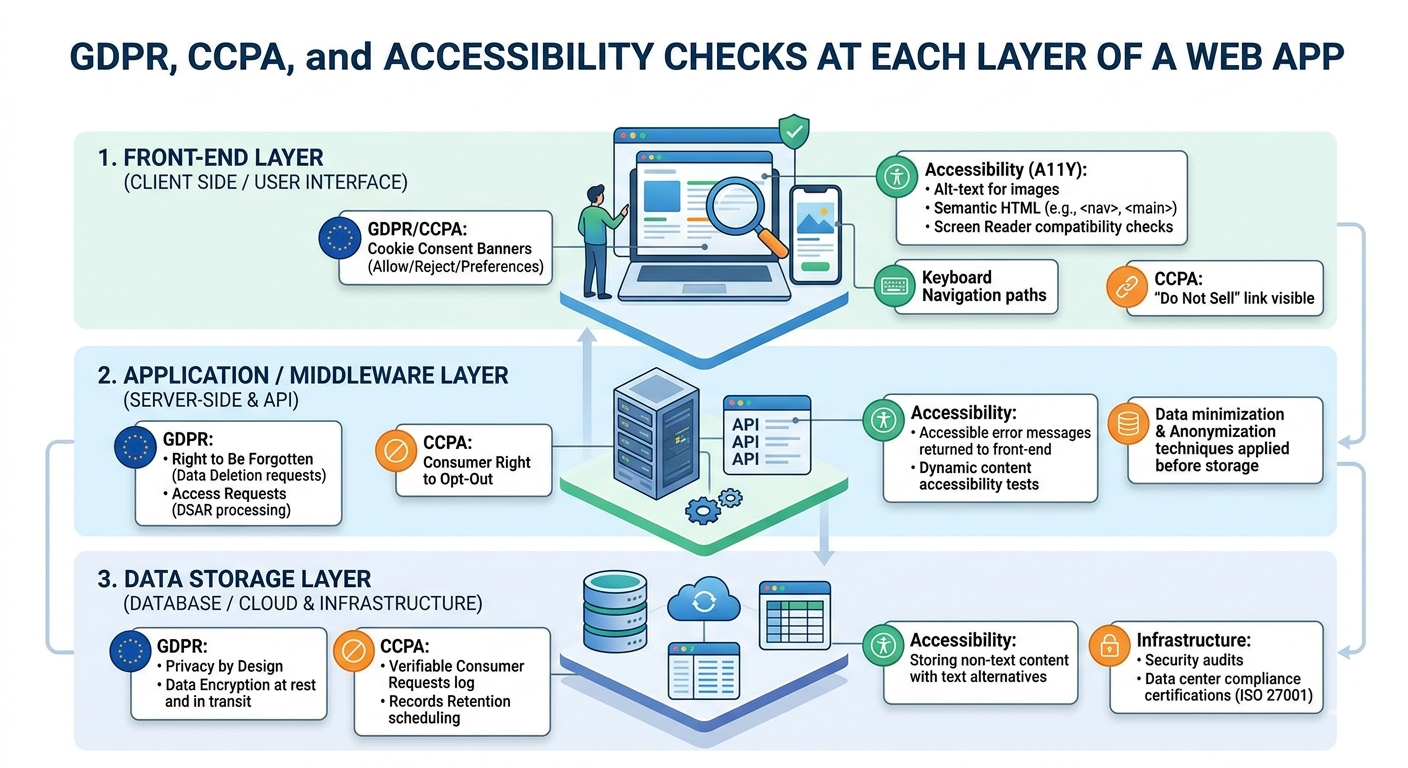
Before we talk about code, let’s look at the “anatomy” of a compliant app. If we use the restaurant analogy:
- The Frontend (The Dining Area): This is where ADA compliant web design lives. If the tables are too close together or there’s no ramp, people can’t get in. On your app, this means your buttons, colors, and fonts must be usable by everyone.
- The Backend (The Kitchen): This is where the Personally Identifiable Information (PII) is processed. If your kitchen isn’t clean (secure), people get sick (data breaches).
- The Database (The Pantry): This is where you store the info. In 2026, you can’t just keep everything forever. You need a system to “throw out” old data.
- APIs (The Delivery Drivers): How you send data to other services (like Stripe or Mailchimp). You’re responsible for making sure they’re compliant, too.
In the world of Web Application Compliance: GDPR, CCPA, and Accessibility, you are the owner of this whole operation. You need to know what’s in your “pantry” and who has the keys to the “kitchen.”
Key Options & Technologies Explained
Navigating the tech side of compliance can feel like ordering from a 20-page menu. Here is the breakdown of the most critical components you’ll need for Web Application Compliance: GDPR, CCPA, and Accessibility in 2026.
Consent Management Platforms (CMPs)
Overview
These are the “Cookie Banners” you see everywhere, but in 2026, they do much more. A modern CMP like Usercentrics or Enzuzo automatically detects what trackers you’re using and blocks them until the user says “Yes.”
Best For
Any business that uses Google Analytics, Facebook Pixels, or any third-party tracking.
Pros
- Automates the legal “heavy lifting.”
- Handles different rules for different regions (GDPR for EU, CCPA for California).
- Provides “Proof of Consent” if you ever get audited.
Cons
- Can slightly slow down page load times.
- Monthly subscription costs.
Estimated Cost
$10 – $150 / month
Learning Curve
Beginner
Real-World Use Case
An e-commerce store using Shopify or React. Instead of coding a custom popup, they drop in a CMP script that handles the “Reject All” button requirements of 2026.
Automated Accessibility Scanners
Overview
Tools like Axe DevTools or Silktide that crawl your site and flag things like “Low color contrast” or “Missing Alt-Text.” This is the first step in a WCAG 2.1 compliance checklist.
Best For
Developers and owners who want to catch errors before they become lawsuits.
Pros
- Catches 60-70% of common errors instantly.
- Gives clear “How to fix” instructions.
- Essential for How to make a web app GDPR and CCPA compliant and accessible.
Cons
- Can’t catch “logical” errors (e.g., a menu that technically works but is confusing for a blind user).
Estimated Cost
$0 (Free tiers) – $200 / month
Learning Curve
Moderate
Real-World Use Case
A SaaS startup running a scan during their weekly build to ensure the new “Dashboard” features don’t break keyboard navigation.
Data Subject Request (DSAR) Portals
Overview
Under GDPR and the 2026 CCPA updates, users have the “Right to be Forgotten.” A DSAR portal is a simple page where users can request a copy of their data or ask you to delete it. The Complete Web Application Development Guide for Small Businesses (2026)
Best For
Apps that handle sensitive user accounts or personal profiles.
Pros
- Saves hours of manual database searching.
- Meets the “Right to Know” requirements of 2026.
Cons
- Requires integration with your actual database.
Estimated Cost
$50 – $300 / month (often bundled with CMPs)
Learning Curve
Moderate
Real-World Use Case
A fitness app user wants to delete their account. Instead of emailing the founder, they click a “Privacy Center” link and the system automatically wipes their PII.
Secure Hosting & Encryption (SOC2/ISO)
Overview
This isn’t a “tool” you buy, but a choice you make. Using AWS, Google Cloud, or Vercel ensures your physical infrastructure is compliant.
Best For
Everyone. Do not host your own servers in a closet in 2026.
Pros
- Bank-level security defaults.
- Automatic backups.
Cons
- Requires technical knowledge to configure correctly.
Estimated Cost
$20 – $500+ / month
Learning Curve
Advanced (for setup)
Real-World Use Case
A fintech startup choosing AWS because it already has the certifications needed to handle Personally Identifiable Information safely.
Options to Avoid (Common Mistakes)
In my years as an architect, I’ve seen some “compliance shortcuts” that ended up costing five times more to fix than doing it right the first time.
1. Using “Accessibility Overlays”
You’ve seen these: a little blue icon in the corner that promises to “Make your site compliant with one click.” Avoid these. * Why it’s risky: Most screen-reader users hate them because they interfere with their existing tools. In 2026, many legal experts argue these are a “litigation magnet” because they signal that your underlying code is actually broken. How to Choose Tech Stack for Web Development Project (2026)
- What to do instead: Fix the actual HTML code. Use semantic tags like <button> and <nav>. It’s cheaper in the long run.
2. “Implied Consent” Banners
Some older sites still use banners that say: “By using this site, you agree to cookies.” * Why it’s risky: Under the Legal requirements for launching a web app in 2026, this is illegal in many jurisdictions. Consent must be an “affirmative action” (clicking Accept).
- What to do instead: Use a CMP that blocks scripts until the user clicks a button.
3. Hard-Coding Privacy Links
- Why it’s risky: If the laws change (and they will), you have to go into the code of 50 different pages to update your policy.
- What to do instead: Use a dynamic policy generator that updates your text automatically when the law changes.
Technology Comparison Table
| Technology | Best For | Difficulty | Cost | Business Rating |
| Enzuzo / Cookiebot | Managed Consent | Easy | Low | ⭐⭐⭐⭐⭐ |
| Manual HTML Audit | Accessibility | Hard | Moderate | ⭐⭐⭐⭐ |
| OneTrust | Large Enterprise | Hard | High | ⭐⭐⭐ |
| Accessibe (Overlay) | Avoiding Effort | Easy | Moderate | ⭐ |
| AWS / Vercel | Secure Hosting | Moderate | Medium | ⭐⭐⭐⭐⭐ |
Rating meaning: ⭐⭐⭐⭐⭐ = Essential; ⭐ = Dangerous/Not recommended.
Sample Web App Tech Stacks
When building for Web Application Compliance: GDPR, CCPA, and Accessibility, your stack choice dictates how hard compliance will be.
What is API Integration in Web Development Explained (2026)
Stack 1: The “Compliance-First” Startup MVP
- Frontend: Next.js (Great for accessibility/SEO)
- Backend: Supabase (Built-in Auth and Data Encryption)
- Compliance Tool: Enzuzo (CMP + Policy Generator)
- Hosting: Vercel (Fast, secure, global)
- Estimated Cost: $30 – $80 / month
- Best For: New SaaS products that need to be “Legal on Day 1.”
Stack 2: The E-commerce Powerhouse
- Frontend: React with Tailwind CSS
- Backend: Node.js / Express
- Database: PostgreSQL (with Row-Level Security)
- Compliance Tool: Usercentrics (Advanced geo-targeting)
- Estimated Cost: $100 – $250 / month
- Best For: Businesses selling across US and EU borders.
Stack 3: The Enterprise/Internal Tool
- Frontend: Angular (Strict structure helps with accessibility)
- Backend: Python (Django – famous for security “out of the box”)
- Database: Managed AWS RDS
- Compliance Tool: OneTrust (Heavy-duty GRC)
- Estimated Cost: $500+ / month
- Best For: Health-tech or Fintech apps with massive data loads.
Cost Breakdown: What You’ll Actually Pay
Getting compliant isn’t a one-time fee; it’s a mix of setup and maintenance. Here’s what I tell my clients to budget for Web Application Compliance: GDPR, CCPA, and Accessibility:
- Self-Managed (The DIY Founder): $2,000 – $5,000. This covers a few months of tool subscriptions and maybe 20-30 hours of a developer’s time to set up the CMP and fix basic accessibility bugs.
- Professional Agency Implementation: $10,000 – $25,000+. This usually includes a full manual WCAG 2.1 compliance checklist audit, custom data mapping for GDPR, and a secure infrastructure overhaul.
- Monthly “Compliance Tax”: Budget about $150 – $300/month for ongoing tool costs and minor updates as laws shift.
What is Responsive Web Design and Why It Matters 2026
Remember: A single CCPA 2026 violation can start at $2,500 per incident. If 100 users are affected, you’re looking at $250,000. Compliance is the cheapest insurance you can buy.
Related Articles You Might Like
If you’re still feeling the “tech stack” itch, you might find our guide on Choosing the Right Framework for Your 2026 Web App helpful. It goes deeper into how React vs. Vue handles data privacy on a code level. You should also check out our Small Business Cybersecurity Checklist to make sure your “Kitchen” is as clean as your “Dining Area.”
How to Create a Web App Requirements Document (2026 Guide)
Frequently Asked Questions
How long does it take to make a web app compliant?
If you’re starting from scratch, it adds about 10-15% to your development time. If you’re trying to “fix” an existing app that was built poorly, it can take anywhere from 2 weeks to 2 months. Most of that time isn’t coding; it’s auditing where your data goes and testing your app with a screen reader to ensure Best practices for web accessibility in modern SaaS are followed.
Does my US-based business really need GDPR?
Yes, if you have even one user from the EU. The law is based on where the user is, not where the business is. In 2026, the EU is very active in sending out automated notices to US businesses. It’s better to have a global compliance strategy than to try and block specific countries, which usually hurts your SEO and growth anyway.
What is the difference between WCAG 2.1 and 2.2?
Think of it as an “update.” WCAG 2.1 is the current standard, but 2.2 (released recently) adds more focus on mobile accessibility and users with cognitive disabilities. For a small business in 2026, aiming for WCAG 2.1 AA is the sweet spot. It covers almost all legal bases without being impossible to implement.
Is CCPA different from GDPR?
They are cousins, not twins. GDPR focuses on “Consent” (You can’t touch data until they say yes). CCPA/CPRA focuses on “Opt-out” (You can use it, but you must make it incredibly easy for them to tell you to stop). In 2026, the Best practices for web accessibility in modern SaaS include a “Do Not Sell My Info” link and an “Opt-out” button that is just as easy to click as the “Accept” button.
Can I just use a free Privacy Policy template?
You can start there, but be careful. Many free templates haven’t been updated for the 2026 CCPA neural data or automated decision-making rules. I always recommend using a “Living Policy” tool like Iubenda or Termly. They cost a few bucks a month, but they update the text automatically when the laws change, which saves you from a legal headache later.
Final Thoughts
Building a web app today is about more than just “Does it work?” It’s about “Is it responsible?”
We’ve covered a lot today from the kitchen-to-pantry analogy to the specific costs of a WCAG 2.1 compliance checklist. If you take away one thing, let it be this: Web Application Compliance: GDPR, CCPA, and Accessibility is not a “final step” you do before launch. It’s a foundation you build on.
How to Validate Your Web App Idea Before Building (2026 Guide)
Start small. Get a good CMP, fix your heading tags for accessibility, and write a clear privacy policy. As your business grows, you can move into the heavy-duty stuff like SOC2 audits. But for now, just make sure you’re respecting your users’ data and their ability to use your site. It’s good for them, and it’s great for your bottom line.
Call To Action
Have you run into a compliance hurdle that felt like a brick wall? Or maybe you found a tool that made Web Application Compliance: GDPR, CCPA, and Accessibility a breeze?
I’d love to hear your stories in the comments below! If you found this guide helpful, consider subscribing to our newsletter for more “over coffee” tech breakdowns. Let’s build something great and legal together.
Internal Tools vs Off-the-Shelf Software: Build or Buy? (2026)
Leave a Reply