
So, you’ve got a killer idea for a web application. Maybe it’s a tool to automate your client bookings, or perhaps it’s a niche SaaS platform that’s going to disrupt your industry. You’re excited, you’re ready to build, and you’ve probably already started looking for developers.
But then comes the wall: “Can you send over the requirements document?”
If you’re like most small business owners I’ve worked with over the last decade, that question can feel like a punch in the gut. You know what you want the app to do, but putting it into a formal “Software Requirements Specification” feels like writing a master’s thesis in a language you don’t speak.
In this guide, I’m going to show you how to create a web app requirements document without the corporate headache. We’re going to talk about how to bridge the gap between your vision and a developer’s code. We’ll cover the difference between “must-haves” and “nice-to-haves,” dive into 2026 tech stacks, and look at what this is actually going to cost you. Grab a coffee let’s get your project moving.
Why This Matters for Small Businesses
I once had a client, a local bakery owner, who wanted an “internal ordering system.” She hired a developer based on a three-sentence email. Six months and $15,000 later, she had a beautiful interface that couldn’t handle “recurring orders” the very thing she needed most. Why? Because it wasn’t in a requirements document.
For a small business, a clear document is your insurance policy. Without it, you’re essentially asking a contractor to build you a house without a blueprint. You might end up with a kitchen in the basement. What is API Integration in Web Development Explained (2026)
When you learn how to create a web app requirementsdocument, you aren’t just making a list; you’re setting the scope. Scope creep where the project slowly grows bigger and more expensive is the how to create a web app requirements document #1 killer of small business tech projects. By defining your User stories and use cases early, you prevent developers from guessing what you want (and charging you for the wrong thing).
A solid document helps you:
- Get Accurate Quotes: Developers can’t give you a real price if they don’t know the full scope.
- Save Time: You won’t spend weeks going back and forth on “wait, I thought it did X.”
- Ensure Quality: It gives your QA (Quality Assurance) person a checklist to test against.
Understanding the Basics
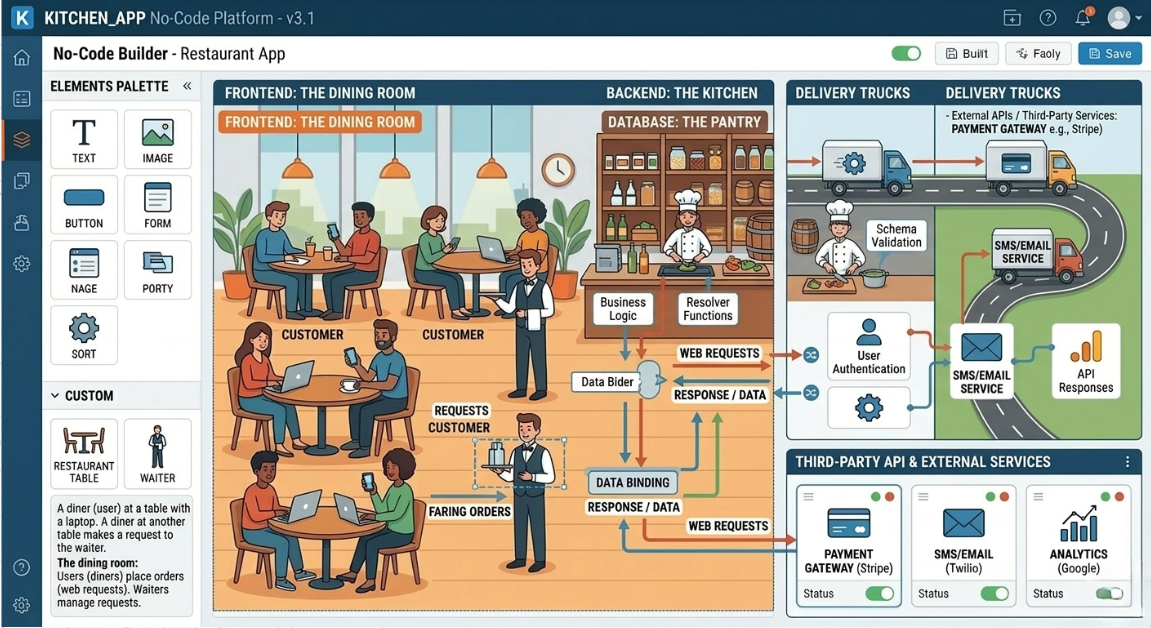
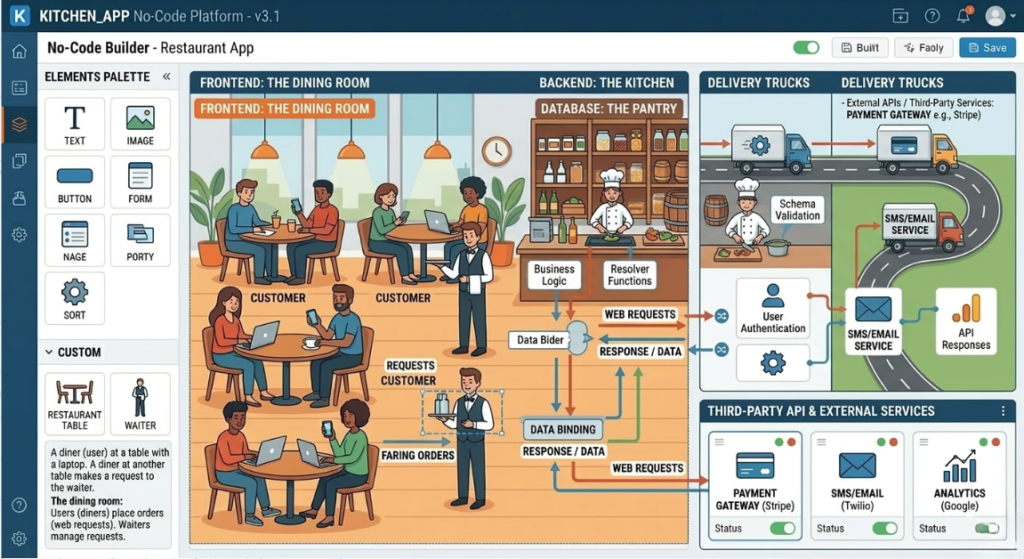
Before we start writing, let’s clear up the “dev-speak.” Think of your web app like a high-end restaurant.
- The Frontend: This is the dining area. It’s the colors, the menus, and the chairs. It’s what your customers interact with. In 2026, we usually build this with tools like React or Next.js.
- The Backend: This is the kitchen. This is where the actual “cooking” (logic) happens. It handles the data, the security, and the heavy lifting.
- The Database: This is the pantry. It stores all your ingredients (data) like user profiles, orders, and product lists.
- APIs: Think of these as the waiters. They carry information back and forth between the kitchen (backend) and the table (frontend), or even to other restaurants (third-party services like Stripe for payments).
When you are figuring out how to create a web app requirements document, you don’t need to be an expert in all of these, but you should know which “kitchen” you’re hiring.
Key Options & Technologies Explained
In 2026, the “how” you build is just as important as the “what.” Here are the main paths you’ll see in a Web application technical specification document template. What is Responsive Web Design and Why It Matters 2026.
Next.js (The Modern Standard)
Overview
Next.js is currently the “gold standard” for building fast, SEO-friendly web apps. It combines the frontend and backend into one sleek package.
Best For
SaaS products, marketing-heavy web apps, and startups that need to rank on Google.
- Pros: Incredible speed, great for SEO, huge developer pool.
- Cons: Can be overkill for a simple internal tool.
- Estimated Cost: $5,000 – $25,000 for an MVP.
- Learning Curve: Moderate.
Real-World Use Case how to create a web app requirements document
A real estate listing site that needs to load instantly and show up in search results.
Python/Django (The “Batteries Included” Choice)
Overview
Django is a backend framework that comes with almost everything you need built-in. It’s famous for being secure and scalable.
Best For
Data-heavy applications, FinTech, or apps with complex user permissions.
- Pros: Very secure, handles massive amounts of data easily, fast to build the “admin” side.
- Cons: Not as “zippy” for highly interactive frontends without extra work.
- Estimated Cost: $8,000 – $30,000.
- Learning Curve: Moderate.
Real-World Use Case
An inventory management system for a warehouse with 50,000 SKUs, how to create a web app requirements document.
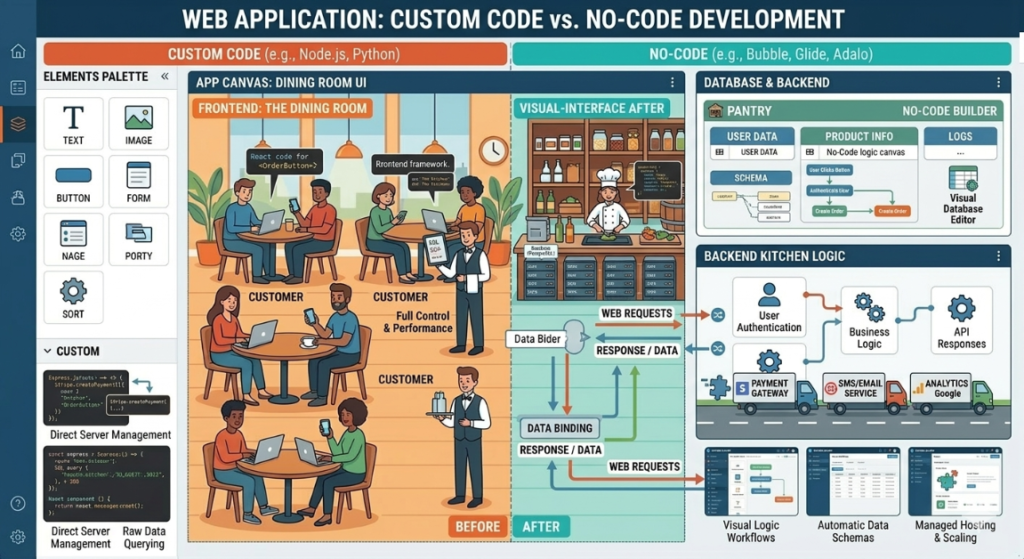
No-Code / Low-Code (The Budget-Friendly Route)
Overview
Tools like Bubble or FlutterFlow allow you to “drag and drop” a functional app.
Best For
Internal tools or very simple first versions of a business idea.
- Pros: Extremely fast to build, much cheaper upfront.
- Cons: You don’t “own” the code; harder to scale later.
- Estimated Cost: $2,000 – $7,000.
- Learning Curve: Beginner.
Real-World Use Case
A simple internal dashboard for a plumbing company to track employee hours.
Node.js / Express (The Speed Demon)
Overview
Node.js allows developers to use JavaScript for everything. It’s great for “real-time” apps.
Best For
Chat apps, collaboration tools, or anything that needs live updates.
- Pros: Very fast performance, handles many users at once.
- Cons: Easy to make a mess of the code if the developer isn’t disciplined.
- Estimated Cost: $6,000 – $20,000.
- Learning Curve: Moderate.
Real-World Use Case
A live auction site where prices change every second.
Options to Avoid (Common Mistakes)
Over the years, I’ve seen small businesses burn through their life savings on tech they didn’t need. Here is what to watch out for: How to create a web app requirements document
- Over-Engineering for Day 1: You don’t need a “microservices architecture” that can handle a billion users when you currently have zero. Stick to a “monolith” (one single codebase) to save money. What to do instead: Focus on a clean MVP feature prioritization list.
- Using “Dead” Tech: Don’t let a developer talk you into a PHP framework from 2012 just because it’s what they know. Why it’s risky: It’s harder to find developers to maintain it later, and security patches stop coming.
- Ignoring Mobile Users: Even if it’s a “web app,” 60% of your users might be on their phones. What to do instead: Ensure “Responsive Design” is a Non-functional requirement in your document.
Technology Comparison Table
| Technology | Best For | Difficulty | Cost | Business Rating |
| Next.js | Modern SaaS / SEO | Medium | Medium | ⭐⭐⭐⭐⭐ |
| No-Code (Bubble) | Rapid MVP | Easy | Low | ⭐⭐⭐⭐ |
| Python/Django | Data & Security | Medium | Medium | ⭐⭐⭐⭐⭐ |
| Java/Spring | Enterprise/Banking | Hard | High | ⭐⭐ |
| WordPress | Simple Content | Very Easy | Very Low | ⭐⭐⭐ |
Sample Web App Tech Stacks
When learning how to create a web app requirements document, you’ll eventually need to decide on a “stack.” Here are three proven recipes for 2026.
Stack 1: The “Startup Hero” (MVP)
- Frontend: React (with Tailwind CSS)
- Backend: Supabase (Database + Auth)
- Hosting: Vercel
- Estimated Cost: $15 – $40/month (Infrastructure only)
- Best For: Getting a polished product to market in 6-8 weeks.
Stack 2: The “Solid SMB” (Service Business)
- Frontend: Next.js
- Backend: Node.js
- Database: PostgreSQL
- Hosting: DigitalOcean
- Estimated Cost: $50 – $120/month
- Best For: Booking systems, client portals, and custom CRMs.
Stack 3: The “Data Powerhouse”
- Frontend: Vue.js
- Backend: Python / FastAPI
- Database: PostgreSQL + Redis
- Hosting: AWS (Amazon Web Services)
- Estimated Cost: $150+ /month
- Best For: Apps involving AI, complex calculations, or massive data sets.
Cost Breakdown
Let’s talk numbers. I hate it when articles dance around this. In 2026, here is the reality for custom web development: How to create a web app requirements document
- Freelancer (Mid-Level): $5,000 – $15,000. Great for simple-to-medium apps. You handle the project management.
- Boutique Agency: $20,000 – $60,000. They provide a designer, a dev, and a manager. Lower risk, higher price.
- Big Box Agency: $100,000+. This is for enterprise-level builds.
Hidden Costs to Watch For:
- Maintenance: Expect to pay 10-20% of the build cost per year for updates.
- API Fees: If your app uses Google Maps, OpenAI, or Stripe, they often charge per use.
- UI/UX design wireframes: Some developers include this; others expect you to provide them. A good designer usually costs $2,000 – $5,000.
Related Articles You Might Like
If you’re still feeling a bit overwhelmed by the tech side, don’t worry. Check out our deep dive on how to choose a tech stack for a web development project. We break down exactly how to match your business goals to the right tools so you don’t overspend on features you’ll never use.
The Complete Web Application Development Guide for Small Businesses (2026)
Web App vs Mobile App in 2026: Which to Choose?
Frequently Asked Questions
1. How long does it take to build a web application?
For a typical small business app (an MVP), expect 3 to 5 months. The first month is usually just planning and design. The next 2-3 months are “heads down” coding. The final month is for testing and fixing bugs. If someone tells you they can build a custom, secure portal in two weeks, they are likely using a template that won’t be easy to customize later.
2. What is the difference between Functional and Non-functional requirements?
This is a big one when learning how to create a web app requirements document.
- Functional: “The user can click a button to download a PDF.” (What it DOES).
- Non-functional: “The page must load in under 2 seconds.” or “The site must be secure against SQL injection.” (How it BEHAVES).
You need both. A car that “goes forward” (functional) but has “no brakes” (non-functional) is a bad car.
3. Do I really need a Software Requirements Specification (SRS)?
Yes. Even if it’s just a 5-page Google Doc. Think of the Software Requirements Specification as the contract of truth. If a developer says “I didn’t know you wanted a ‘Forgot Password’ feature,” you can point to the document. Without it, you have no leverage when things go wrong or when the bill starts climbing.
4. Should I hire a developer or an agency?
Hiring a freelancer is like hiring a solo carpenter. It’s cheaper, and you talk directly to the person doing the work. Hiring an agency is like hiring a construction firm. You get a project manager, a designer, and multiple developers. If you have the time to manage someone daily, go with a freelancer. If you want to “set it and forget it,” pay the premium for an agency.
5. What are User Stories and why do I need them?
A User Story is a simple sentence: “As a [User Type], I want to [Action] so that [Benefit].” Example: “As a Customer, I want to see my past orders so I can quickly re-order my favorite coffee.”
Writing these helps developers understand the intent behind a feature, which often leads to better, simpler code.
Final Thoughts
Building a web app is a huge milestone for any small business. It’s the difference between manual labor and a system that works while you sleep. But remember: the most successful projects aren’t the ones with the biggest budgets they’re the ones with the clearest plans.
Learning how to create a web app requirements document is the single best way to protect your investment. Take the time to map out your user flows, pick a modern (but stable) tech stack, and be honest about your budget. Treat your developer like a partner, not just a vendor, and you’ll end up with a tool that actually grows your business.
Call To Action
Ready to start your project? Download our free Web application technical specification document template to get a head start on your build.
How to Validate Your Web App Idea Before Building (2026 Guide)
Leave a Reply