
Look, I get it. As a small business owner, you’re already wearing fifty different hats. You’re managing sales, putting out fires, and trying to keep your team happy. The last thing you want to think about is building software from scratch. But there usually comes a tipping point. You start realizing that the cheap software you bought a few years ago is now actively holding you back.
If you are researching the 10 signs your small business needs a custom web application, you are probably at that exact breaking point. Maybe your spreadsheets are crashing, or your team is spending ten hours a week doing double data entry.
In this guide, we are going to grab a coffee, sit down, and talk through this like human beings. No robotic tech jargon, no corporate buzzwords. Just practical, experience-based advice from a developer who has helped dozens of small businesses and startups make this transition.
We will cover the exact 10 signs your small business needs a custom web application, breakdown the costs, explain how different technologies work, and help you make the smartest decision for your company’s future. Let’s dive in.
Why This Matters for Small Businesses
Before we get into the tech, let’s talk about why this is so critical. A lot of small businesses try to duct-tape their operations together using five different cheap apps. For a while, it works. But eventually, the tape loses its stick.
I recently worked with a local wholesale bakery. They were taking orders via email, manually typing them into an ancient accounting tool, and printing out paper routes for delivery drivers. It was a nightmare. They didn’t know when to switch from spreadsheets to custom web application solutions, so they just kept hiring more admin staff to handle the mess. That is a classic mistake. By not leveraging business process automation, they were throwing away thousands of dollars a month on unnecessary labor.
Once they recognized the 10 signs your small business needs a custom web application, we built them a simple internal portal. Drivers got a mobile view of their routes, and customers could order directly. Their error rate dropped to zero.
Here are the actual 10 signs your small business needs a custom web application that I tell every founder to look out for:
- Your spreadsheets take minutes to load (and crash constantly).
- You are paying for SaaS features you never use.
- Your data is trapped in multiple systems that don’t talk to each other.
- Manual data entry is eating up your team’s valuable time.
- You are relying on paper trails or sticky notes for critical tasks.
- Your customers complain about a clunky, frustrating digital experience.
- You cannot easily scale your team because your current software charges per user.
- Generating a simple weekly report takes a whole afternoon.
- You lack serious security and permissions for sensitive company data.
- You desperately need legacy system integration with an old, unchangeable vendor tool.
If you are nodding your head at three or more of these, it’s time to start weighing SaaS vs custom development. Relying on tools that don’t fit is one of the biggest roadblocks to growth. Addressing these 10 signs your small business needs a custom web application isn’t just an IT upgrade; it’s a fundamental business strategy.
Understanding the Basics
Okay, if you’ve acknowledged the 10 signs your small business needs a custom web application, the next step is understanding what actually goes into building one. You don’t need to write code, but you do need to understand the basic moving parts so you don’t get ripped off by an agency.
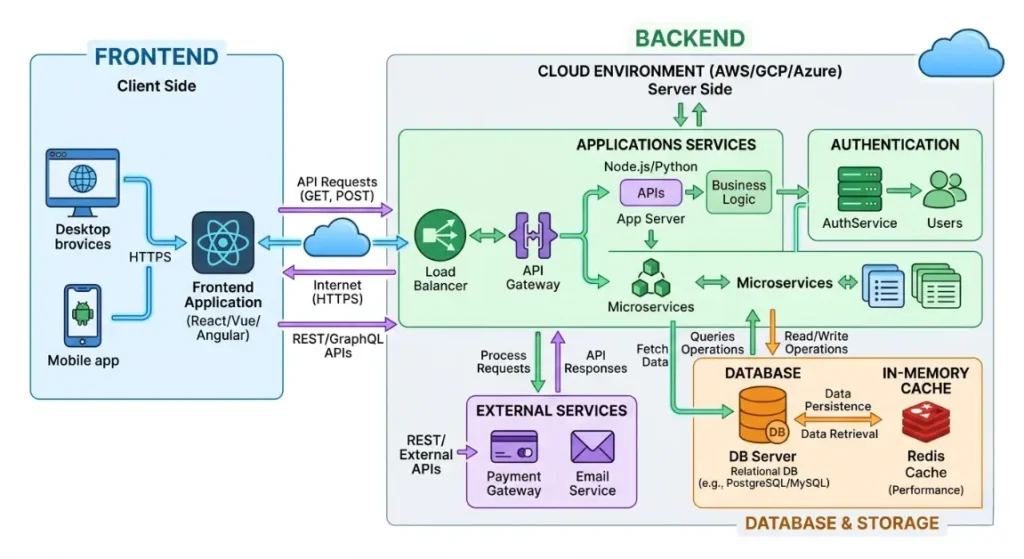
Think of a web application like a restaurant.
The Frontend (The Dining Area)
This is what your users actually see and interact with. It’s the tables, the menus, the decor. In tech terms, it’s the buttons, the layout, and the design on the screen. If you are building custom internal tools for improving small business operational efficiency, you want a frontend that is incredibly simple and clean so your staff doesn’t need a manual to use it.
The Backend (The Kitchen)
This is where the real work happens. The customer orders a burger (clicks a button), and the waiter takes that request to the kitchen. The kitchen (backend server) cooks the food (processes the data) and sends it back out. Your users never see the backend, but if the kitchen is chaotic, the whole restaurant fails.
The Database (The Pantry)
This is where you store all your ingredients. User profiles, order history, inventory counts—it all lives in the database securely. Knowing when to switch from spreadsheets to custom web application databases is crucial because spreadsheets aren’t built to handle complex relationships between data.
APIs (The Waiters)
APIs are the messengers. They take a request from the frontend, bring it to the backend, and return the result. They also allow your custom app to talk to other software, which is essential if you need legacy system integration with your old accounting software.
Hosting (The Building)
This is where your restaurant physically lives. In the tech world, hosting means renting space on a server (like AWS or Google Cloud) so your application is available on the internet 24/7.
When you start spotting the 10 signs your small business needs a custom web application, understanding these five components will help you have intelligent conversations with developers.
Key Options / Technologies Explained
Once you have identified the 10 signs your small business needs a custom web application, you’ll start hearing a bunch of weird acronyms and tech names. Let’s break down the most popular tools we developers use to build scalable software solutions for small businesses.
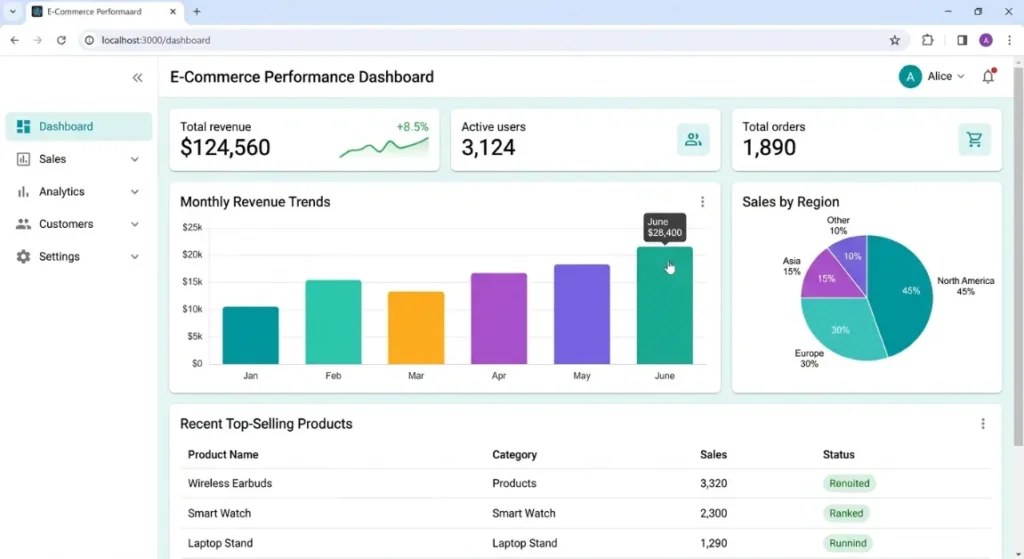
React.js (Frontend Framework)
Overview
React is a frontend tool created by Facebook. It allows developers to build user interfaces using “components” (think of them like Lego blocks). Instead of building a whole page from scratch, we build a “button” block, a “menu” block, and assemble them.
Best For
Modern, highly interactive web applications where the user needs a smooth, fast experience without the page constantly reloading.
Pros
- Incredibly fast and snappy for the user.
- Huge community, meaning it’s very easy to find developers to hire.
- Easily reusable code, which can speed up future updates.
Cons
- Can be overkill for a very simple, static website.
- The ecosystem updates frequently, requiring maintenance.
- Requires a skilled developer to set up the initial architecture properly.
Estimated Cost
Development rates: $50 – $150/hour. (React devs are in high demand).
Learning Curve
Moderate to Advanced
Real-World Use Case
Imagine you own a gym and want an app where members can book classes in real-time, see a live schedule, and manage their payments. React makes that interface feel instantaneous, just like a mobile app, keeping your customers happy and engaged.
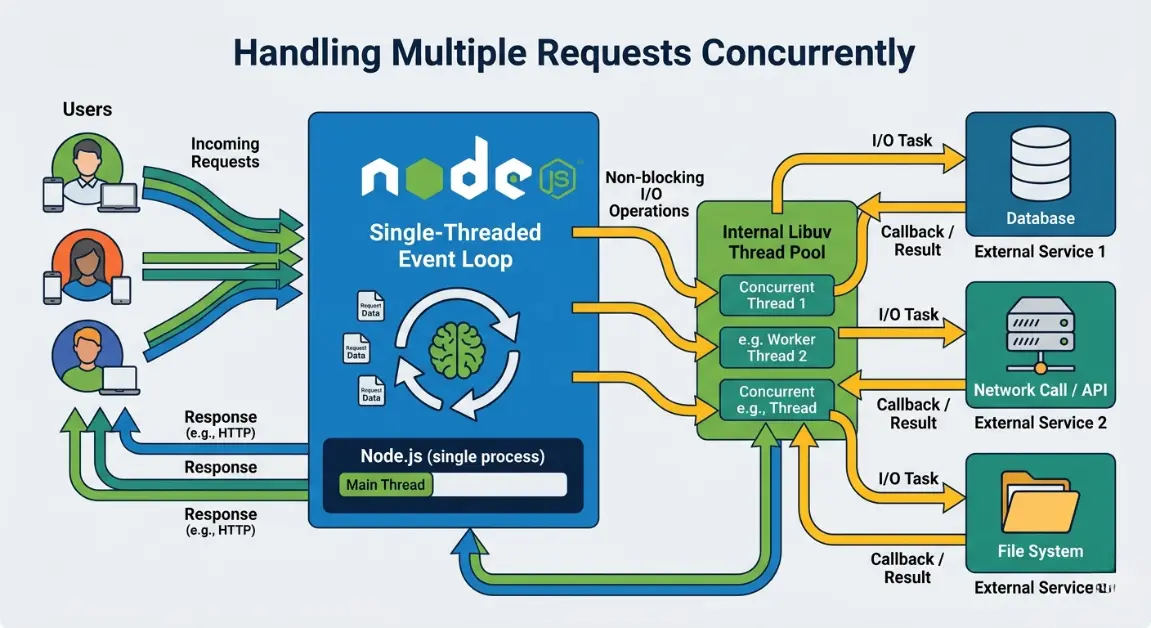
Node.js (Backend Environment)
Overview
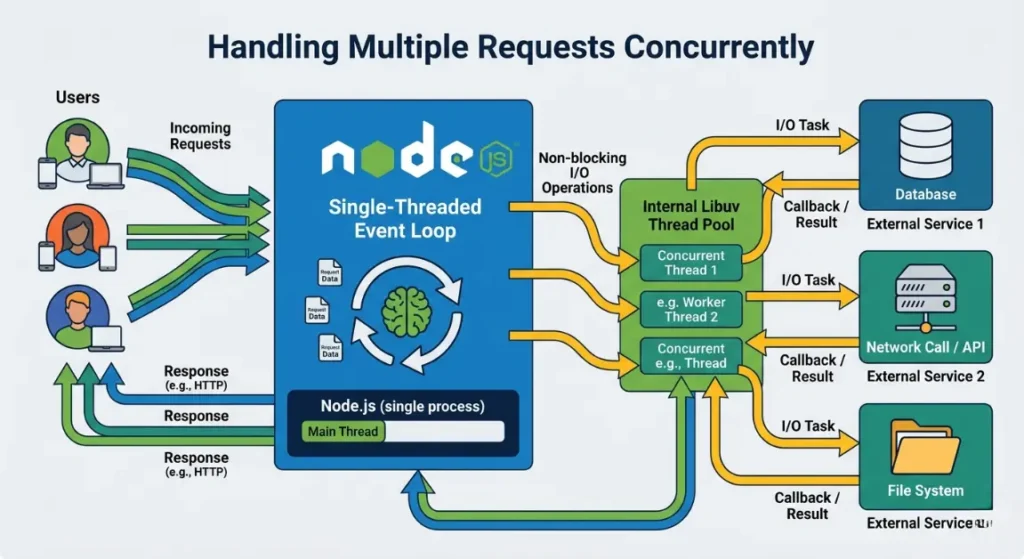
Node.js lets developers use JavaScript—typically a frontend language—to write backend kitchen logic. This means a single developer can often build both the front and back of your app.
Best For
Applications that need to handle a massive amount of simultaneous connections, like real-time chat apps or live dashboard updates.
Pros
- Fast performance for real-time data.
- Allows “Full-Stack” developers to work faster using one language.
- Excellent for business process automation that requires fast data processing.
Cons
- Not the best choice for heavy, complex mathematical computations.
- Code can get messy if the developer isn’t disciplined.
- Relies heavily on third-party packages, which need security monitoring.
Estimated Cost
Development rates: $50 – $130/hour.
Learning Curve
Moderate
Real-World Use Case
If you run a local delivery service and need a live map showing where your drivers are in real-time, Node.js is perfect for pushing those continuous, rapid location updates to your dispatcher’s screen.
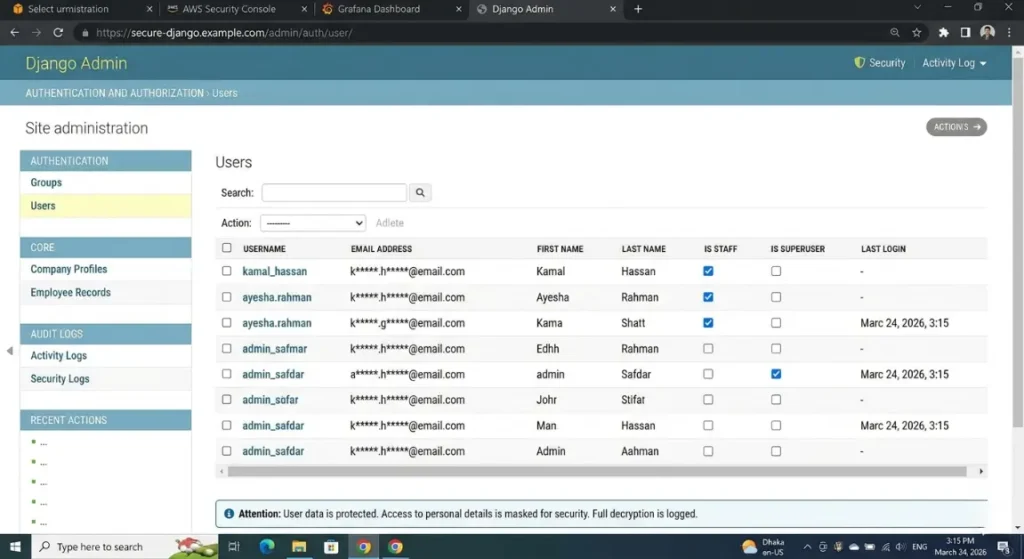
Python with Django (Backend Framework)
Overview
Python is a rock-solid, easy-to-read programming language. Django is a framework built on top of Python that comes with a lot of built-in tools (like a user login system and database manager) right out of the box.
Best For
Data-heavy applications, secure portals, and companies looking to build Enterprise resource planning (ERP) for SMBs.
Pros
- Extremely secure by default.
- “Batteries included” approach saves development time on standard features.
- Incredible for data analysis, AI integration, and heavy logic.
Cons
- Slightly slower performance for real-time chat compared to Node.js.
- Can feel monolithic and heavy for super small projects.
- Hosting requires a bit more configuration.
Estimated Cost
Development rates: $60 – $150/hour.
Learning Curve
Moderate
Real-World Use Case
A local healthcare clinic needs a custom patient portal. They need rigid security, robust user permissions, and complex database relationships to track medical history. Django provides the high-level security and structure required for this kind of sensitive legacy system integration.
PostgreSQL (Database)
Overview
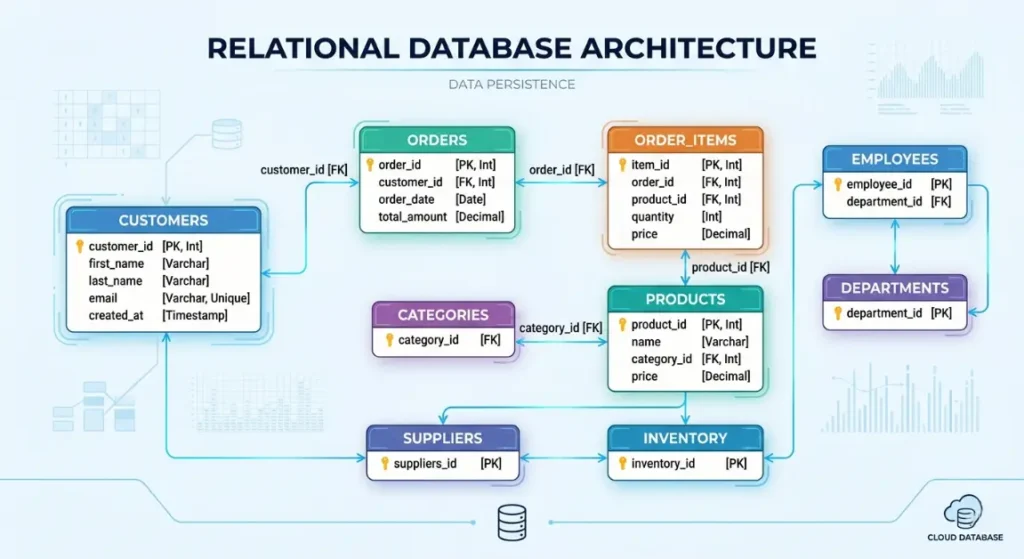
PostgreSQL (often just called Postgres) is a powerful, open-source relational database. Think of it as the ultimate, bulletproof evolution of your messy Excel sheets.
Best For
Virtually any small business application that requires reliable, structured data storage.
Pros
- 100% free and open-source.
- Can handle massive amounts of data without slowing down.
- Incredible reliability and data integrity rules.
Cons
- Harder to scale horizontally (spreading across multiple servers) than NoSQL databases.
- Requires knowledge of SQL (Structured Query Language) to manage deeply.
- Can be complex to configure for absolute beginners.
Estimated Cost
Software is free. Managed hosting costs $15 – $100+/month.
Learning Curve
Moderate
Real-World Use Case
If you are running an e-commerce warehouse and need to track exact inventory counts, supplier orders, and customer shipments, Postgres ensures that if two people try to buy the last item at the exact same millisecond, the database handles the conflict perfectly without breaking.
Amazon Web Services (AWS) (Cloud Infrastructure)
Overview
AWS is Amazon’s cloud computing platform. Instead of buying a physical server to put in your office closet, you rent server space from Amazon’s massive, highly secure data centers.
Best For
Businesses that anticipate rapid growth and need scalable software solutions that will never go offline.
Pros
- You only pay for exactly what you use.
- Enterprise-grade security.
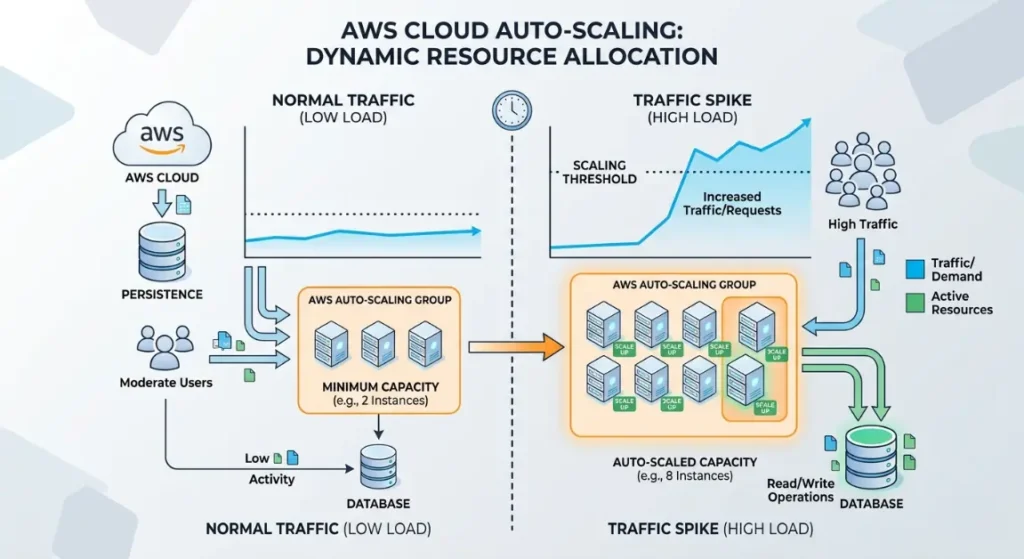
- Can scale to handle millions of users in minutes.
Cons
- The pricing model can be confusing and unpredictable.
- The interface is notoriously complex and overwhelming.
- You often need a dedicated DevOps engineer to set it up securely.
Estimated Cost
$20 – $500+/month depending on traffic. Evaluating the cost benefit of custom software for small business 2026 often centers on AWS usage.
Learning Curve
Advanced
Real-World Use Case
A startup launches a new SaaS product and suddenly gets mentioned on national television. Instead of their website crashing from a massive spike in visitors, AWS automatically spins up more servers to handle the load, keeping the site online.
Options to Avoid (Common Mistakes)
When business owners finally recognize the 10 signs your small business needs a custom web application, they often panic and make rushed decisions. Here are the common mistakes you absolutely must avoid:
Over-Engineering Your MVP
The biggest mistake I see is a founder trying to build the “next Facebook” on day one. They want AI chatbots, blockchain integration, and mobile apps all at once.
- Why it’s risky: You will burn through your budget in three months and have nothing to show for it.
- What to do instead: Focus strictly on solving the specific 10 signs your small business needs a custom web application that triggered your project. Build a simple, core version (Minimum Viable Product), launch it, and gather feedback from your team before adding fancy features.
Choosing the Wrong Framework for the Job
Sometimes a developer will recommend a trendy, experimental technology just because they want to learn it, not because it’s right for your business.
- Why it’s risky: Trendy tech often lacks support. If that developer quits, you won’t be able to find anyone else to fix your code.
- What to do instead: Stick to boring, proven technologies like React, Node.js, Python, or standard PHP. The goal is business stability, not a science experiment.
Ignoring Scalability
On the flip side of over-engineering, some businesses go too cheap. They hire someone for $500 to build an app on a rigid, unscalable platform.
- Why it’s risky: If your business doubles in size, the cheap platform will break, and you will have to rewrite the entire application from scratch.
- What to do instead: Have an honest conversation about SaaS vs custom development and ensure your architect designs a database that can handle 10x your current volume.
Relying on Outdated Technology
Using heavily outdated, niche tech stacks because a legacy employee insists on it.
- Why it’s risky: Security vulnerabilities will pile up, and modern legacy system integration becomes nearly impossible.
- What to do instead: Upgrade your core stack. If you are seeing the 10 signs your small business needs a custom web application, use modern, well-supported open-source languages.
Technology Comparison Table
To make this super clear, here is a quick cheat sheet summarizing the technologies we discussed.
| Technology | Best For | Difficulty | Cost | Business Rating |
| React.js | Interactive user interfaces | Medium | Medium | ⭐⭐⭐⭐⭐ |
| Node.js | Fast, real-time backend apps | Medium | Medium | ⭐⭐⭐⭐ |
| Python/Django | Secure portals & data apps | Medium | Medium | ⭐⭐⭐⭐⭐ |
| PostgreSQL | Reliable business databases | Medium | Low (Hosting) | ⭐⭐⭐⭐⭐ |
| AWS | Massively scalable cloud hosting | Hard | Varies / High | ⭐⭐⭐ |
| Vercel | Quick frontend deployment | Easy | Low | ⭐⭐⭐⭐ |
(Rating meaning: ⭐⭐⭐⭐⭐ = excellent for small business, ⭐⭐⭐⭐ = good choice, ⭐⭐⭐ = situational, ⭐⭐ = limited use, ⭐ = avoid for beginners)
Sample Web App Tech Stacks
When evaluating the 10 signs your small business needs a custom web application, it helps to see how these technologies combine into a “stack.” Here are three realistic tech stacks I build for clients regularly. How to Deploy Web Application for Free 2026 (Beginner Guide)
Stack 1: Startup MVP Stack
If you are a startup reacting to the 10 signs your small business needs a custom web application, you need something fast, modern, and cheap to run while you test your idea.
- Frontend: React
- Backend: Node.js
- Database: MongoDB (NoSQL, very flexible for early changes)
- Hosting: Vercel (Frontend) / Render (Backend)
Estimated Cost: $20 – $50/month
Best For: MVP startups trying to get a product to market in 6-8 weeks.
Stack 2: Small Business Internal Portal
If you are a traditional business (like construction or retail) building custom internal tools for improving small business operational efficiency, reliability is your top priority.
- Frontend: Next.js (React framework)
- Backend: Node.js or Python
- Database: PostgreSQL (Bulletproof data storage)
- Hosting: DigitalOcean
Estimated Cost: $40 – $100/month
Best For: Service businesses managing employees, schedules, and internal data.
Stack 3: Scalable SaaS Platform
If you are building a product that you intend to sell to thousands of other businesses, you need heavy-duty scalable software solutions.
- Frontend: React
- Backend: Python (Django)
- Database: PostgreSQL
- Hosting: AWS (Amazon Web Services)
Estimated Cost: $100+ /month (scales with user growth)
Best For: SaaS startups aiming for enterprise-level security and high user volume.
Cost Breakdown
Let’s talk money. Recognizing the 10 signs your small business needs a custom web application is easy; paying for it is the hard part. Understanding the cost benefit of custom software for small business 2026 is essential before you write a check.
Developer Costs
This is your biggest expense.
- Freelancer: $2,000 – $10,000. Great for simple internal tools, but risky if they disappear on you.
- Boutique Agency: $10,000 – $50,000+. You get a project manager, a designer, and multiple developers. Best for serious applications that require high reliability.
Infrastructure & Hosting
For a small business, server costs are actually quite cheap. You can run a powerful web application for $30 to $100 a month on platforms like DigitalOcean or Heroku. The Ultimate best frontend framework for beginners 2026 ranking Guide
Third-Party APIs
If your app needs to send text messages (Twilio) or process credit cards (Stripe), you will pay small usage fees. Usually pennies per transaction, but it adds up.
eCommerce Website Cost for Small Business (2026 Guide)
Maintenance
Software is like a car; it needs oil changes. Expect to spend 15% to 20% of your initial development cost annually on maintenance, server updates, and minor bug fixes. It is a necessary investment to support your ongoing business process automation. How Much Does It Cost to Build a Simple Web App (2026 Guide)
If you’ve spotted the 10 signs your small business needs a custom web application, yes, the upfront cost hurts. But compare a one-time $20,000 build to paying $2,000 a month for clunky SaaS tools over five years, plus the hidden cost of wasted employee time. The math usually favors custom builds.
Related Articles You Might Like
If you found this guide on the 10 signs your small business needs a custom web application useful, you should dive deeper into our content ecosystem.
Check out our complete article on how to choose a tech stack for your next web development project, where we break down specific frameworks and tools for fast-growing startups. You might also enjoy our deep dive into the true cost of legacy system integration, which explains how to rescue old company data without breaking the bank.
The Complete Web Application Development Guide for Small Businesses (2026)
Frequently Asked Questions
When founders ask me about the 10 signs your small business needs a custom web application, these five questions almost always come up next:
How long does it take to build a web application?
For a basic internal tool or Minimum Viable Product (MVP), expect 6 to 10 weeks of active development. If you are building a complex platform with multiple user roles, advanced security, and third-party integrations, it can take 3 to 6 months. Rushing the process usually leads to bad code, so give your developers the time they need to build a solid foundation.
What is the best framework for beginners?
If you are trying to learn yourself, start with standard HTML, CSS, and Vanilla JavaScript. If you are hiring someone to build an MVP quickly, React for the frontend and Node.js for the backend is the industry standard. They have massive communities, meaning if you run into a bug, someone on the internet has already solved it and posted the answer.
How much does a small business web app cost?
It varies wildly based on complexity. A simple time-tracking portal built by a freelancer might cost $4,000. A fully custom e-commerce dashboard built by a US-based agency could be $40,000+. When evaluating the cost benefit of custom software for small business 2026, remember that a custom app becomes a business asset you own, eliminating ongoing expensive monthly user licenses.
Should I hire a developer or an agency?
It depends on your risk tolerance. Weighing SaaS vs custom development is one thing, but choosing who builds it is another. A freelancer is cheaper but single-threaded; if they get sick, your project stops. An agency is more expensive but provides a team, project management, and a safety net. For mission-critical software, I always recommend a small, reputable agency.
What is the best database for web applications?
For 90% of small business needs, PostgreSQL is the absolute best choice. It is incredibly reliable, open-source (free), and excellent at handling complex relationships between data (like linking a customer to an invoice to a specific product). It is the backbone of most robust custom internal tools for improving small business operational efficiency.
Final Thoughts
Making the leap from off-the-shelf software to a custom build is scary. But if you have clearly identified the 10 signs your small business needs a custom web application, ignoring the problem will only cost you more money in lost efficiency and frustrated customers. Best Form Validation Libraries for React 2026 (Business Guide)
Stop letting clunky spreadsheets dictate how fast you can grow. By investing in business process automation and building tools specifically tailored to your unique workflow, you are fundamentally upgrading the value of your business. Keep it simple, choose boring but reliable technology, hire professionals you trust, and don’t try to build the Death Star on day one.
Freelance vs Agency: Who Should Build Your Web App in 2026?
Start small, solve your immediate bottlenecks, and scale up as you go. If you pay attention to the 10 signs your small business needs a custom web application and take action, you’ll wonder how you ever ran your company without it.
Call To Action
Have you noticed any of these signs in your own company? What is the biggest software bottleneck driving your team crazy right now?
Web App Monetization Strategies That Work in 2026: A Guide
I’d love to hear your experiences. Drop a comment below or share this article with a fellow business owner who is struggling with their tech stack. If you are ready to explore scalable software solutions, subscribe to our blog for more weekly developer insights, or follow me on social media where I post daily tips on managing software projects without losing your mind!
Leave a Reply