
Pull up a chair. If you’re reading this, you’re likely staring at a screen of open tabs, comparing subscription prices for a CRM or project management tool, while simultaneously wondering if your “unique” business process is just going to break the moment you try to force it into a pre-made template.
The Internal Tools vs Off-the-Shelf Software: Build or Buy? dilemma is the classic “home cooking vs. restaurant” debate of the tech world. One is ready right now but might not have exactly what you crave; the other takes time and effort but tastes exactly like home. In 2026, this choice has changed. With AI-assisted coding and high-end low-code platforms, the “Build” side is no longer just for Silicon Valley giants.
In this guide, we’re going to cut through the corporate jargon. I’ll explain the real-world costs of custom software development, show you exactly what’s under the hood of a modern web app, and give you a framework to decide Internal Tools vs Off-the-Shelf Software: Build or Buy? which path will actually grow your business without draining your bank account.
Why This Matters for Small Businesses
I once worked with a local logistics company. They were spending $2,000 a month on three different “off-the-shelf” SaaS (Software as a Service) platforms. None of them talked to each other. Every Monday, two employees spent eight hours manually copying data from one system to another just to generate a weekly report.
They were essentially paying a “subscription tax” to do manual labor. Internal Tools vs Off-the-Shelf Software: Build or Buy?
The biggest mistake small businesses make is choosing software based on the sticker price rather than the total cost of ownership. They see a $50/user/month plan and think it’s a steal. Fast forward two years: they have 30 users, the vendor just hiked the price by 15%, and they’re paying for features they never use while missing the one feature they actually need.
On the flip side, I’ve seen founders try to build the “Amazon of their niche” from scratch when a simple Shopify setup would have worked. They spend $50,000 on a custom build and run out of marketing budget before the first customer even signs up.
Understanding the balance between Internal Tools vs Off-the-Shelf Software: Build or Buy? is about protecting your most valuable resource: your time. If the software is “core” to what makes you different from your competitors, you likely need to build. If it’s just “utility” (like payroll or email), just buy it and move on.
Understanding the Basics: How Web Apps Actually Work
Before we talk dollars and cents, let’s pull back the curtain. If you’re going to decide between internal tools vs off-the-shelf software: build or buy?, you need to know what you’re actually buying (or building).
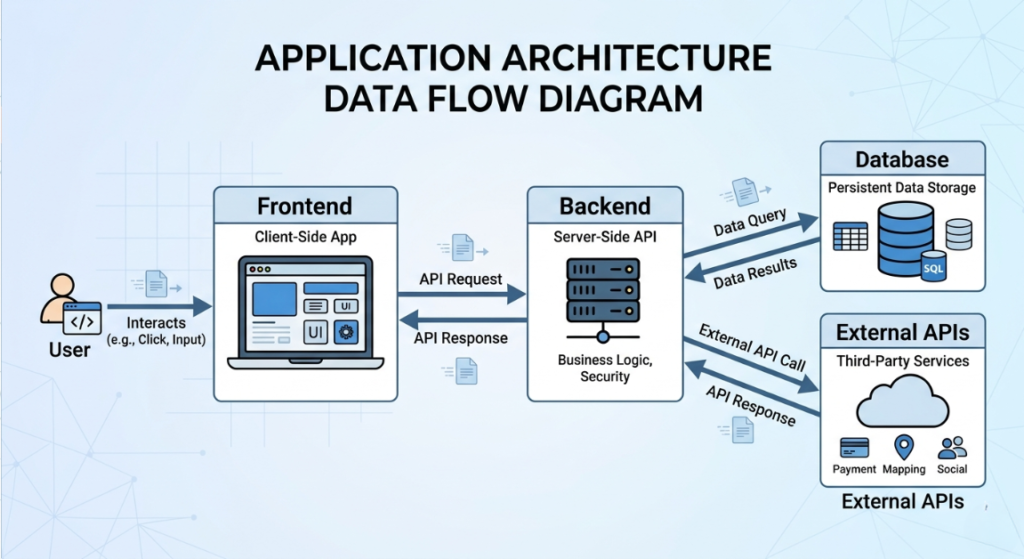
Think of a web application like a physical restaurant:
- The Frontend (The Dining Area): This is what your users see. The buttons, the colors, and the forms. In 2026, we use “frameworks” like React or Next.js to make this feel snappy and modern.
- The Backend (The Kitchen): This is where the magic happens. It processes the orders, checks the “pantry” (database), and makes sure the rules are followed. Common “chefs” here include Node.js or Python.
- The Database (The Pantry): This is where all your data lives customer names, order history, and inventory levels.
- APIs (The Waitstaff): APIs are the messengers. They allow your app to talk to other apps (like sending a payment request to Stripe or a message to Slack).
- Hosting (The Building): This is where your app “lives” on the internet. Companies like AWS, Vercel, or DigitalOcean provide the digital real estate.
Key Options & Technologies Explained
When you dive into the internal tools vs off-the-shelf software: build or buy? rabbit hole, you’ll find a few distinct paths. Here is how they break down in today’s market. What is API Integration in Web Development Explained (2026)
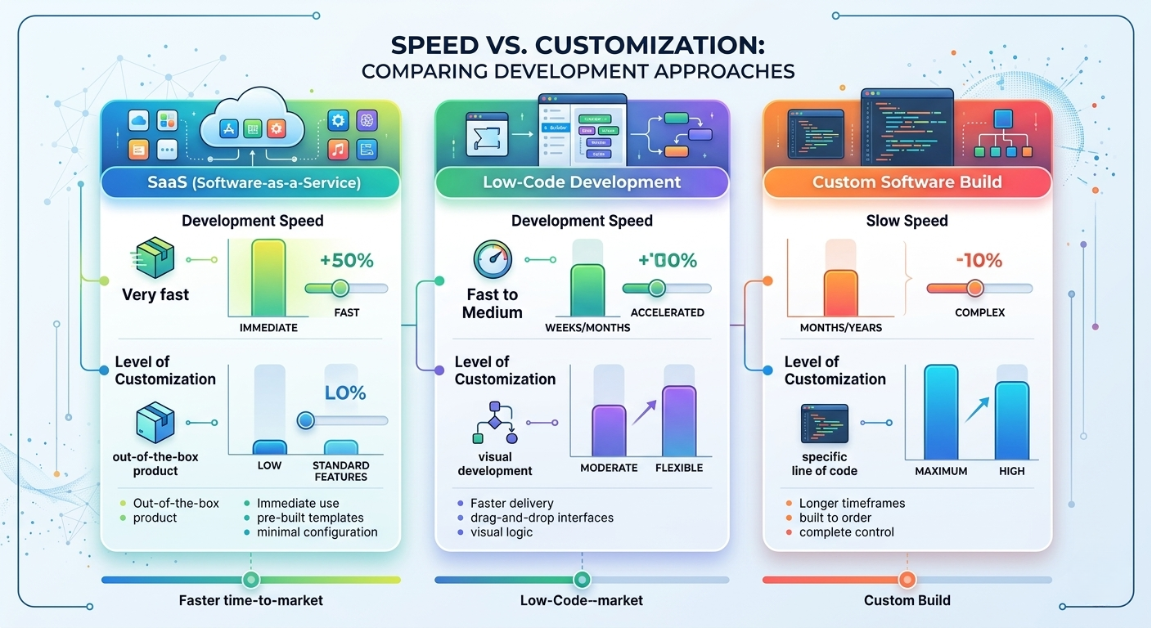
SaaS (Off-the-Shelf Software)
Overview
This is the “Rent” model. You pay a monthly fee to use someone else’s software. Examples include Salesforce, HubSpot, or Trello.
Best For
Standard business processes like accounting, general CRM, or team communication.
Pros: Internal Tools vs Off-the-Shelf Software: Build or Buy?
- Instant setup (Log in and go).
- Zero maintenance (The vendor fixes the bugs).
- Predictable monthly costs.
Cons: Internal Tools vs Off-the-Shelf Software: Build or Buy?
- “Feature bloat” (paying for 90% of things you don’t use).
- Limited customization (you have to change your workflow to fit the app).
- Data is held by a third party.
Estimated Cost
$20 – $200 per user/month.
Learning Curve
Beginner (Usually has great documentation).
Low-Code/No-Code Platforms
Overview
Tools like Retool, Bubble, or Microsoft Power Apps. They allow you to build custom interfaces by dragging and dropping components, with a little bit of “logic” sprinkled in.
Best For
Small businesses that need a specific internal dashboard or a simple customer portal but don’t have a $50k budget.
Pros: Internal Tools vs Off-the-Shelf Software: Build or Buy?
- Much faster than traditional coding.
- Easier to update yourself without a full-time dev.
- High scalability of internal tools built this way.
Cons: Internal Tools vs Off-the-Shelf Software: Build or Buy?
- Platform lock-in (if the provider goes bust, your app might too).
- Monthly platform fees can get steep as you scale.
- Performance can lag on very complex data tasks.
Estimated Cost
$50 – $500/month (Platform fees) + $2,000 – $10,000 (Initial setup if hiring a pro).
Learning Curve
Moderate.
Custom Custom Build (Full-Code)
Overview
Hiring developers to write every line of code specifically for you. This is the custom software development costs heavyweight.
Best For
Mission-critical applications that are the “secret sauce” of your business.
Pros: Internal Tools vs Off-the-Shelf Software: Build or Buy?
- Total ownership of the Intellectual Property (IP).
- Unlimited flexibility if you can dream it, it can be built.
- No per-user license fees.
Cons: Internal Tools vs Off-the-Shelf Software: Build or Buy?
- High upfront investment.
- You are responsible for security and updates.
- Takes months, not days.
Estimated Cost
$20,000 – $150,000+.
Learning Curve
Advanced (Requires a technical partner).
AI-Assisted Rapid Development
Overview
A new 2026 trend. Using AI “agents” (like Lovable or Claude Code) to generate 80% of the boilerplate code, which a human developer then polishes.
Best For
Startups wanting to launch an MVP (Minimum Viable Product) quickly.
Pros: Internal Tools vs Off-the-Shelf Software: Build or Buy?
- Cuts development time by 40-60%.
- Lower custom software development costs than traditional methods.
Cons: Internal Tools vs Off-the-Shelf Software: Build or Buy?
- Needs an experienced developer to verify the code (AI can make mistakes).
- Can lead to “technical debt” if not managed.
Estimated Cost
$10,000 – $40,000.
Learning Curve
Moderate to Advanced.
Options to Avoid (Common Mistakes)
In my years as a consultant, I’ve seen businesses throw money into “tech pits” because they followed bad advice.
- Over-Engineering the MVP: * The Mistake: Trying to build every single feature on Day 1.
- The Risk: You spend your whole budget on features your customers might not even want.
- What to do instead: Build the “Minimum Viable Product.” What is the one thing this tool must do to be useful? Build that first.
- The “Frankenstein” SaaS Integration:
- The Mistake: Buying 10 different SaaS tools and trying to “duct tape” them together with basic automations.
- The Risk: One update to Tool A breaks Tool B, C, and D. You spend more time fixing “zombie” automations than doing work.
- What to do instead: If you need more than 3-4 deep integrations, it’s time to look at custom software development.
- Ignoring the “Hidden” Maintenance:
- The Mistake: Thinking that once the code is written, you never have to pay for it again.
- The Risk: Security vulnerabilities or browser updates break your app in year two.
- What to do instead: Always budget 15-20% of the initial build cost for annual maintenance. This is one of the biggest hidden costs of maintaining internal software.
Technology Comparison Table
| Technology | Best For | Difficulty | Cost | Business Rating |
| SaaS (Off-the-shelf) | Standard workflows | Easy | Low (Monthly) | ⭐⭐⭐⭐⭐ |
| Low-Code (Retool/Bubble) | Internal Dashboards | Medium | Moderate | ⭐⭐⭐⭐ |
| AI-Assisted Custom | Fast MVPs | Hard | Medium | ⭐⭐⭐⭐ |
| Full Custom Build | Core IP/Unique logic | Very Hard | High | ⭐⭐⭐ |
| Excel “Apps” | Very small teams | Easy | Free | ⭐ |
Rating meaning: ⭐⭐⭐⭐⭐ = excellent for small business; ⭐ = avoid for long-term growth. Web App vs Mobile App in 2026: Which to Choose?
Sample Web App Tech Stacks (2026 Edition)
If you decide to go the custom route, here is what the “blueprints” usually look like.
Stack 1: The “Speed Demon” (Low-Code/AI)
- Platform: Retool (Frontend/Backend)
- Database: Retool Database (PostgreSQL)
- Integration: Zapier / Make.com
- Estimated Cost: $50 – $150/month
- Best For: Internal admin panels, inventory trackers, and simple CRMs.
Stack 2: The Modern Startup (Full-Stack)
- Frontend: Next.js (React)
- Backend: Node.js (Serverless)
- Database: Supabase (PostgreSQL + Auth)
- Hosting: Vercel
- Estimated Cost: $20 – $100/month (Infrastructure only)
- Best For: Client-facing portals, specialized SaaS products, and apps needing high performance.
Stack 3: The Data Powerhouse (Scalable)
- Frontend: React
- Backend: Python (FastAPI or Django)
- Database: PostgreSQL + Redis (for speed)
- Hosting: AWS (Amazon Web Services)
- Estimated Cost: $150+/month
- Best For: Applications handling massive amounts of data or complex AI/ML calculations.
How to Choose Tech Stack for Web Development Project (2026)
Cost Breakdown: What You’re Actually Paying For
When you see a quote for custom software development costs, it’s rarely just “coding hours.” In 2026, here is how a $50,000 project usually splits up:
- Discovery & Design (15%): Mapping out exactly how the app will work so we don’t build the wrong thing.
- Frontend & UX (25%): Making it look good and making sure it’s easy for your team to use.
- Backend & Logic (35%): The “brain” of the operation.
- QA & Testing (15%): Finding the bugs before your customers do.
- Project Management (10%): Keeping everything on track and on budget.
Realistic Price Ranges:
- Freelancer (Solopreneur): $5,000 – $25,000 (High risk if they disappear, but budget-friendly).
- Boutique Agency: $25,000 – $100,000 (Best balance of quality and cost).
- Enterprise Agency: $150,000+ (Usually overkill for a small business).
Don’t forget the Total cost of ownership. A SaaS tool might cost $500/month, but over five years, that’s $30,000 and you still don’t own the code. A custom tool might cost $40,000 upfront, but in year four, you’re only paying for hosting. The Complete Web Application Development Guide for Small Businesses (2026)
Related Articles You Might Like
If you’re still weighing your options for Internal Tools vs Off-the-Shelf Software: Build or Buy?, you might find these other guides helpful. We’ve broken down the best frameworks for 2026 and how to vet a developer without being a tech expert yourself. Check out our deep dive on SaaS vs custom build strategies for more industry-specific examples.
Frequently Asked Questions
1. How long does it take to build a custom internal tool?
In 2026, a “Small” project (like a custom dashboard) usually takes 4 to 8 weeks. A “Medium” project (like a client portal with payments) takes 3 to 5 months. If someone promises a full custom app in two weeks, they are likely using a template that might not scale well later.
2. Is it ever cheaper to build than to buy?
Rarely in the first year. However, if you have 100+ employees and the SaaS vendor charges $50/head, you’re looking at $60,000 a year. In that case, building a custom tool for $100,000 pays for itself in less than two years. This is the build vs buy framework for enterprise software thinking scaled down for smart SMBs.
3. What are the “hidden” costs of buying SaaS?
The biggest one is “Process Misfit.” If the software doesn’t fit your workflow, your team will spend hours doing manual workarounds. You also have to consider data migration costs (getting your data out if you decide to leave) and the annual 5-10% price hikes common in the industry.
4. Can I start with SaaS and move to custom later?
Absolutely. In fact, for 80% of businesses, I recommend this. Use the ready-made software integration to prove that the “idea” works. Once you hit the limits of that software or once your monthly bill becomes painful then invest in a custom build.
5. Should I hire a freelancer or an agency?
If the project is small and you have the time to manage a developer daily, a freelancer is great. If the project is mission-critical and you need a “set it and forget it” solution with design, coding, and testing included, go with an agency.
Final Thoughts: Making the Smart Move
At the end of the day, the Internal Tools vs Off-the-Shelf Software: Build or Buy? decision comes down to one question: Is this software your competitive advantage? What is Responsive Web Design and Why It Matters 2026
If you’re a plumbing company, your “secret sauce” isn’t your accounting software it’s your service. Buy QuickBooks and spend your energy elsewhere. But if you’re a logistics company with a unique way of routing trucks that saves 20% on gas, that is your secret sauce. Build a tool for that. How to Validate Your Web App Idea Before Building (2026 Guide)
Technology should be an investment that buys you back your time, not a bill that keeps you up at night. Start small, focus on the problem you’re solving, and don’t be afraid to ask a developer for a “Discovery Phase” before you commit to a big build.
Call To Action
Have you struggled with a software “misfit” in your business? Or maybe you’re currently debating a custom build and aren’t sure if the numbers add up? Drop a comment below or share this guide with a fellow founder. We’d love to hear your experience sometimes the best tech advice comes from those who’ve already been in the trenches!
Leave a Reply