
If you are running a retail shop, an e-commerce brand, or a wholesale distribution business, you already know the massive headache that comes with tracking stock. You spend hours staring at spreadsheets, guessing how much product you need to order for next month, and still end up with either too much dead stock or missing out on sales because a popular item sold out. It is a frustrating, time-consuming cycle.
Over the last few years working as an AI solutions architect, the most common question I get from founders over coffee is about exactly this problem. They want to know how to implement ai inventory management small business systems without needing a PhD in computer science or a million-dollar budget.
In this guide, I am going to walk you through exactly how to implement ai inventory management small business setups. We will skip the overly academic machine learning jargon. Instead, we are going to look at practical, real-world solutions. Whether you are curious about choosing between OpenAI and open-source models, figuring out how much a custom AI chatbot costs, or just looking to set up simple automation workflows, this article will cover it all. Grab a cup of coffee, and let’s dive into making your stock tracking smarter.
Why This Matters for Small Businesses
A lot of business owners think artificial intelligence is only for massive tech giants with limitless budgets. That could not be further from the truth. In fact, smaller, agile teams actually have the most to gain from adopting AI early. When you figure out how to implement ai inventory management small business workflows, you are essentially cloning your best operations manager and letting them work 24/7 without taking a coffee break.
Let me share a quick story from a recent project. I was consulting for a mid-sized regional hardware supplier. They were struggling with unpredictable seasonal trends. One month they had a massive surplus of power tools, and the next, they were completely out of essential plumbing supplies. We implemented a straightforward system utilizing machine learning to analyze their past three years of sales data alongside local weather patterns and economic indicators.
By utilizing proper Demand forecasting, we cut their overstock by 40% in the first quarter alone. They also achieved true Real-time tracking of their warehouse aisles using a simple tablet interface connected to an AI database. This kind of Inventory optimization isn’t science fiction anymore; it is highly accessible.
When you look into AI inventory management software for small business ecommerce, you aren’t just buying a tool; you are buying time. You are preventing the costly mistakes of human error, and you are setting up Automated replenishment so your shelves never go empty.
Understanding the AI Basics
Before we get into the heavy details of how to implement ai inventory management small business setups, we need to clear up some of the confusing vocabulary. You don’t need to be a programmer to understand this, but knowing these terms will protect you from buying the wrong software.
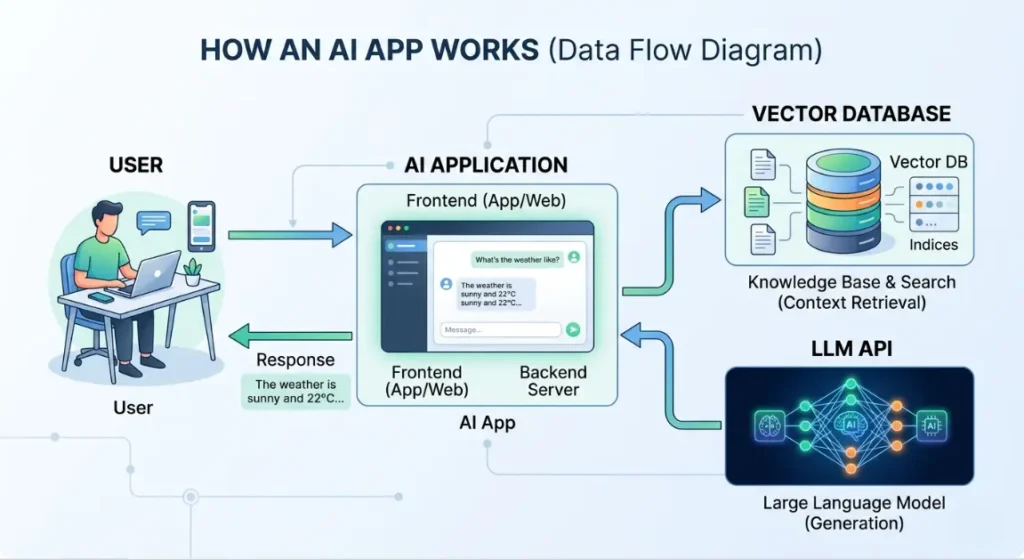
Think of building an AI application like hiring a new warehouse employee.
First, you have the LLM (Large Language Model). Think of the LLM as the brain of your new employee. Examples include OpenAI’s GPT-4 or Anthropic’s Claude 3. They are incredibly smart and can read, write, and analyze text or data, but out of the box, they don’t know anything about your specific business.
Next, we have Vector Databases. If the LLM is the brain, the Vector Database is the filing cabinet. Because an LLM can’t remember millions of your past invoices at once, we convert your business data into numbers (vectors) and store them here. When you ask the AI a question, it quickly searches this filing cabinet to pull the exact context it needs.
Then, there are Prompts and Context Windows. A prompt is simply the instruction you give the AI (e.g., “Look at this spreadsheet and tell me what is running low”). The context window is how much information the AI can “hold in its head” at one single time.
Finally, we use APIs (Application Programming Interfaces). This is the bridge how to implement ai inventory management small business. It allows your existing tools like Shopify or a custom dashboard to talk directly to the LLM brain without you having to build a supercomputer in your back office.
Key AI Options / Technologies Explained
When clients ask me how to implement ai inventory management small business solutions, I always start by auditing what they actually need. There is no one-size-fits-all answer. Some businesses just need a smart chatbot to check stock, while others need heavy predictive mathematical models.
Here is a breakdown of the core technologies you can use, explained simply.
Generative AI Chatbots for Stock Queries
- Overview: Instead of clicking through five different screens in your inventory software to find out if you have a specific blue t-shirt in size medium, you simply type or speak to an AI chatbot: “Do we have any blue medium tees left in the downtown store?” The AI checks your database and answers instantly.
- Best For: Retail staff on the floor, customer support teams, and busy owners who need quick answers on the go.
- Pros: Incredibly easy to use, saves massive amounts of time, requires zero training for your staff.
- Cons: Only as accurate as your underlying database; if your physical stock count is wrong, the AI will be wrong.
- Estimated Cost: $20 – $100/month in API token costs depending on how often your team asks questions.
- Learning Curve: Beginner
- Real-World Use Case: A boutique clothing store owner uses a Slack integration where staff can message a bot to instantly check backroom inventory without leaving the customer’s side.
Machine Learning for Demand Forecasting
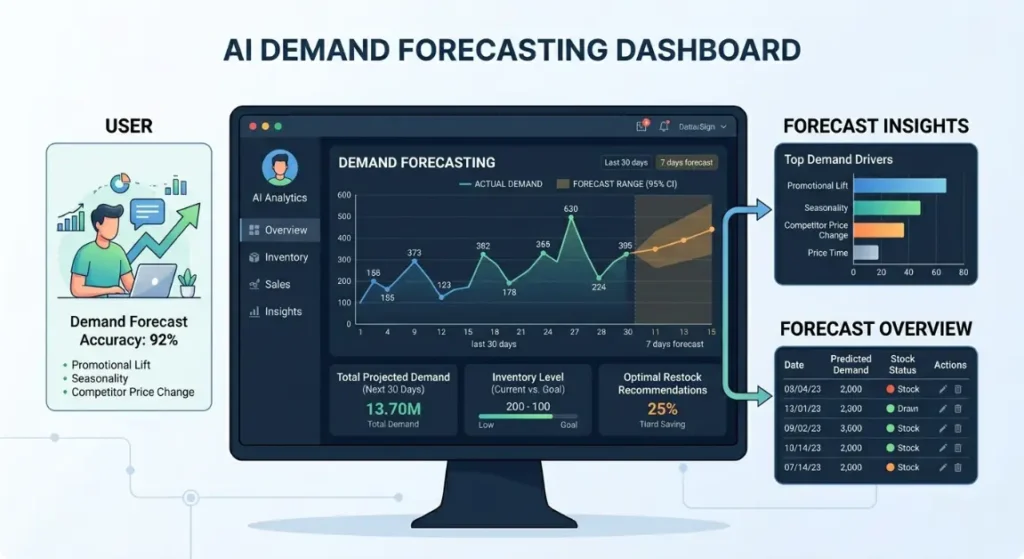
- Overview: This involves using historical sales data to predict exactly what you will sell in the future. It looks at complex patterns that a human on a spreadsheet would miss. This is the gold standard for predictive demand forecasting for small retail business operations how to implement ai inventory management small business.
- Best For: Businesses with highly seasonal products, perishable goods, or fast-moving consumer goods.
- Pros: Drastically reduces overstock, frees up cash flow, prevents stockouts of popular items.
- Cons: Requires a good amount of clean, historical data (usually 1-2 years) to be accurate.
- Estimated Cost: $200 – $500/month for cloud-based ML services (like AWS Forecast).
- Learning Curve: Advanced
- Real-World Use Case: A regional bakery uses Machine learning to predict how many croissants to bake each morning based on the day of the week, local holidays, and the weather forecast.
RAG (Retrieval-Augmented Generation) for Supplier Docs
- Overview: RAG is a way to let an AI securely read your private documents. You upload all your supplier contracts, lead times, and shipping manifests into a Vector Database. The AI can then answer complex questions based only on those documents.
- Best For: Wholesale distributors who manage dozens of complex vendor relationships and confusing pricing tiers.
- Pros: Eliminates the need to manually dig through PDF contracts; highly accurate; keeps data private.
- Cons: Setup requires a developer to connect the Vector DB and the LLM properly.
- Estimated Cost: $3,000 – $8,000 for initial development, then $50/month to run.
- Learning Curve: Moderate (to use), Advanced (to build).
- Real-World Use Case: A distributor types, “Which supplier has the fastest shipping time for copper piping, and what is the minimum order quantity?” The AI reads 50 PDFs in seconds and gives the exact answer.
Smart APIs for Real-Time Tracking
- Overview: Connecting your physical store scanners, your e-commerce website, and your warehouse into one unified system using AI-powered APIs. This ensures that the moment an item is sold online, it is deducted from the warehouse, and the AI logs the velocity of the sale.
- Best For: Omnichannel brands selling on Shopify, Amazon, and in physical retail simultaneously.
- Pros: True Real-time tracking across all platforms; prevents double-selling items.
- Cons: Can be fragile if an API connection breaks or if one platform updates its software.
- Estimated Cost: $50 – $150/month for middleware integration tools like Make.com.
- Learning Curve: Moderate
- Real-World Use Case: When considering AI inventory management software for small business ecommerce, a brand sets up APIs so their warehouse robots instantly know when a VIP customer places an order on Shopify.
No-Code Tools for Automated Replenishment
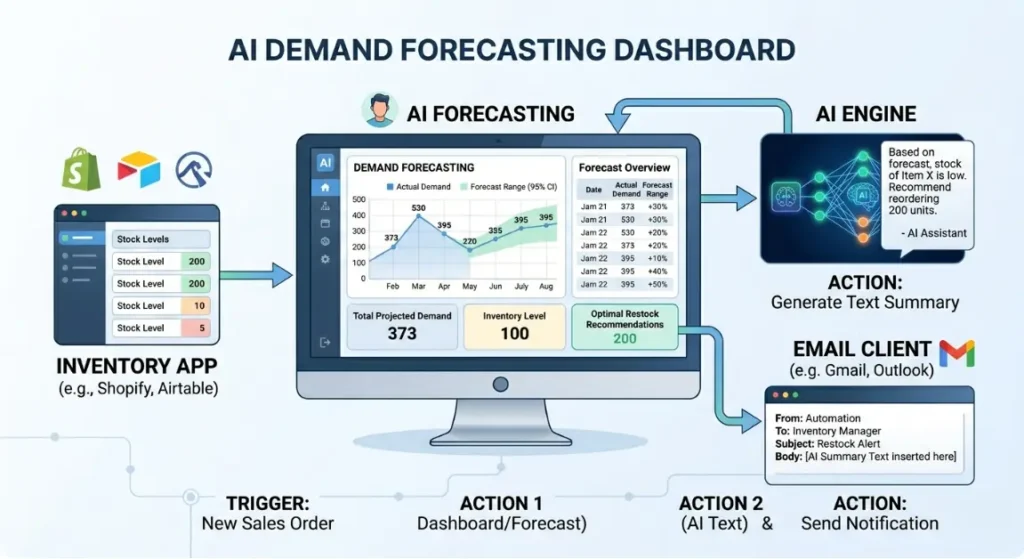
- Overview: Using visual, drag-and-drop tools (like Zapier) to connect AI to your daily workflow. For example, if stock drops below a certain number, the AI drafts an email to your supplier, attaches a purchase order, and saves it in your drafts folder for approval.
- Best For: Non-technical founders who want to automate repetitive administrative tasks without writing code.
- Pros: Very fast to set up, visually intuitive, easy to change as your business grows.
- Cons: Can get expensive if you have tens of thousands of automated tasks running daily.
- Estimated Cost: $30 – $150/month depending on task volume.
- Learning Curve: Beginner
- Real-World Use Case: These are incredible automated stock replenishment tools for wholesalers. A manager gets a drafted email every Monday morning proposing exactly what needs to be reordered based on the weekend’s sales velocity.
Options to Avoid (Common AI Mistakes)
When business owners start researching how to implement ai inventory management small business solutions, they often get excited and fall into a few expensive traps. Here is what you need to avoid to protect your time and money.
First, do not try to train an AI model from scratch. I see founders read about building custom models and think they need to hire a data science team to build the next ChatGPT. That is a multi-million dollar mistake. For 99% of small businesses, using existing APIs from OpenAI or Anthropic is vastly superior, cheaper, and faster. Use pre-trained models and give them your data via RAG (Retrieval-Augmented Generation).
How to Deploy Web Application for Free 2026 (Beginner Guide)
Second, do not ignore data privacy. A massive mistake is taking your raw, unanonymized customer purchase histories or highly confidential supplier pricing and pasting it directly into the public, free version of ChatGPT. That data can potentially be used to train future public models. Always use enterprise API endpoints (which do not train on your data) or secure open-source models if privacy is your top concern.
Third, avoid over-engineering simple tasks. If you only have 50 SKUs (Stock Keeping Units) and steady, predictable sales, you do not need a complex Machine learning predictive model. A simple Zapier automation that alerts you when stock hits zero is enough. Start small, prove the value, and then scale up.
Finally, do not roll out AI without testing prompts. If you build an AI chatbot for your staff, you need to test how it handles weird questions. If a staff member asks it a vague question, it might hallucinate an incorrect stock number. Always build in safeguards where the AI says “I don’t know” instead of guessing.
Technology Comparison Table
To make choosing a foundational model easier, here is a quick breakdown of the core AI brains you might use when you figure out how to implement ai inventory management small business systems.
| Technology/Model | Best For | Difficulty | Cost | Business Rating |
| OpenAI API (GPT-4) | Complex reasoning | Medium | Medium-High | ⭐⭐⭐⭐⭐ |
| Anthropic (Claude 3) | Large document analysis | Medium | Medium | ⭐⭐⭐⭐⭐ |
| Open Source (Llama 3) | Complete data privacy | Hard | High (Hosting) | ⭐⭐⭐ |
Rating meaning:
⭐⭐⭐⭐⭐ = excellent for small business
⭐⭐⭐⭐ = good choice
⭐⭐⭐ = situational
⭐⭐ = limited use
⭐ = avoid for beginners
Sample AI App Tech Stacks
To give you a very practical view of how to implement ai inventory management small business solutions, here are three exact blueprints (tech stacks) I use when building for clients.
The Ultimate best frontend framework for beginners 2026 ranking Guide
Stack 1: Basic AI Chatbot Stack
This is perfect for allowing your staff to quickly query stock levels using natural language.
- AI Model: OpenAI GPT-3.5/GPT-4o mini (Fast and cheap)
- Framework: LangChain (Connects the AI to your data)
- Database: Supabase (Stores your inventory data securely)
- Hosting: Vercel (Keeps the app running on the web)
- Estimated Cost: $10 – $30/month (API usage)
- Best For: Simple customer service bots and internal staff queries.
Stack 2: Internal Knowledge Base (RAG) Stack
If you have massive supplier catalogs, complicated shipping matrices, and training manuals, this stack allows an AI to read and answer questions about all of it.
- AI Model: Anthropic Claude 3 (Incredible at reading long, complex documents)
- Framework: LlamaIndex (Specialized for connecting documents to LLMs)
- Vector Database: Pinecone (The filing cabinet for your documents)
- Hosting: AWS / DigitalOcean
- Estimated Cost: $50 – $150/month
- Best For: Companies with large training manuals/documents and complex supplier contracts.
Stack 3: No-Code Automation Stack
For founders who want Automated replenishment alerts and don’t want to hire a developer.
- Automation: Zapier / Make.com (The glue that holds it together)
- AI Model: OpenAI API (To draft emails and analyze text)
- Trigger: Gmail / Slack / Shopify
- Estimated Cost: $30 – $100/month
- Best For: Non-technical founders automating daily workflows.
Cost Breakdown (Building & Running)
Let’s talk money. Figuring out how to implement ai inventory management small business tools is heavily dependent on your budget.
How to Choose Tech Stack for Web Development Project (2026)
Running Costs (The monthly bills):
AI isn’t usually a flat monthly fee if you build it yourself; it is pay-as-you-go based on “tokens.” Think of a token like a piece of a word. 1,000 tokens is about 750 words. Using an API like OpenAI might cost a few cents per 1,000 tokens, how to implement ai inventory management small business. For a small business doing daily stock checks, your AI API costs might literally be $10 to $30 a month. Add in $20 to $70 a month for hosting a Vector DB and web server, and your monthly running costs are generally between $20 – $500+ depending on usage and scale.
Development Costs (Building the tool):
If you use no-code tools, your cost is just your own time. However, if you want a custom dashboard securely tied into your ERP, you need to hire.
- Freelance AI Dev: $3,000 – $12,000. Great for building out one of the specific tech stacks mentioned above.
- AI Agency: $15,000 – $60,000+. Best if you need deep, custom predictive Machine learning models tied securely into legacy enterprise software.
Related Articles You Might Like
If you found this guide useful, check out our article on “How to ensure Data Privacy when using AI APIs“, where we break down security for startups. You might also enjoy our deep dive into “The Best automated stock replenishment tools for wholesalers in 2026”, which compares off-the-shelf software versus custom builds for larger warehouses. Finally, don’t miss our guide on predictive demand forecasting for small retail business models. Complete AI Implementation Guide
Frequently Asked Questions
How long does it take to build a custom AI chatbot?
If you are hiring a competent freelance AI developer, a basic internal AI chatbot that connects to your existing clean database can typically be built and tested in 2 to 4 weeks. If your data is messy or spread across multiple legacy systems, data cleaning alone can add an extra month to the timeline.
Is my business data safe when using OpenAI API?
Yes, if configured correctly. When you use OpenAI’s paid API endpoints, how to implement ai inventory management small business their standard enterprise agreement states they do not use your data to train their future public models. However, you should never paste sensitive company data into the free, consumer-facing ChatGPT web interface, as that data can be used for training.
How much does an AI application cost to run monthly?
For a small business using a custom internal tool, monthly running costs are surprisingly low. You pay for server hosting (around $20-$50), a vector database (often free tier or $70), and API token usage. Most small teams spend under $150 a month on total running costs for a well-optimized AI inventory app.
What is the difference between ChatGPT and OpenAI API?
ChatGPT is the consumer-facing chat website built by OpenAI; it is a finished product. The OpenAI API is the raw “engine” underneath it. As a business, you rent access to this engine via the API to build your own custom software, ensuring your data remains private and the AI acts exactly how you program it.
Should I hire an AI developer or use a no-code tool?
If your goal is simple task automation like getting a Slack message when inventory is low start with a no-code tool like Zapier. It is fast and cheap. You should only hire an AI developer when you need deep integrations with custom databases, RAG systems for private documents, or highly customized user interfaces for your staff.
Final Thoughts
Stepping into the world of artificial intelligence can feel like trying to drink from a firehose, but it really doesn’t have to be overwhelming. The secret to understanding how to implement ai inventory management small business workflows is to start incredibly small. Pick one single bottleneck whether that is Demand forecasting for your top five products or stopping manual stock counts and apply a targeted AI solution.
How Much Does It Cost to Build a Simple Web App (2026 Guide)
You don’t need to rebuild your entire business overnight. By taking advantage of AI inventory management software for small business ecommerce, utilizing modern APIs, how to implement ai inventory management small business and maintaining a focus on Inventory optimization, you will save countless hours of manual labor. Your business will run smoother, your customers will stay happy, and you will finally have the time to focus on growing your company instead of just counting boxes in the back room.
Call To Action
Are you ready to stop fighting with spreadsheets and start automating your stock? I’d love to hear what specific inventory headaches are holding your business back right now. How to implement ai inventory management small business Drop a comment below to share your experience, ask any technical questions, or subscribe to our AI newsletter for weekly tips. If you need hands-on help, click here to book a free 15-minute consultation to map out your perfect AI tech stack!
The Complete Web Application Development Guide for Small Businesses (2026)
Leave a Reply