
Let’s be honest for a second. If you are a non-technical founder or a small business owner, stepping into the software world feels a lot like reading a menu in a language you don’t speak. You know you want a great meal (a working app), but the ingredients are confusing. React? Node? PostgreSQL? AWS? It’s enough to make your head spin.
One of the most common questions I hear over coffee from clients is exactly this: how to choose tech stack for web development project without blowing the budget or making a massive mistake?
Figuring out how to choose tech stack for web development project requirements doesn’t have to be a nightmare. In this guide, I’m going to take off my developer hat, put away the heavy corporate jargon, and explain things to you simply and practically. We will cover the core concepts of web applications, realistic development costs, the best frameworks, and the hosting solutions you need to know about.
By the end of this read, you won’t just understand the buzzwords you’ll be equipped to confidently hire developers, manage your budget, and make the right foundational choices for your business.
Why This Matters for Small Businesses
You might be thinking, “Can’t I just leave this to the developers?” Yes and no. While you don’t need to write the code yourself, understanding how to choose tech stack for web development project builds the foundation of your entire business software.
Think about it like building a physical store. If you tell a contractor “just build it,” they might use expensive marble when you only needed sturdy wood, or they might build a tiny foundation when you secretly planned to add three more floors next year. The same applies to software.
A common mistake I see small businesses make is blindly trusting a flashy agency without understanding what’s going under the hood. For example, I once worked with a local restaurant owner who wanted a custom online ordering system. The previous agency they hired used an overly complex enterprise setup meant for massive corporations. The result? The restaurant paid $3,000 a month just in server costs for an app that handled maybe 50 orders a day! They completely lacked a scalable architecture suited for their actual size.
Whether you are a startup building your first SaaS product or a local clinic digitizing patient intake forms, your technology choices impact three massive things: how fast you can launch, how much it will cost to maintain, and how easily you can grow. Making the right choices early ensures you have a scalable architecture that grows with your revenue, rather than draining it. Knowing how to choose tech stack for web development project setups guarantees you stay in the driver’s seat.
Understanding the Basics
Before we talk about specific tools, let’s demystify how a web application actually works. I promise, no heavy jargon here. Let’s use a simple restaurant analogy to understand the core pieces.
The Frontend (The Dining Area)
The frontend is what your customers see, touch, and interact with on their screens. It’s the layout of the tables, the decor, and the menu in our restaurant analogy. In the tech world, this is built using Frontend frameworks. These frameworks handle the buttons, the animations, and the overall user interface.
The Backend (The Kitchen)
The backend is where the actual magic happens. Your customers never see it, but it’s running the show. When a user clicks “Submit Order” (giving an order to the waiter), the request goes to the backend (the kitchen). The backend processes the payment, applies the discount code, and prepares the data. We use Backend technologies to build this invisible, heavy-lifting logic, how to choose tech stack for web development project.
The Database (The Pantry)
Where does the kitchen keep its ingredients? The pantry. In software, this is your database. It securely stores all your user accounts, passwords, order histories, and product listings. We use Database management systems to organize and retrieve this data safely and quickly.
Hosting (The Building)
Even the best restaurant needs a physical building to exist in. In software, your code needs a place to live so people on the internet can access it 24/7. We use Cloud hosting services (like renting a commercial space) to keep your web app online and accessible to the world.
When we talk about a “Tech Stack,” we simply mean the combination of these four things: the dining area, the kitchen, the pantry, and the building. Learning how to choose tech stack for web development project setups is just picking the right combination of these four elements for your specific business size and budget.

Key Options / Technologies Explained
Now that we know the basics, let’s look at the actual tools developers use. If you want the best tech stack for small business web applications in 2026, you should familiarize yourself with these industry standards.
I strongly recommend prioritizing Open-source software whenever possible. Open-source means the underlying code is free and supported by a massive global community, keeping your licensing costs at absolute zero and ensuring you aren’t locked into a single vendor.
Let’s break down the major players so you know how to choose tech stack for web development project needs.
React.js (Frontend Framework)
Overview
React is a frontend tool created by Facebook. It is currently the undisputed king of Frontend frameworks. It allows developers to build highly interactive user interfaces efficiently by breaking the screen down into reusable “components” (like Lego blocks).
Best For
Almost any modern web application, from small business dashboards to massive social media platforms.
Pros
- Massive talent pool (easy to find developers to hire).
- Incredibly fast and responsive for users.
- Backed by Meta, ensuring long-term support and updates.
Cons
- It’s just a view library; it requires other tools to form a complete solution.
- Can be overkill for a very simple, static informational website.
Estimated Cost
$0 (It is Open-source software). You only pay for the developer’s time.
Learning Curve
Moderate.
Real-World Use Case
Imagine a startup building a real-time project management tool where dragging and dropping tasks needs to feel instant. React is the perfect tool for making that dashboard feel fast and snappy without reloading the web page.
Node.js (Backend Technology)
Overview
Node.js allows developers to use JavaScript (which was originally just a frontend language) to write backend code. This means a single developer can potentially build both the frontend and the backend using the same language, which is the core concept of Full-stack development.
Best For
Real-time applications, chat apps, and businesses looking for a cost-effective tech stack for building a minimum viable product (MVP) quickly.
Pros
- Enables fast development since the whole team uses one language.
- Handles multiple simultaneous connections very well (great for real-time apps).
- Massive ecosystem of pre-built, free tools.
Cons
- Not the best choice for highly intensive, heavy mathematical computations.
- The code can get messy if not structured properly by an experienced developer.
Estimated Cost
$0 to use (Open-source).
Learning Curve
Moderate.
Real-World Use Case
A local delivery service app that needs to track drivers in real-time and instantly update the customer’s screen with the driver’s location. Node.js handles these rapid, constant updates flawlessly.
Python / Django (Backend Technology)
Overview
Python is a powerful, highly readable programming language, and Django is its most popular web framework. Django’s motto is “the framework for perfectionists with deadlines.” It comes with a lot of built-in features (like admin panels and security protocols) how to choose tech stack for web development project right out of the box.
Best For
Data-heavy applications, fintech platforms, and founders who want a highly secure, structured backend out of the gate.
Pros
- Excellent for security; prevents a lot of common developer mistakes.
- Incredible for anything involving data analytics or AI integration.
- Very organized, forcing developers to write clean, maintainable code.
Cons
- Can feel a bit rigid or bulky for extremely small, simple applications.
- Slightly slower performance in real-time chat scenarios compared to Node.js.
Estimated Cost
$0 (Open-source).
Learning Curve
Moderate to Advanced.
Real-World Use Case
A healthcare startup building a secure patient portal that needs to comply with privacy regulations, manage complex medical data, and integrate an AI tool for diagnosing symptoms. Django’s built-in security and Python’s AI capabilities make this a perfect match.
PostgreSQL (Database Management System)
Overview
PostgreSQL (often just called Postgres) is an incredibly robust, relational database. Think of it as a series of highly organized, deeply connected Excel spreadsheets. It is widely considered the gold standard among Database management systems today.
Best For
Businesses that have highly structured data where relationships matter (e.g., a customer has many orders, an order has many products).
Pros
- Bulletproof reliability and data integrity.
- Handles extremely complex queries and reporting effortlessly.
- 100% free and open-source.
Cons
- Requires a structured plan before you start (you have to define your data tables upfront).
- Can be slightly harder to scale horizontally compared to NoSQL databases.
Estimated Cost
$0 for the software, but hosting a managed Postgres database typically costs $15 – $50/month for small businesses.
Learning Curve
Moderate.
Real-World Use Case
An e-commerce platform where a lost transaction or mismatched inventory could cost the business thousands of dollars. Postgres ensures that the relationship between “User Account”, “Payment Plan”, and “Order History” is never broken or corrupted.
MongoDB (Database Management System)
Overview
MongoDB is a NoSQL database. Instead of strict tables and rows, it stores data like flexible documents. If Postgres is a strict filing cabinet, MongoDB is a flexible folder where you can toss in different kinds of related papers without strict rules.
Best For
Startups that are iterating rapidly and don’t know exactly what their data structure will look like yet, or apps dealing with massive amounts of unstructured data.
Pros
- Extremely flexible; you can change your data structure on the fly without breaking the app.
- Often faster for developers to set up in the very early days of an MVP.
- Easy to scale horizontally across multiple servers.
Cons
- Lacks the strict data integrity checks of Postgres (can lead to messy data if you aren’t careful).
- Complex reporting and analytics can be more difficult to run.
Estimated Cost
$0 for the software. Managed cloud hosting (MongoDB Atlas) starts with a free tier, scaling to $15-$60+/month.
Learning Curve
Beginner to Moderate.
Real-World Use Case
A social media startup where users can post articles, videos, or just text. Because the type of data a user submits changes constantly, a flexible document database like MongoDB handles this variety beautifully.
Vercel & AWS (Cloud Hosting Services)
Overview
To get your app online, you need hosting. AWS (Amazon Web Services) is the massive, global leader in Cloud hosting services, offering every tool under the sun. Vercel is a much simpler, newer platform that sits on top of AWS, designed specifically to make deploying frontend and full-stack apps incredibly easy for developers.
Best For
AWS is for complex, enterprise-grade scalability. Vercel is the absolute best tech stack for small business web applications in 2026 when you want zero server maintenance and instant deployments.
Pros
- Vercel: Practically zero configuration; developers push code and it’s live globally in seconds.
- AWS: Infinite scalability; if you become the next Netflix, AWS can handle it.
- Both offer pay-as-you-go pricing models.
Cons
- Vercel: Can become expensive at a massive enterprise scale.
- AWS: Incredibly complex; you often need to hire a specialist just to manage the servers so you don’t accidentally run up a $5,000 bill.
Estimated Cost
Vercel: $20/month per developer. AWS: Highly variable, starting around $20 – $100/month for small apps.
Learning Curve
Vercel: Beginner. AWS: Advanced.
Real-World Use Case
A startup launches an MVP using Vercel. Because Vercel manages the servers automatically, the small team can focus entirely on writing business features rather than playing IT support.
Options to Avoid (Common Mistakes)
Knowing how to choose tech stack for web development project setups is as much about knowing what to run away from as it is about knowing what to choose. Let’s look at the pitfalls that swallow small business budgets whole.
Mistake 1: Over-Engineering (The “Netflix” Trap)
Many junior developers love to use the newest, most complex tools (like Kubernetes or Microservices) because it looks great on their resume. However, unless you are streaming video to millions of users globally, you do not need this.
- Why it’s risky: It triples your development time, inflates your monthly server bills, and makes finding bugs incredibly difficult.
- What to do instead: Stick to a simple, monolithic scalable architecture for your first few years. Use a proven, straightforward stack (like React + Node.js or Django).
Mistake 2: Choosing an Obscure or Dying Framework
Sometimes a developer will suggest a fringe framework because it’s their personal favorite, or a business owner might buy outdated software built on ancient technologies (like older versions of PHP or Ruby on Rails that haven’t been updated).
- Why it’s risky: If that developer quits, you will struggle to find anyone else who knows how to fix your app. The talent pool is tiny, making hiring expensive and slow.
- What to do instead: Stick to the heavy hitters. Frontend frameworks like React or Vue, and Backend technologies like Node.js or Python guarantee you can always find replacement talent easily.
Mistake 3: Ignoring Open-Source Software
Paying massive licensing fees for proprietary software builders or locked-in database systems when you are just starting out.
- Why it’s risky: You become “vendor-locked.” If the company raises their prices by 300% next year, you are trapped.
- What to do instead: Demand that your core application uses Open-source software. Postgres, React, and Python belong to the community, meaning you own your code entirely and owe no monthly licensing fees for the language itself.
When figuring out how to choose tech stack for web development project boundaries, keeping things simple, popular, and open-source is your safest bet.
Technology Comparison Table
To help you visualize how to choose tech stack for web development project tools at a glance, I’ve created this comparison matrix. Keep this handy when interviewing developers or agencies.
| Technology | Best For | Difficulty | Cost | Business Rating |
| React.js | Most web apps | Medium | Low | ⭐⭐⭐⭐⭐ |
| Node.js | Real-time apps | Medium | Low | ⭐⭐⭐⭐⭐ |
| Python/Django | Data/Security apps | Medium | Medium | ⭐⭐⭐⭐ |
| PostgreSQL | Structured data | Medium | Low | ⭐⭐⭐⭐⭐ |
| MongoDB | Flexible data | Easy | Low | ⭐⭐⭐⭐ |
| AWS | Complex apps | Hard | High | ⭐⭐⭐ |
| Vercel | Small apps/MVPs | Easy | Low | ⭐⭐⭐⭐⭐ |
Rating meaning:
⭐⭐⭐⭐⭐ = excellent for small business
⭐⭐⭐⭐ = good choice
⭐⭐⭐ = situational
⭐⭐ = limited use
⭐ = avoid for beginners
Sample Web App Tech Stacks
If you are looking for the absolute best tech stack for small business web applications in 2026, you rarely pick tools in isolation. You pick them as a bundle. To make how to choose tech stack for web development project planning easy, here are three complete, real-world examples you can take straight to your development team.
Stack 1: Startup MVP Stack
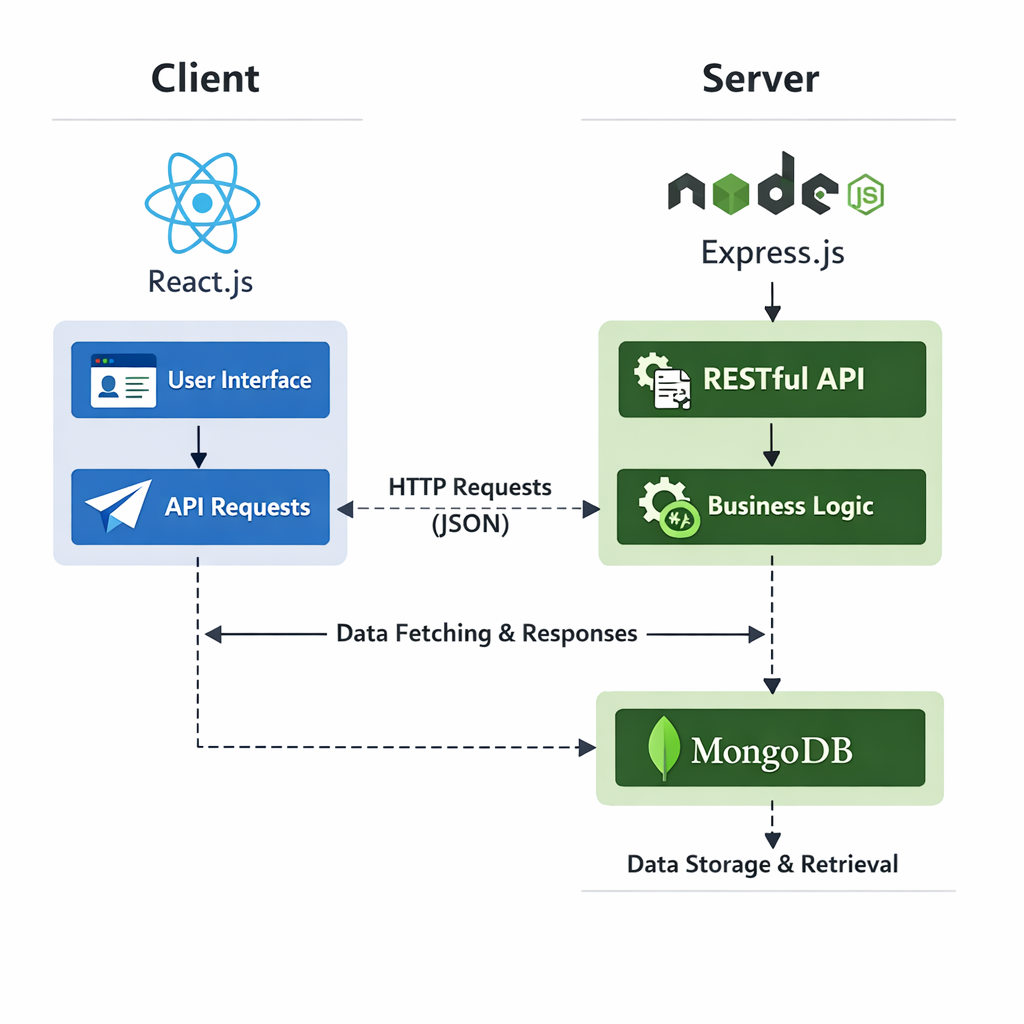
If you are bootstrapping and want a cost-effective tech stack for building a minimum viable product (MVP), this is the modern standard. Often referred to as a variation of the MERN stack, it leverages JavaScript everywhere for rapid Full-stack development.
- Frontend: React
- Backend: Node.js
- Database: MongoDB
- Hosting: Vercel
- Estimated Cost: $20 – $50/month
- Best For: MVP startups, fast-moving founders, and apps needing to iterate their data models constantly.
(Note: People frequently ask how to choose between MEAN and MERN stack for startups. MERN uses React, while MEAN uses Angular. In 2026, React (MERN) is significantly more popular, making it far easier and cheaper to hire developers for.)
Stack 2: Small Business Website & Portal
If you are a local service business (like a law firm or clinic) that needs a blazing fast marketing website attached to a secure customer login portal, this stack provides unmatched stability and SEO performance.
- Frontend: Next.js (A powerful framework built on top of React)
- Backend: Node.js
- Database: PostgreSQL
- Hosting: AWS / DigitalOcean
- Estimated Cost: $40 – $100/month
- Best For: Service businesses, B2B portals, and applications requiring rock-solid data integrity.
Stack 3: Scalable SaaS Platform
If you are building a heavy-duty software-as-a-service (SaaS) that will handle thousands of user transactions, integrate with AI, and manage complex financial data, you need a highly organized, bulletproof backend.
- Frontend: React
- Backend: Python (Django)
- Database: PostgreSQL
- Hosting: AWS
- Estimated Cost: $100+ /month
- Best For: SaaS startups, fintech apps, and data-heavy enterprise tools aiming for massive scale.

Cost Breakdown
A huge part of understanding how to choose tech stack for web development project feasibility is understanding the money. How much does this actually cost? Let’s break down realistic 2026 numbers so you don’t get taken for a ride.
1. Developer Cost (The Biggest Expense)
Your technology choices directly dictate developer rates. Because React and Node.js have huge talent pools, they are often more affordable.
- Freelancer (MVP/Small App): $2,000 – $10,000. Great for simple projects, but you manage the project yourself.
- Boutique Agency: $10,000 – $50,000+. You get a project manager, a designer, and developers. Best for serious businesses.
2. Cloud Hosting Services
As mentioned earlier, hosting your code online costs money.
- For an MVP on Vercel or basic AWS setups: $20 – $50/month.
- For a growing SaaS with high traffic: $100 – $500+/month.
3. Infrastructure and Third-Party APIs
Most modern apps don’t build everything from scratch. You will likely pay for APIs (services that connect to your app).
- Sending Emails (e.g., SendGrid): ~$15/month.
- Processing Payments (e.g., Stripe): Usually a percentage of the transaction (e.g., 2.9% + 30¢), no fixed monthly fee.
4. Maintenance
Software is like a car; it needs oil changes. Expect to pay a developer for roughly 10-20 hours a month to update Frontend frameworks, patch security holes, and ensure the Database management systems are backed up.
Related Articles You Might Like
If you found this guide useful and are continuing your research on how to choose tech stack for web development project strategies, check out our other resources. We highly recommend our article on how to choose tech stack for web development project budgeting, where we dive deeper into negotiating with freelance developers. You might also enjoy our deep-dive comparison on how to choose between MEAN and MERN stack for startups, which breaks down the pros and cons of JavaScript-heavy Full-stack development.
Frequently Asked Questions
How long does it take to build a web application?
For a standard MVP or small business application, expect the development timeline to range from 8 to 16 weeks. The first few weeks focus on design and planning. The middle chunk is dedicated to coding the Frontend frameworks and Backend technologies. The final weeks are strictly for testing and bug fixing. Highly complex enterprise platforms can take 6 months to a year. Having a clear plan speeds this up significantly.
What is the best framework for beginners?
If you are learning to code yourself, or hiring a junior developer, React is the undisputed champion of Frontend frameworks. The community is massive, which means if you encounter an error, someone has likely already solved it on a forum or YouTube. For the backend, Node.js or Python are highly recommended due to their clear syntax, rich ecosystems, and vast libraries of free Open-source software.
How much does a small business web app cost?
A functional, custom web app for a small business typically costs between $5,000 and $25,000. If you hire an overseas freelancer, you might hit the lower end of that range. If you hire a local US-based agency to ensure high quality and project management, expect to pay closer to the $25,000 mark. Remember to factor in your ongoing Cloud hosting services, which will add roughly $30-$100 to your monthly operating expenses.
Should I hire a developer or agency?
This depends entirely on your budget and available time. Hiring a solo freelancer is a very cost-effective tech stack for building a minimum viable product (MVP) approach, but it requires you to act as the project manager, QA tester, and designer. Hiring an agency costs significantly more, but they provide an entire team to handle Full-stack development, design, and deployment, allowing you to focus purely on running your business.
What is the best database for web applications?
For 80% of small business applications, PostgreSQL is the absolute best choice among modern Database management systems. It is highly reliable, forces good data habits, handles complex relationships smoothly, and is completely free Open-source software. However, if you are building an app with highly unpredictable, rapidly changing data structures, a NoSQL option like MongoDB might be a faster, more flexible choice during the early stages.
Final Thoughts
We’ve covered a lot of ground today! From breaking down the “kitchen and dining room” of web architecture to analyzing the costs of different Cloud hosting services and looking at real-world stacks.
At the end of the day, understanding how to choose tech stack for web development project setups isn’t about memorizing every programming language in existence. It is about understanding your business needs. If you prioritize reliable, popular Open-source software (like React, Node, Python, and Postgres), avoid over-engineering your initial launch, and maintain a scalable architecture, you will be miles ahead of the competition.
Don’t let the technical jargon intimidate you. Use the sample stacks and comparison tables provided here to hold confident conversations with developers. You now know exactly how to choose tech stack for web development project success without getting overwhelmed.

Call To Action
Have you recently hired a developer or are you currently trying to figure out how to choose tech stack for web development project details for your upcoming launch? I’d love to hear your story!
Drop a comment below sharing your experience or any questions you still have. Don’t forget to subscribe to the blog and follow us on social media for more weekly, jargon-free developer insights designed specifically to help small businesses thrive in the digital age. Let’s build something great together!
The Complete Web Application Development Guide for Small Businesses (2026)
Leave a Reply