
Ever found yourself staring at a blank screen, dreaming of that perfect web application for your business, only to be hit with the daunting question: “How long does it take to build a web application?” You’re not alone. Many small business owners and startup founders grapple with the uncertainty of development timelines, often leading to cost confusion, tough decisions about choosing the right frameworks, and the challenge of hiring the right developers. It’s a common problem, and frankly, it can feel like navigating a maze blindfolded.
This article is designed to be your compass. We’ll cut through the jargon and provide clear, practical insights into the web application development process. We’ll explore the factors that influence timelines, offer realistic cost estimates, and share real-world examples to help you make informed decisions.
Whether you’re building your very first web app or looking to understand the nuances of modern development, consider this your friendly chat with an experienced developer over a cup of coffee. Let’s demystify the journey of bringing your web application vision to life in 2026.
Why This Matters for Small Businesses
For small businesses and startups, understanding the web application development process isn’t just about curiosity; it’s about survival and growth. In today’s digital landscape, a well-crafted web application can be the difference between thriving and merely existing.
Many small businesses, however, How long does it take to build a web application fall into common pitfalls: underestimating timelines, overspending on unnecessary features, or choosing a technology stack that doesn’t align with their long-term goals.
I once worked with a local restaurant owner who wanted an online ordering system. Initially, he thought it would be a quick, off-the-shelf solution. But after discussing his unique needs – custom menu options, loyalty program integration, and specific delivery zones – it became clear that a bespoke web application, while taking a bit longer, would ultimately provide a far more robust and scalable solution than a generic platform.
This experience highlights the importance of understanding the web app development lifecycle stages early on to avoid costly mistakes and ensure your investment truly serves your business.
Understanding the Basics
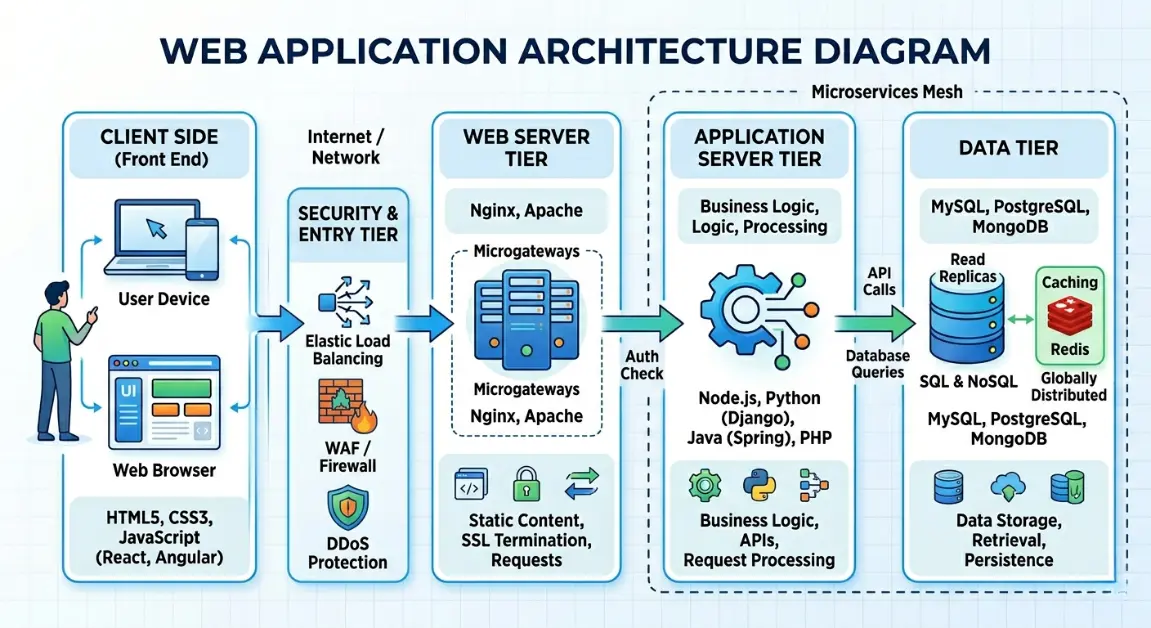
Before we dive deeper into timelines and costs, let’s get on the same page about what makes a web application tick. Think of a web application like a restaurant. You, the user, interact with the frontend – that’s the dining area, the menu, and the friendly waiter taking your order. It’s everything you see and click on in your browser. Behind the scenes, there’s the backend, which is like the kitchen.
This is where all the magic happens: orders are processed, ingredients are managed, and the chef How long does it take to build a web application (your server-side code) prepares your meal. The database is the pantry, storing all the essential information, from customer details to menu items. When the frontend needs to talk to the backend, they use APIs (Application Programming Interfaces) – think of these as the standardized language the waiter uses to communicate your order to the kitchen.
Finally, hosting is the restaurant building itself, the physical space where your web application lives on the internet, making it accessible to everyone. And frameworks? They’re like pre-built kitchen stations or standardized recipes that help developers build the frontend and backend more efficiently, ensuring consistency and speeding up development. Understanding these core components is crucial when considering how long does it take to build a web application, as each piece contributes to the overall complexity and development effort.
Key Options / Technologies Explained
The world of web development is vast, with countless technologies and approaches. Choosing the right ones can significantly impact your project’s timeline, cost, and long-term success. Here, we’ll break down some key options, helping you understand what they are, who they’re best for, and their pros and cons.
Frontend Frameworks (React, Angular, Vue.js)
Overview
These JavaScript libraries and frameworks are the backbone of modern, interactive user interfaces. They allow developers to build dynamic, single-page applications (SPAs) that offer a smooth, app-like experience in a web browser. They manage the
user interface and user interactions, making web applications feel responsive and fast.
Best For
Startups and small businesses aiming for highly interactive web applications, complex user interfaces, or single-page applications (SPAs) that need to deliver a rich user experience. Ideal for SaaS products, dashboards, and social platforms.
Pros
•Enhanced User Experience: Provides fast, fluid interactions without constant page reloads.
•Component-Based Architecture: Promotes reusability of code, speeding up development.
•Large Communities & Ecosystems: Abundant resources, libraries, and developer support.
•Cross-Platform Potential: Can be used with frameworks like React Native for mobile app development.
Cons
•Steeper Learning Curve: Can be complex for beginners, especially Angular.
•SEO Challenges: SPAs can sometimes be harder for search engines to crawl, though modern solutions exist.
•Larger Bundle Sizes: Can lead to slower initial load times if not optimized.
Estimated Cost
Development costs can range from $5,000 – $25,000+ for a basic to moderately complex frontend, depending on features and developer rates.
Learning Curve
Moderate to Advanced (depending on the framework and prior JavaScript knowledge).
Real-World Use Case
A small e-commerce store wanting a dynamic product catalog and a seamless checkout experience. React or Vue.js would be excellent choices for building a responsive and engaging storefront.
Backend Frameworks (Node.js/Express, Python/Django/Flask, Ruby on Rails)
Overview
Backend frameworks handle the server-side logic, database interactions, user authentication, and API endpoints that power the frontend. They are crucial for data storage, security, and business logic, acting as the brain of your web application.
Best For
Any web application requiring data persistence, user management, complex business logic, or integration with external services. Essential for almost all dynamic web applications.
Pros: How long does it take to build a web application
•Robust Data Handling: Securely manages and processes data.
•Scalability: Designed to handle increasing user loads and data volumes.
•Security Features: Often come with built-in security measures to protect against common vulnerabilities.
•Integration Capabilities: Easily connects with databases, third-party APIs, and other services.
Cons: How long does it take to build a web application
•Complexity: Can be more challenging to set up and manage than simple static sites.
•Performance Overhead: Requires server resources, which can incur ongoing costs.
•Debugging: Server-side issues can sometimes be harder to diagnose.
Estimated Cost
Backend development can range from $7,000 – $30,000+, depending on the complexity of business logic, integrations, and database design.
Learning Curve
Moderate to Advanced (requires understanding of server-side programming, databases, and APIs).
Real-World Use Case
A subscription-based content platform that needs to manage user accounts, process payments, and deliver personalized content. A Node.js/Express or Python/Django backend would provide the necessary infrastructure.
Databases (PostgreSQL, MongoDB, MySQL)
Overview
Databases are organized collections of data that web applications use to store, retrieve, and manage information. Choosing the right database depends on the type of data you’re storing and how you plan to access it.
Best For
Any application that needs to store and retrieve structured or unstructured data, from user profiles and product inventories to transaction records and content.
Pros: How long does it take to build a web application
•Data Integrity: Ensures data is accurate and consistent.
•Efficient Retrieval: Optimized for fast querying and data access.
•Scalability: Can be scaled to handle large volumes of data and traffic.
•Security: Provides mechanisms for data encryption and access control.
Cons: How long does it take to build a web application
•Management Overhead: Requires administration and maintenance.
•Complexity: Designing efficient database schemas can be challenging.
•Cost: High-performance databases or large data storage can be expensive.
Estimated Cost
Database setup and management can range from $1,000 – $10,000+, depending on complexity, data volume, and whether you use managed services.
Learning Curve
Moderate (understanding SQL or NoSQL concepts, schema design, and optimization).
Real-World Use Case
A customer relationship management (CRM) system that stores vast amounts of customer data, interactions, and sales pipelines. PostgreSQL (relational) or MongoDB (NoSQL) could be suitable, depending on the data structure.
Cloud Hosting Providers (AWS, Google Cloud, DigitalOcean, Vercel)
Overview
Cloud hosting providers offer the infrastructure (servers, storage, networking) needed to deploy and run your web application, making it accessible to users worldwide. They provide scalable, reliable, and often cost-effective solutions compared to on-premise servers.
Best For
All web applications, from small marketing sites to large-scale enterprise solutions. Essential for making your application publicly available and ensuring high availability and performance.
Pros: How long does it take to build a web application
•Scalability: Easily scale resources up or down based on demand.
•Reliability & Uptime: High availability and redundancy to minimize downtime.
•Global Reach: Deploy applications closer to your users for better performance.
•Managed Services: Many providers offer managed databases, serverless functions, and other services to simplify operations.
Cons: How long does it take to build a web application
•Cost Complexity: Pricing models can be intricate and lead to unexpected costs if not managed carefully.
•Vendor Lock-in: Migrating between providers can be challenging.
•Configuration Complexity: Initial setup and optimization can require technical expertise.
Estimated Cost
Monthly hosting costs can range from $10 – $1,000+, depending on the provider, resources consumed, and traffic volume.
Learning Curve
Moderate to Advanced (understanding cloud concepts, service configurations, and deployment pipelines).
Real-World Use Case
A rapidly growing startup launching a new social media platform. AWS or Google Cloud would provide the necessary scalability and global infrastructure to support a large user base.
Options to Avoid (Common Mistakes)
In the journey of building a web application, it’s just as important to know what to embrace as it is to understand what to steer clear of. Many small businesses, in their eagerness to launch, often stumble into common pitfalls that can derail projects, inflate costs, and lead to a less-than-ideal final product. Here are some mistakes to avoid:
Over-engineering from Day One
Why it’s risky: It’s tempting to build a web application with every conceivable feature, anticipating future needs. However, this often leads to bloated codebases, extended development timelines, and significant cost overruns for features that may never be used. For a small business, resources are precious, and every dollar spent on an unnecessary feature is a dollar not invested in core functionality or marketing.
What to do instead: Focus on building a Minimum Viable Product (MVP). How long does it take to build a web application Identify the absolute core features that deliver value to your users and launch with those. You can always add more features iteratively based on user feedback and market demand. How long does it take to build a web application, This agile approach saves time, money, and ensures you’re building what your users truly need.
Choosing the Wrong Framework or Technology Stack
Why it’s risky: Selecting a trendy but unsuitable framework or an outdated technology stack can lead to long-term headaches. An unsuitable framework might lack the features you need, have a small community for support, or be difficult to scale. An outdated stack can be a security risk, hard to maintain, and challenging to find developers for.
What to do instead: Research and consult with experienced developers or consultants. Consider your project’s specific requirements, scalability needs, and the availability of developers for the chosen technologies. Opt for well-supported, mature, and actively maintained frameworks that align with your project’s goals and your team’s expertise.
Ignoring Scalability from the Outset
Why it’s risky: While starting small is good, completely ignoring future growth can lead to significant problems down the line. An application not designed for scalability might crash under increased user load, become slow, or require a complete re-architecture, which is far more expensive and time-consuming than building with scalability in mind from the beginning.
What to do instead: Even with an MVP, consider potential growth. Discuss scalability with your developers. This doesn’t mean over-engineering, but rather making architectural decisions that allow for easier scaling in the future, such as using cloud services that can automatically adjust resources or designing a modular codebase.
Using Outdated Technologies or Practices
Why it’s risky: The web development landscape evolves rapidly. Relying on outdated technologies or security practices can expose your application to vulnerabilities, make it difficult to integrate with modern services, and hinder performance. It also makes it harder to attract and retain skilled developers who prefer working with current tools.
What to do instead: Stay informed about industry best practices and modern technologies. Prioritize security updates and regular maintenance. While you don’t need to chase every new trend, ensuring your technology stack is reasonably current will save you from technical debt and security headaches in the long run.
Technology Comparison Table
To help you visualize the choices, here’s a quick comparison of some common technologies and approaches:
| Technology | Best For | Difficulty | Cost | Business Rating |
| React (Frontend) | Interactive SPAs, complex UIs | Moderate | Medium | ⭐⭐⭐⭐⭐ |
| Node.js (Backend) | Real-time apps, APIs | Moderate | Medium | ⭐⭐⭐⭐ |
| Python/Django (Backend) | Data-heavy apps, rapid development | Moderate | Medium | ⭐⭐⭐⭐ |
| PostgreSQL (Database) | Complex relational data | Moderate | Medium | ⭐⭐⭐⭐⭐ |
| MongoDB (Database) | Flexible, unstructured data | Easy | Low-Medium | ⭐⭐⭐⭐ |
| AWS/GCP (Hosting) | Scalable, enterprise solutions | Advanced | High | ⭐⭐⭐ |
| DigitalOcean (Hosting) | Simpler deployments, cost-effective | Moderate | Medium | ⭐⭐⭐⭐ |
| Vercel (Hosting) | Frontend deployments, serverless | Easy | Low-Medium | ⭐⭐⭐⭐⭐ |
Rating meaning:
•⭐⭐⭐⭐⭐ = excellent for small business
•⭐⭐⭐⭐ = good choice
•⭐⭐⭐ = situational
•⭐⭐ = limited use
•⭐ = avoid for beginners
Sample Web App Tech Stacks
Choosing individual components is one thing, but combining them into a cohesive tech stack is where the real magic happens. Here are a few examples of common tech stacks tailored for different small business needs, How long does it take to build a web application giving you a clearer picture of how long does it take to build a web application with specific technologies.
Stack 1: Startup MVP Stack (Lean & Fast)
This stack is designed for speed and agility, perfect for validating a new idea with minimal investment.
•Frontend: React (for a dynamic user interface)
•Backend: Node.js (with Express.js for API handling)
•Database: MongoDB (flexible NoSQL for rapid schema changes)
•Hosting: Vercel (for frontend deployment and serverless functions)
•Estimated Cost: $20 – $50/month (hosting & basic services)
•Best For: MVP startups, rapid prototyping, applications with evolving data structures.
Stack 2: Small Business Website (Robust & Scalable)
Ideal for service-based businesses or e-commerce sites that need a reliable and scalable online presence.
•Frontend: Next.js (React framework for performance and SEO)
•Backend: Node.js (with a robust framework like NestJS or a simpler Express setup)
•Database: PostgreSQL (reliable relational database for structured data)
•Hosting: AWS / DigitalOcean (scalable cloud infrastructure)
•Estimated Cost: $40 – $100/month (hosting, database, and other services)
•Best For: Service businesses, online stores, content platforms requiring good SEO and performance.
Stack 3: Scalable SaaS Platform (Enterprise-Ready)
For ambitious SaaS products that anticipate significant growth and require complex features and integrations.
•Frontend: React (or Angular/Vue.js for large applications)
•Backend: Python (Django or Flask for powerful backend capabilities and extensive libraries)
•Database: PostgreSQL (or MySQL for enterprise-grade relational data management) How long does it take to build a web application
•Hosting: AWS (for comprehensive services, scalability, and global reach)
•Estimated Cost: $100+/month (for robust hosting, managed databases, and other AWS services)
•Best For: SaaS startups, complex business applications, platforms requiring advanced analytics and integrations.
Cost Breakdown
Understanding the overall timeline for building a web application often goes hand-in-hand with understanding the costs involved. It’s not just about the initial development; there are ongoing expenses that every small business owner should factor into their budget. Here’s a realistic breakdown:
Developer Cost
This is typically the largest component. Rates vary significantly based on experience, location, and whether you hire freelancers, agencies, or an in-house team.
•Freelancer: Often ranges from $2,000 – $10,000 for a small, focused project. Hourly rates can be $50-$150+.
•Small Agency: For more comprehensive projects, an agency might charge $10,000 – $50,000+. They offer project management, design, and development under one roof.
•In-house Team: This involves salaries, benefits, and overhead, making it a significant long-term investment, typically for larger companies or those with continuous development needs.
Hosting & Infrastructure
This is the cost of keeping your application online and accessible. It includes servers, databases, and other cloud services. How to Deploy Web Application for Free.
•Basic Hosting: For simple web apps, expect $10 – $50/month.
•Scalable Cloud Infrastructure (AWS, GCP): For more complex or high-traffic applications, costs can range from $50 – $500+/month, depending on resource usage.
Maintenance & Updates
Web applications require ongoing care to remain secure, performant, and up-to-date. This includes bug fixes, security patches, software updates, and minor feature enhancements.
•Expect to allocate 15-20% of the initial development cost annually for maintenance. This can be a recurring monthly fee if you work with an agency or developer on retainer.
Third-Party APIs & Services
Many applications integrate with external services like payment gateways (Stripe, PayPal), email marketing tools (Mailchimp), or SMS services (Twilio). These often come with usage-based fees.
•Costs can vary widely, from $0 to hundreds or thousands of dollars per month, depending on your usage volume and the specific services.
Design & UI/UX
While sometimes bundled with development, dedicated design work for user interface (UI) and user experience (UX) is crucial for a successful application.
•Expect $1,000 – $10,000+ for professional UI/UX design, depending on the complexity and number of screens.
By considering all these factors, you can build a more accurate budget and timeline for your web application project, ensuring you’re prepared for the full scope of the investment.
Related Articles You Might Like
If you found this guide useful in understanding how long does it take to build a web application, you might be interested in diving deeper into specific aspects of web development. Check out our article on how to choose a tech stack for your web development project, where we break down various frameworks and tools specifically for startups. We also have a comprehensive guide on effective project management strategies for small business software development, offering insights into agile methodologies and team collaboration.
How Much Does It Cost to Build a Simple Web App (2026 Guide)
Frequently Asked Questions
Here are some common questions small business owners ask when embarking on their web application journey:
How long does it take to build a web application?
The timeline for building a web application varies significantly based on its complexity, features, and the development approach. A simple MVP might take 2-4 months, while a more complex application with extensive features could take 6-12 months or even longer. Factors like team size, communication, and scope changes also play a crucial role in determining the final delivery date.
What is the best framework for beginners?
For beginners, frameworks like React (for frontend) and Node.js with Express (for backend) are often recommended due to their large communities, extensive documentation, and relative ease of learning compared to more complex enterprise-level frameworks. Python-based frameworks like Flask are also beginner-friendly for backend development.
How much does a small business web app cost?
The cost of a small business web app can range from a few thousand dollars for a basic MVP developed by a freelancer to tens of thousands for a more feature-rich application built by an agency. Ongoing costs for hosting, maintenance, and third-party services should also be factored in, typically adding $50-$500+ per month.
Should I hire a developer or agency?
This depends on your project’s scope, budget, and your own technical expertise. Hiring a freelance developer can be cost-effective for smaller, well-defined projects if you can manage the project yourself. An agency offers a full suite of services, including project management, design, and development, making them suitable for larger or more complex projects where you need a complete solution.
What is the best database for web applications?
The best database depends on your application’s specific needs. For structured, relational data (like user accounts, orders), PostgreSQL or MySQL are excellent choices. For flexible, unstructured data (like content, user-generated data), NoSQL databases like MongoDB are often preferred. Consider factors like data integrity, scalability, and ease of integration with your chosen backend framework. How to Deploy Web Application for Free 2026 (Beginner Guide)
Final Thoughts
Navigating the world of web application development can feel like a complex journey, but with the right understanding and approach, it’s a journey that can lead to incredible growth for your small business. We’ve explored the core components, the technologies that power them, and the common pitfalls to avoid.
Freelance vs Agency: Who Should Build Your Web App in 2026?
Remember, the answer to “how long does it take to build a web application” isn’t a single number, but rather a dynamic equation influenced by your vision, your choices, and your commitment to an iterative process. Focus on value, prioritize your MVP, and always keep your users at the heart of your development The Ultimate best frontend framework for beginners 2026 ranking Guide decisions. By making smart, informed choices, you’re not just building a web application; you’re building a foundation for future success in the digital age.
Call To Action
Ready to turn your web application idea into a reality? Share your thoughts and experiences in the comments below! What challenges have you faced in web development, or what successes have you celebrated? We’d love to hear from you. Don’t forget to subscribe to our blog for more practical insights and follow us on social media for the latest updates in web development for small businesses.
Leave a Reply