
Let’s imagine you are finally building that web application you have been dreaming about. You hire a developer, they build a beautiful online store for you, and you launch it. But on day one, a customer clicks “Add to Cart,” and… the little shopping cart icon in the top right corner doesn’t update. They click it three more times, get frustrated, and leave.
What just happened? Your application suffered from a memory failure. In the software world, we call an application’s memory its “state.” And choosing the best state management for react applications 2026 is the single most important decision you can make to prevent bugs like the one above.
State management sounds like technical jargon, but it is actually the beating heart of your software. It is how your application remembers who is logged in, what is in their cart, and whether they have paid yet. In this guide, we are going to grab a coffee and talk through this like business owners. We will cover what these terms mean, how much it costs to build a reliable web app, and how to choose the best state management for react applications 2026 without overspending or over-engineering your project. By the end of this article, you will be able to talk confidently with any developer about your tech stack.
Why This Matters for Small Businesses
You might be thinking, “I’m a business owner, not a coder. Why do I need to care about state management?” I hear this all the time. The reality is that the foundation you choose today dictates your payroll costs tomorrow.
Let me share a quick story. A few years ago, a local restaurant owner came to me. He had paid a budget freelancer to build a custom online ordering system. The menu looked great, but the kitchen staff kept receiving duplicate orders, and customers were being charged incorrectly. The core issue? The app was confusing global vs local state patterns. The “local state” (what the customer saw on their specific phone screen) wasn’t properly communicating with the “global state” (what the kitchen and the payment processor saw).
If you pick the wrong tools, your developers will spend 80% of their time fixing weird bugs instead of building new features that make you money. By identifying the best state management for react applications 2026 right out of the gate, you ensure your app is scalable, fast, and bug-free.
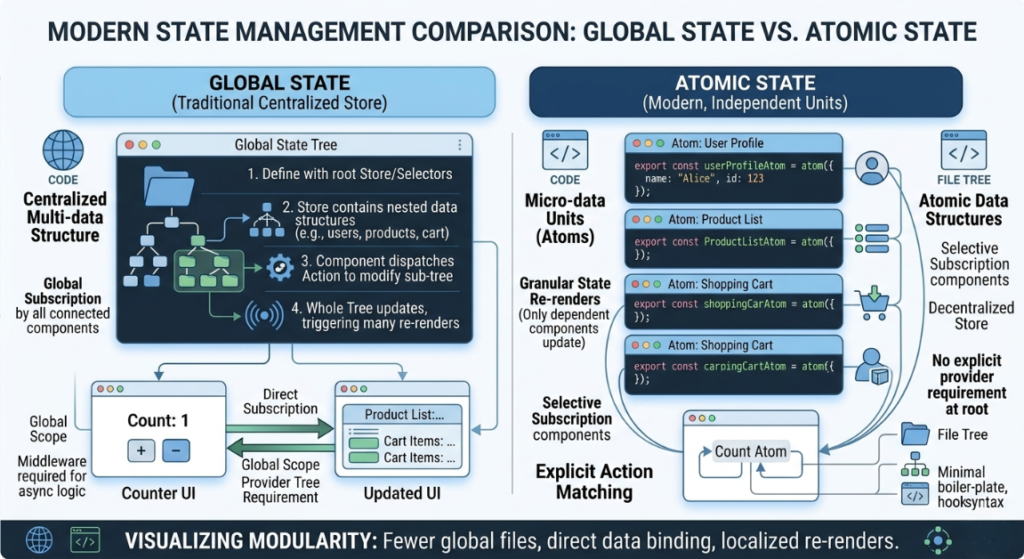
Understanding global vs local state patterns is crucial. Local state is like a customer looking at a menu and mentally deciding what they want. Global state is when they give that order to the waiter, and now the whole restaurant (the kitchen, the cashier, the host) needs to know about it. If your app fumbles that handoff, your business loses money. Getting this right is why finding the best state management for react applications 2026 is not just a tech decision it is a critical financial decision for your startup.
Understanding the Basics
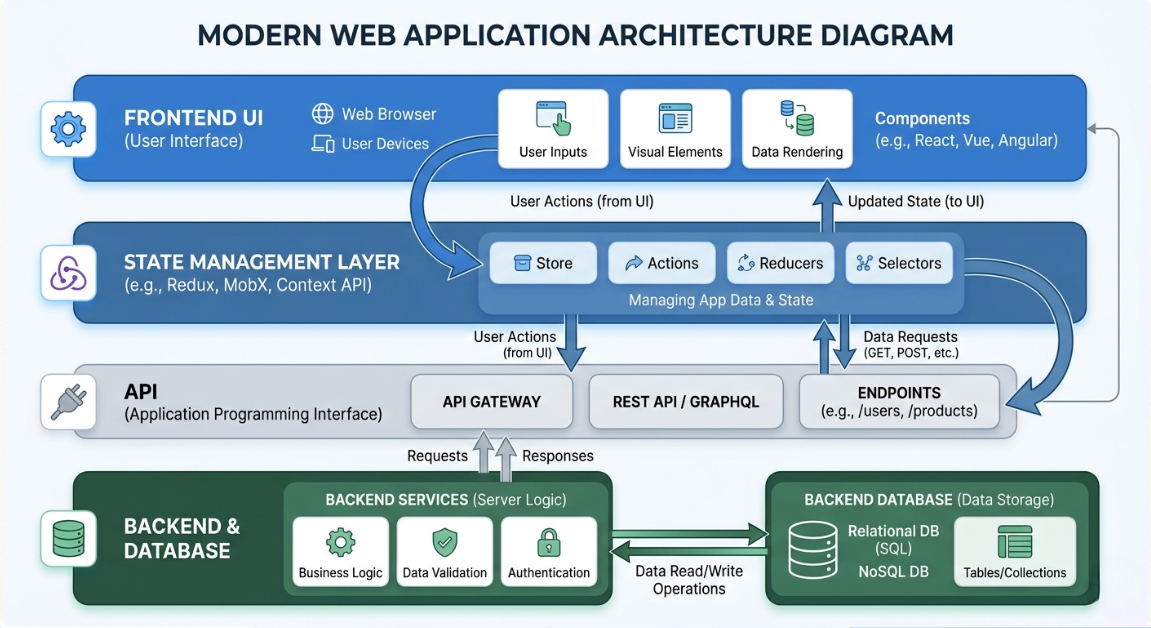
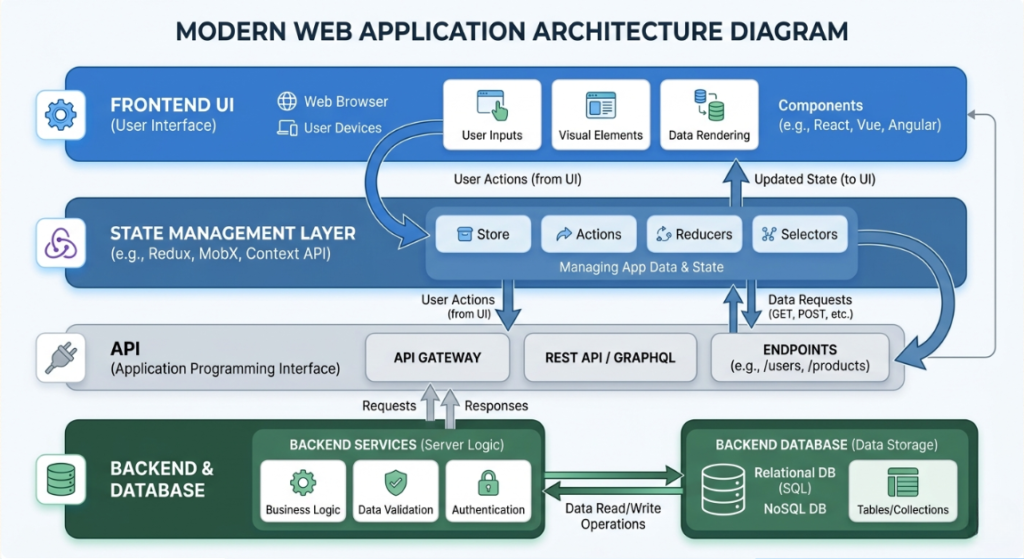
Before we dive into the specific tools that represent the best state management for react applications 2026, we need to define the playground. Let’s use a simple restaurant analogy to break down the standard web application architecture.
- Frontend (The Dining Area): This is what your users see and interact with on their phones or laptops. It is the buttons, the text, and the layout. Most modern web apps use a tool called React to build this dining area.
- Backend (The Kitchen): This is the server where the heavy lifting happens. It processes the logic, checks if passwords are correct, and runs the business rules.
- Database (The Pantry): This is where you permanently store your data. User profiles, order history, and product catalogs live here.
- APIs (The Waitstaff): APIs are the messengers. They take the customer’s request from the frontend, carry it to the backend kitchen, and bring the result back to the screen.
- State (The Waiter’s Notepad): This is the temporary memory. As the customer is speaking, the waiter writes it down. If the notepad gets lost, the order is ruined. This is exactly why we need the best state management for react applications 2026.
When developers build apps, they combine these elements into a “tech stack.” But the glue that holds the frontend together ensuring that when a user likes a photo, the “like” count instantly goes up is state management. Without proper memory management, your app will feel broken, sluggish, and unprofessional.
Key Options / Technologies Explained
The developer world moves fast, and the tools we used three years ago are already starting to show their age. Today, the conversation revolves around efficiency and speed. Here is a breakdown of the top tools vying for the title of the best state management for react applications 2026.
Zustand
Overview
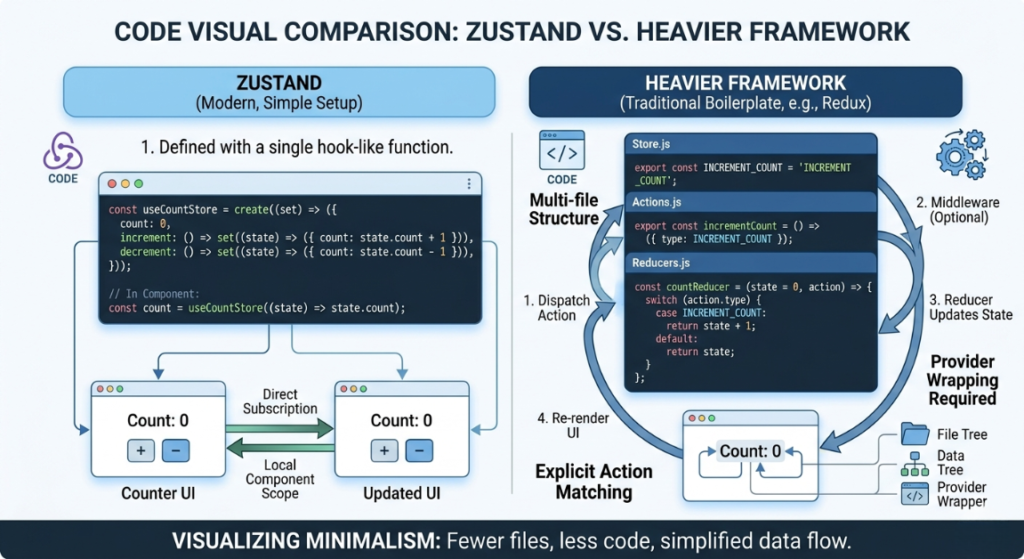
Zustand (which is German for “state”) is a small, incredibly fast, and minimalist library. Instead of forcing developers to write hundreds of lines of complex setup code, Zustand lets them create a global memory bank in just a few lines. It has become a massive fan favorite for modern developers because it perfectly handles immutability in React state behind the scenes, meaning your developers don’t have to worry about accidentally overwriting critical data.
Best For
Small to medium-sized applications, startups building their first Minimum Viable Product (MVP), and teams that want to move fast without writing “boilerplate” (repetitive, boring code).
Pros: best state management for react applications 2026
- Extremely lightweight, so your web app loads instantly for users.
- Very little code required, meaning developers work faster (saving you money).
- Manages immutability in React state automatically, reducing bugs.
Cons: best state management for react applications 2026
- Because it is so flexible, junior developers can accidentally create messy code if they aren’t careful.
- Lacks some of the ultra-strict guardrails needed for massive, banking-level enterprise apps.
Estimated Cost
$0 (Open Source software). Developer time to implement: Very low.
Learning Curve
Beginner to Moderate
Real-World Use Case
A local fitness studio building an app for members to book classes. The app just needs to remember who is logged in and what class they tapped on. Zustand handles this effortlessly, proving why many consider it the best state management for react applications 2026.
TanStack Query (formerly React Query)
Overview
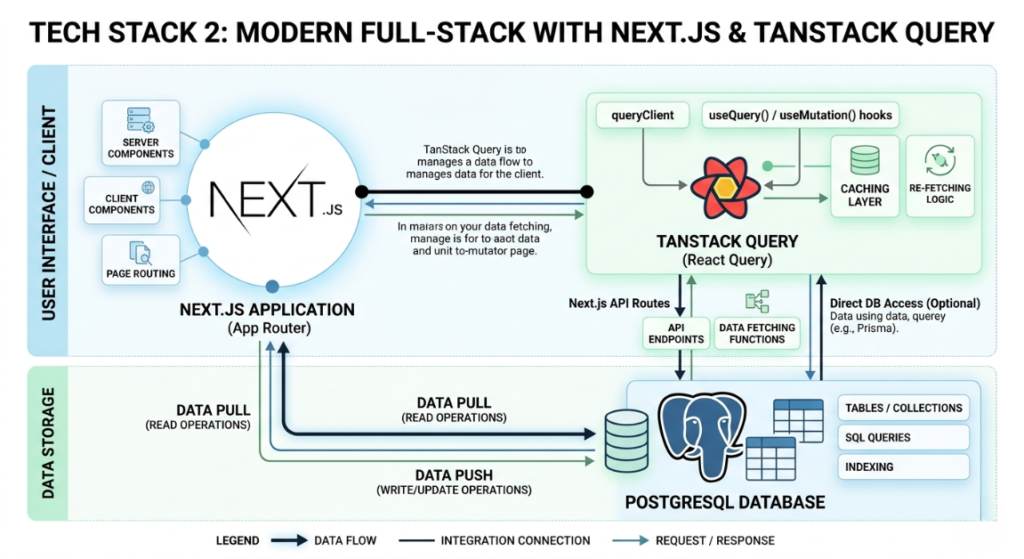
TanStack Query is fundamentally different from the others. While tools like Zustand remember things happening on the screen (like a user typing in a search bar), TanStack Query specializes in server state synchronization. This means its entire job is fetching data from your backend database, caching it so it loads instantly next time, and keeping it perfectly synced with what the user sees.
Best For
Applications that are heavily reliant on pulling data from a database and displaying it, like dashboards, social feeds, or e-commerce product catalogs.
Pros: best state management for react applications 2026
- The absolute best tool on the market for server state synchronization.
- Automatically handles loading spinners and error messages, which drastically improves the user experience.
- Reduces the number of times your app asks the database for info, saving you money on server costs.
Cons: best state management for react applications 2026
- It only handles server data. You usually still need another tool (like Zustand) to handle local screen data.
Estimated Cost
$0 (Open Source).
Learning Curve
Moderate
Real-World Use Case
A financial analytics dashboard. When a user logs in, TanStack Query fetches their latest stock data. If the user clicks away and comes back, TanStack Query instantly shows the cached data while silently checking the server for updates in the background. This is why founders constantly ask about Zustand vs TanStack Query: when to use each in a React project. The answer? You actually use them together. Zustand for the screen, TanStack Query for the server.
Redux Toolkit (RTK)
Overview
For a long time, Redux was the undisputed king of React memory. However, it was notoriously difficult to use and required writing thousands of lines of extra code. Redux Toolkit was created to modernize it. Today, it remains a powerhouse. If you are looking for the Best React state management library for large scale enterprise apps 2026, RTK is still the heavyweight champion.
Best For
Massive, complex applications with huge development teams. Think banking portals, airline booking systems, or large corporate software.
Pros: best state management for react applications 2026
- Incredibly strict rules, which prevents junior developers from breaking the app.
- Amazing debugging tools that allow developers to “time travel” through the app’s memory to find exactly where a bug occurred.
- The industry standard for the Best React state management library for large scale enterprise apps 2026.
Cons: best state management for react applications 2026
- Very steep learning curve.
- Takes significantly longer to build simple features compared to lighter tools.
- Overkill for 90% of small business apps.
Estimated Cost
$0 (Open Source). Developer time to implement: High (costs more billable hours).
Learning Curve
Advanced
Real-World Use Case
A multinational logistics company managing real-time tracking of tens of thousands of shipping containers. The memory states are so complex that the strict, unbending rules of Redux Toolkit are necessary to keep the app from collapsing. However, many startups are currently migrating from Redux Toolkit to lightweight state management in 2026 because their apps just don’t need this level of heavy machinery.
Jotai
Overview
Jotai takes a completely different approach. Instead of having one giant global memory bank (like a massive filing cabinet), Jotai uses atomic state management. Think of “atoms” as tiny, individual sticky notes of memory scattered throughout your app. When one sticky note changes, only the specific part of the screen looking at that note updates.
Best For
Highly interactive applications where lots of tiny things are changing at once, like digital drawing tools, interactive maps, or web-based video games.
Pros: best state management for react applications 2026
- Provides incredible fine-grained reactivity.
- Keeps your application lightning fast because it only redraws the exact pixel that changed, rather than reloading the whole page.
- Very intuitive atomic state management system.
Cons: best state management for react applications 2026
- Can be confusing to track where all the “atoms” are if the app gets really big and disorganized.
- Smaller community, meaning fewer tutorials and answers on Google when developers get stuck.
Estimated Cost
$0 (Open Source).
Learning Curve
Moderate
Real-World Use Case
A collaborative design tool similar to Figma or Canva. When a user drags a square across the screen, the coordinates are updating hundreds of times a second. Jotai handles this fine-grained reactivity beautifully without freezing the browser.
React Context API
Overview
The Context API isn’t actually an external library you download; it is built directly into React itself. It allows developers to pass data down through the application without having to hand it off manually at every single step.
Best For
Very simple, lightweight features like managing a user’s theme preference (Light Mode vs. Dark Mode) or keeping track of the user’s language preference (English vs. Spanish).
Pros: best state management for react applications 2026
- Already built into React; no extra downloads required.
- Great for basic global vs local state patterns where the data rarely changes.
- Easy for beginners to understand.
Cons: best state management for react applications 2026
- Terrible for performance if used for rapidly changing data. If you use it for a fast-updating shopping cart, it might cause your entire website to glitch and redraw itself constantly.
- Not a true replacement for dedicated state tools.
Estimated Cost
$0 (Built-in).
Learning Curve
Beginner
Real-World Use Case
A simple blog site where the only memory needed is whether the user clicked the “Dark Mode” toggle button. It’s the right tool for simple jobs, but definitely not the best state management for react applications 2026 if you are building complex software.
Options to Avoid (Common Mistakes)
As a technical consultant, I spend half my time rescuing small businesses from bad technology decisions. When trying to find the best state management for react applications 2026, avoiding traps is just as important as picking the right tool.
First, avoid over-engineering. The most common mistake I see is a startup hiring a developer who insists on using Redux Toolkit for a basic 5-page e-commerce site. Because Redux takes longer to write, the business owner ends up paying $15,000 for a project that should have cost $5,000 using Zustand. This is exactly why we are seeing a huge trend of companies migrating from Redux Toolkit to lightweight state management in 2026. Unless you are building the next Facebook, you probably don’t need heavy-duty enterprise tools.
Second, avoid ignoring scalability. On the flip side, don’t let a developer build your entire SaaS product using only the built-in React Context API to save time. Context API lacks proper server state synchronization and handles immutability in React state poorly on a large scale. Your app will work fine for the first 100 users, but the moment you hit 5,000 users, the app will become incredibly slow, and you will have to pay to rewrite the whole thing.
Finally, avoid mixing conflicting paradigms. When developers get confused about Zustand vs TanStack Query: when to use each in a React project, they sometimes try to use both to do the same job. This creates a messy tug-of-war in the code. Establish clear rules: TanStack Query talks to the database, Zustand handles the screen. Keeping these boundaries clean is the secret to a successful build.
Technology Comparison Table
To make your decision easier, here is a quick cheat sheet for business owners evaluating the best state management for react applications 2026.
| Technology | Best For | Difficulty | Cost (Dev Time) | Business Rating |
| Zustand | Small apps & Startups | Easy | Low | ⭐⭐⭐⭐⭐ |
| TanStack Query | Data-heavy dashboards | Medium | Medium | ⭐⭐⭐⭐⭐ |
| Jotai | Highly interactive tools | Medium | Medium | ⭐⭐⭐⭐ |
| Redux Toolkit | Complex enterprise apps | Hard | High | ⭐⭐⭐ |
| React Context | Basic UI toggles | Easy | Low | ⭐⭐ |
Rating meaning:
⭐⭐⭐⭐⭐ = excellent for small business
⭐⭐⭐⭐ = good choice
⭐⭐⭐ = situational
⭐⭐ = limited use
⭐ = avoid for beginners
Sample Web App Tech Stacks
To help you visualize how this all comes together, here are three complete, real-world combinations (tech stacks) that I frequently recommend to my clients best state management for react applications 2026.
Stack 1: Startup MVP Stack
This stack is all about speed to market. It is cheap, incredibly fast to build, and perfectly suited for testing a new business idea. By using the best state management for react applications 2026 in a lightweight format, you keep developer hours low.
- Frontend: React
- State Management: Zustand
- Backend: Node.js
- Database: MongoDB
- Hosting: Vercel
- Estimated Cost: $20 – $50/month for infrastructure.
- Best For: MVP startups, local service businesses, and simple directories.
Stack 2: Small Business Data Dashboard: best state management for react applications 2026
If you are building an internal tool for your company like a portal for your employees to track inventory or a dashboard for your clients to view their analytics you need heavy data fetching.
- Frontend: Next.js (A React framework)
- State Management: TanStack Query + Zustand
- Backend: Node.js
- Database: PostgreSQL
- Hosting: DigitalOcean or AWS
- Estimated Cost: $40 – $100/month for infrastructure.
- Best For: Service businesses, B2B portals, and data-heavy web apps.
Stack 3: Scalable SaaS Platform
When you have secured funding and are building a robust platform that needs to handle complex user permissions, thousands of transactions, and rigid business logic, you need the enterprise stack.
- Frontend: React
- State Management: Redux Toolkit
- Backend: Python (Django) or Go
- Database: PostgreSQL
- Hosting: AWS (Amazon Web Services)
- Estimated Cost: $150+ /month for infrastructure.
- Best For: Funded SaaS startups and complex enterprise software.
Cost Breakdown
When business owners ask me about the best state management for react applications 2026, they are usually really asking: “How much is this whole app going to cost me?” Let’s look at realistic numbers for 2026.
How Much Does It Cost to Build a Simple Web App (2026 Guide)
- Developer Cost: This is where 80% of your budget goes. If you hire a solo freelancer to build a solid MVP using Zustand and React, expect to pay between $5,000 and $15,000. If you hire an established digital agency to build a fully customized SaaS platform, the starting price is usually $25,000 to $50,000+.
- Hosting & Infrastructure: In the early days, hosting is cheap. Platforms like Vercel or AWS will cost you anywhere from $20 to $100 a month. As you gain thousands of users, best state management for react applications 2026 those costs will scale up, but by then, you should have the revenue to support it.
- APIs and Third-Party Tools: If your app uses Stripe to process payments or Twilio to send SMS text messages, you will pay tiny micro-transaction fees. Budget around $50 to $100 a month for essential third-party API services.
- Ongoing Maintenance: Software is like a car; it needs oil changes. You should budget 15% to 20% of your initial build cost per year for maintenance, security updates, and bug fixes.
Related Articles You Might Like
If you found this guide useful, check out our article on How to Choose the Right Tech Stack for Your Web Development Project, where we break down frontend frameworks, backend languages, and database tools for startups. We also have a great guide on Understanding API Integrations for Non-Technical Founders.
The Complete Web Application Development Guide for Small Businesses (2026)
Frequently Asked Questions
How long does it take to build a web application?
A basic, functional web application (an MVP) typically takes a freelancer or a small agency between 8 to 12 weeks to complete. However, if you are building a highly complex enterprise platform with multiple user roles, payment systems, and custom integrations, it can easily take 4 to 6 months. Using efficient tools like Zustand can shave weeks off your timeline.
What is the best framework for beginners?
If you are learning to code or hiring a very junior developer, React combined with Zustand is the absolute best starting point. It requires very little configuration and is highly forgiving. It allows developers to grasp the concepts of state management without getting bogged down in the massive amounts of code required by older tools like Redux.
How much does a small business web app cost?
The cost varies based on complexity and who you hire. A simple customer portal built by a freelancer might cost around $5,000 to $10,000. If you are hiring a professional agency to build a custom logistics tracking system, expect to invest $25,000 to $50,000. Always demand a clear, line-item scope of work before signing a contract.
Should I hire a developer or an agency?
It depends entirely on your budget and risk tolerance. Freelance developers are more affordable and are fantastic for building MVPs quickly. However, if they get sick, your project stalls. Agencies cost significantly more, but they provide project managers, a team of developers, QA testers, and guaranteed delivery. If you have the budget, an agency drastically reduces your risk.
What is the best database for web applications?
For most modern web applications in 2026, PostgreSQL is the undisputed champion. It is an open-source, highly secure, and incredibly scalable relational database. Whether you are building a small internal tool or a massive SaaS platform, PostgreSQL can handle the load beautifully.
Final Thoughts
Building a custom web application is one of the biggest investments a small business can make. By taking the time to understand the tools running under the hood, you instantly protect yourself from bad advice, bloated budgets, and buggy software.
Finding the Best Framework for Small Business Website 2026
You don’t need to write the code yourself, but understanding concepts like server state synchronization and fine-grained reactivity empowers you to lead your project effectively. If you are starting a new project today, the best state management for react applications 2026 for the vast majority of small businesses is a combination of Zustand for local memory and TanStack Query for database communication. It is fast, cost-effective, and beloved by developers worldwide.
The Ultimate best frontend framework for beginners 2026 ranking Guide
Remember, the goal of technology is to make your business run smoother, not to give you a headache. Choose the right tools, hire good people, and focus on delivering an amazing experience to your customers.
Call To Action
Are you currently planning to build a web app for your business, or are you stuck dealing with a buggy, slow application built by someone else? I would love to hear about your project! Share your experience or ask any tech questions in the comments below.
React vs Vue vs Angular Which is Best For Beginners (2026)
If you want more practical, jargon-free advice on building software that actually makes money, be sure to subscribe to our blog and follow us on social media for weekly insights!
The Best CSS Framework for Modern Web Development (2026 Guide)
Leave a Reply