
Let me ask you a question. Have you ever tried to buy something online, filled out a massive checkout page, clicked “Submit,” and… nothing happened? Or worse, all your data got erased because you missed one tiny checkbox? It’s frustrating, right? As a web application architect who helps small businesses build digital products, I see this all the time. Bad forms kill sales. Period.
Whether you are a startup founder building your first SaaS product, or a small business owner upgrading your internal tools, the way your application handles user input is critical. Forms are the literal gateway to your business. They handle sign-ups, payments, customer inquiries, and lead generation. If they are broken, slow, or confusing, your customers will simply leave and go to a competitor.
That is exactly why we need to talk about the best form validation libraries for react 2026. If your development team is using React (one of the most popular ways to build web apps today), they have a lot of choices for building forms. Some choices are fast and modern. Others are slow and outdated.
In this guide, we are going to grab a cup of coffee and walk through the best form validation libraries for react 2026. No heavy jargon, no robotic corporate speak. Just a practical, human explanation of what works, what doesn’t, and how to make the right choice for your budget and your business goals. We’ll cover development costs, the right tech stacks, and how to avoid the expensive mistakes I’ve seen countless startups make.
Why This Matters for Small Businesses
You might be thinking, “I’m a business owner, why do I care about the best form validation libraries for react 2026? Isn’t that my developer’s job?”
Yes and no. While your developer writes the code, you pay for the hours they spend writing it, and you suffer the lost revenue if the app is slow or buggy.
Let me share a quick story. Last year, I consulted for a local catering company. They spent $15,000 having an agency build them a custom ordering portal. It looked gorgeous. But they kept getting angry phone calls from corporate clients saying, “I can’t submit my catering order for 50 people!”
I looked under the hood. The developers had chosen an outdated way to manage the form. Every time a user typed a single letter into the “Special Instructions” box, the entire page would freeze for a split second. By the time the user filled out 20 fields, the app was practically crashing. They were losing thousands of dollars a week in catering orders because of bad form architecture.
When you understand the basics of headless form management and modern validation, you can ask your developers the right questions. You can ensure they aren’t using heavy, outdated tools that will bog down your application. Forms are where the conversion happens. If you want to maximize your return on investment, you need to ensure your team is using the best form validation libraries for react 2026 to create a smooth, frictionless experience for your users.
Understanding the Basics
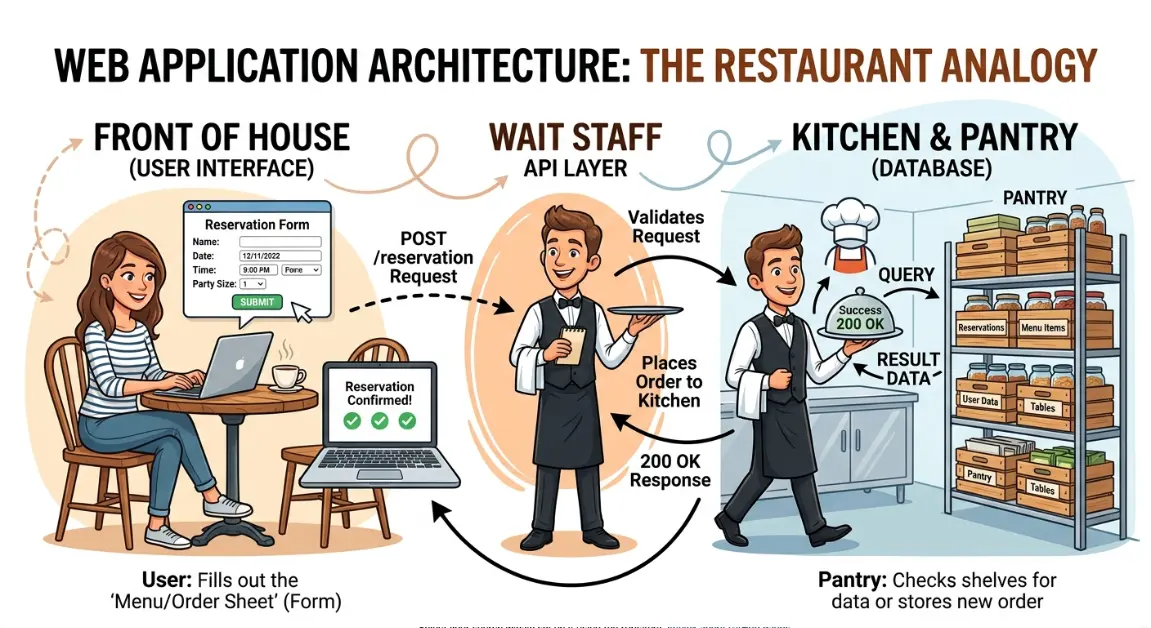
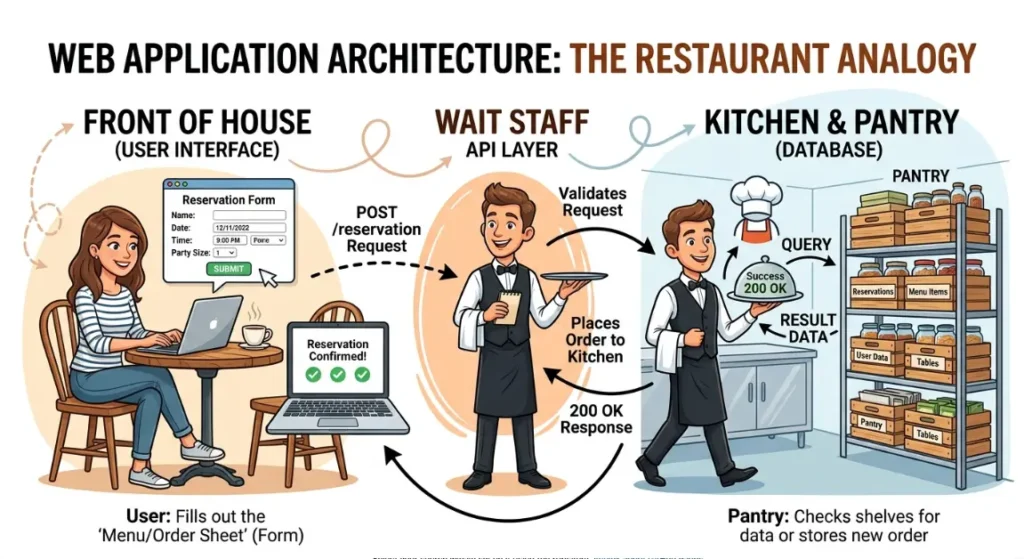
Before we dive into the specific tools, let’s break down how web applications actually work. I like to use a restaurant analogy.
Think of the Frontend as the dining area of your restaurant. This is what the customer sees. The tables, the menus, the decor. In the digital world, this is the layout, the buttons, and the forms on your screen. React is a tool used to build this frontend dining area.
The Backend is the kitchen. The customer never sees it. It’s where the heavy lifting happens processing payments, saving data, doing calculations.
The Database is your pantry. It’s where you store all your ingredients (or in our case, user data, passwords, and order history).
APIs are your waiters. They take the customer’s order from the dining area (frontend) and carry it back to the kitchen (backend).
So, where do forms fit into this? Forms are the literal order ticket. It’s how the customer tells the waiter what they want.
Now, imagine if the waiter didn’t check the order before walking to the kitchen. The customer orders a “burger with no meat,” and the waiter just blindly hands it to the chef, causing confusion and delays. That is what happens without form validation.
Form validation is the process of checking the user’s input before sending it to the backend. It’s the waiter saying, “Sir, your password needs a special character,” or “Ma’am, you forgot to enter your zip code.”
To make this happen efficiently, developers use specific tools. By utilizing the best form validation libraries for react 2026, developers can build forms that check for errors instantly, don’t slow down the page, and provide clear, helpful feedback to the user.
Key Options / Technologies Explained
When you hire a developer or an agency, they are going to pick a “stack” of tools to build your app. Here is a plain-English breakdown of the heavy hitters in the React ecosystem right now. Understanding these will help you ensure your team is using the best form validation libraries for react 2026.
React Hook Form
Overview
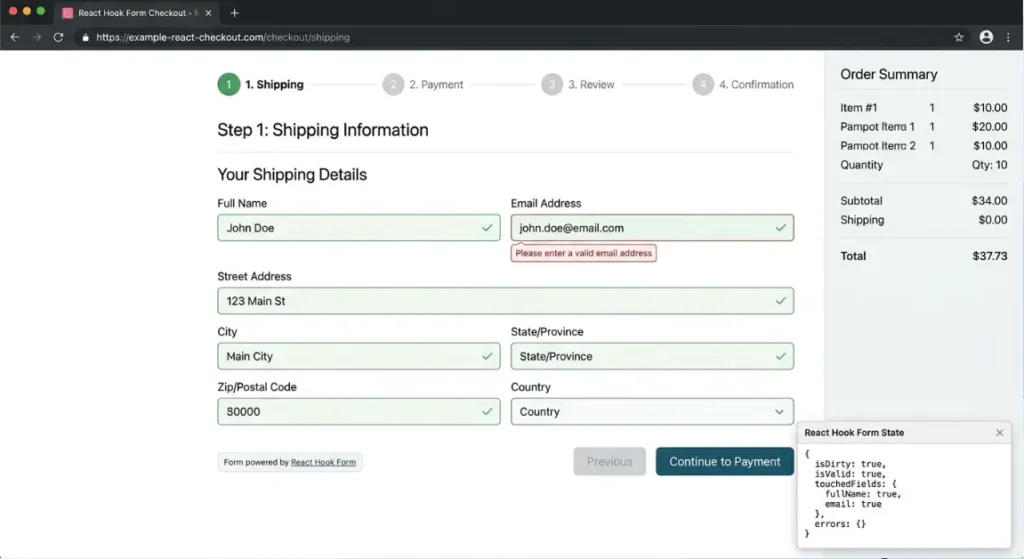
If you ask any senior developer right now what the industry standard is, they will likely point you here. React Hook Form is a lightweight tool that focuses on performance. It uses something called uncontrolled react form components. In simple terms, this means the form doesn’t constantly redraw the entire screen every time a user types a single letter. It only updates when it absolutely needs to.
Best For
Almost every small business, startup MVP, and enterprise application. If you want fast, snappy forms, this is the go-to. It is widely considered one of the absolute best form validation libraries for react 2026.
Pros
- Incredible performance (no lag when typing).
- Excellent for complex forms (like a multi-step checkout).
- Very small file size, meaning your website loads faster.
Cons
- Can be slightly tricky for junior developers to learn initially.
Estimated Cost
$0 (Open Source, but saves you hours of billable developer time).
Learning Curve
Moderate
Real-World Use Case
An e-commerce store with a long, multi-page checkout process where you need to collect shipping, billing, and payment info without the page slowing down.
Formik
Overview
Formik is the older, slightly heavier sibling in the React world. A few years ago, it was the absolute standard. However, as web apps grew more complex, developers noticed performance issues. If you do a performance comparison react hook form vs formik in large applications, Formik tends to cause more screen lag because it redraws the screen too often.
Best For
Maintaining older applications that were built 3 to 5 years ago.
Pros
- Very easy for beginners to understand.
- Huge community and lots of older tutorials available.
Cons
- Slower performance on large, complex forms.
- Not actively updated as often as newer libraries.
Estimated Cost
$0 (Open Source).
Learning Curve
Beginner to Moderate
Real-World Use Case
A simple “Contact Us” form on a small business website where peak performance isn’t as critical, or a legacy internal employee dashboard.
TanStack Form
Overview
This is the new kid on the block that all the senior architects are talking about. TanStack Form is what we call headless form management. “Headless” just means the tool handles all the complex logic (the brain) but gives the developer total freedom to design what the form looks like (the body). It is incredibly powerful and pairs perfectly with modern tools for type-safe react form validation with tanstack form and zod.
Best For
Startups building highly complex SaaS applications where data accuracy is mission-critical. It’s a strong contender for the title of best form validation libraries for react 2026 for enterprise-level apps.
Pros
- Unmatched flexibility and power.
- “Type-safe,” which is developer-speak for “it catches bugs before the app even goes live.”
- Great for massive data-entry systems.
Cons
- Overkill for a simple local business website.
- Steeper learning curve for developers.
Estimated Cost
$0 (Open Source).
Learning Curve
Advanced
Real-World Use Case
A medical startup building an electronic health records system where doctors have to input hundreds of data points, and absolutely nothing can go wrong or crash.
Zod (Schema Validation)
Overview
Zod isn’t a form library itself; it’s a “bouncer” at the door of your form. It provides schema-based validation. You write a “schema” (a set of rules, like “Password must be 8 characters, age must be over 18”), and Zod rigorously enforces it. When developers use the best form validation libraries for react 2026, they almost always pair them with Zod.
Best For
Any business that wants to make sure the data entering their database is perfectly clean and formatted correctly.
Pros
- Makes developer code much cleaner and easier to read.
- Extremely reliable.
- Prevents bad data from crashing your backend server.
Cons
- It’s an extra tool for your developers to learn and install.
Estimated Cost
$0 (Open Source).
Learning Curve
Moderate
Real-World Use Case
A financial tech (FinTech) app where a user applying for a loan must enter their exact income, social security number format, and phone number perfectly before the form can be submitted.
Conform (Server-First Forms)
Overview
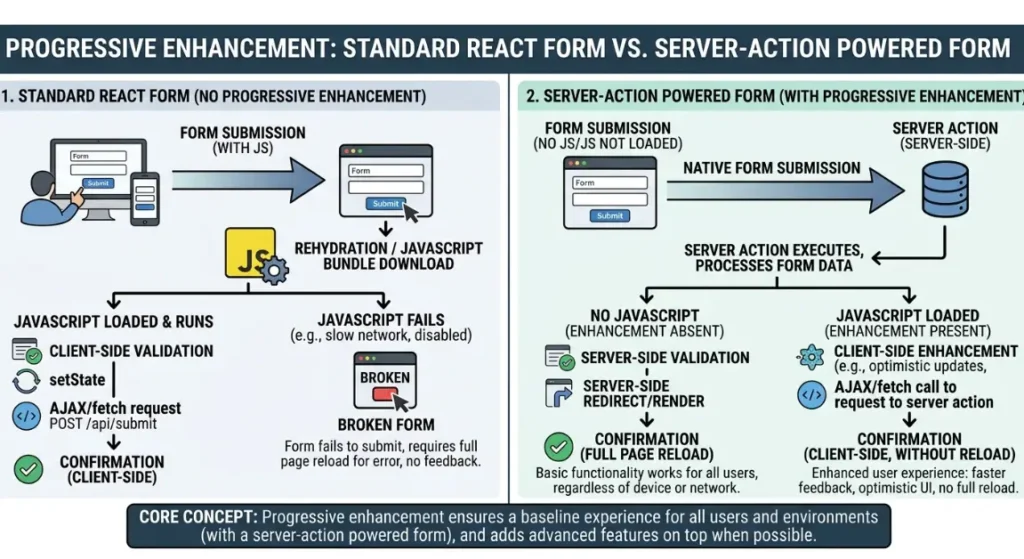
The web is shifting back to relying more on servers rather than forcing the user’s phone or computer to do all the heavy lifting. Conform is built for this modern era. It focuses on progressive enhancement react forms. This is a fancy way of saying: “Even if the user has a terrible internet connection or a slow phone, the form will still work.” It is widely regarded as the best react form validation for server actions 2026.
Best For
Modern applications using new frameworks like Next.js or Remix, where SEO and ultra-fast initial page loads are the top priority.
Pros
- Works even if the user’s browser fails to load complex scripts.
- Amazing for SEO (Search Engine Optimization).
- Very secure, as validation happens securely on the server side too.
Cons
- Only works with specific, modern React frameworks (like Next.js).
Estimated Cost
$0 (Open Source).
Learning Curve
Advanced
Real-World Use Case
A massive online publishing platform or blog where forms need to load instantly for SEO purposes and must work flawlessly on old mobile devices on 3G networks.
Options to Avoid (Common Mistakes)
As a business owner, you don’t need to write the code, but you should know when your team is heading down a dangerous path. Even if they claim to be using the best form validation libraries for react 2026, they can still make costly mistakes.
1. The “Do It Yourself” Custom Approach
Why it’s risky: I see junior developers do this all the time. They think, “I don’t need a library, I’ll just write the form validation from scratch!” It starts fine, but as your business logic grows, the code becomes a tangled mess of spaghetti. It becomes buggy, hard to update, and expensive to fix.
What to do instead: Insist your team uses an established library like React Hook Form. Don’t pay your developers to reinvent the wheel when free, battle-tested wheels already exist.
2. Ignoring the Bundle Size
Why it’s risky: “Bundle size” is how much data a user has to download to view your app. If your developers pick bloated, massive libraries, your website will take 10 seconds to load on a mobile phone. Customers will leave before the page even renders. If you look at a react form bundle size comparison, older tools are massive compared to modern ones.
What to do instead: Ask your developer, “Are we keeping our bundle size small?” This simple question shows you care about performance and will steer them toward lighter tools.
3. Skipping Schema-Based Validation
Why it’s risky: If your team relies on messy, inline “if/else” statements to check if an email is valid, bugs will slip through. Bad data (like someone entering a string of emojis instead of a phone number) will reach your database and cause crashes.
What to do instead: Ensure they are using schema-based validation like Zod or Yup to keep your data perfectly clean.
4. Over-Engineering Simple Websites
Why it’s risky: Sometimes, developers get excited about new shiny tech. If you just need a simple “Subscribe to my Newsletter” form, you do not need advanced headless form management or complex server actions.
What to do instead: Match the tool to the job. Simple website? Keep it simple. Scalable SaaS app? Use the heavy-duty tools.
Technology Comparison Table
To make this super clear for your next meeting with your tech team, here is a quick cheat sheet. If you want to know what the best form validation libraries for react 2026 are at a glance, refer to this table.
| Technology | Best For | Difficulty | Cost | Business Rating |
| React Hook Form | Almost all apps, MVP startups | Medium | Low | ⭐⭐⭐⭐⭐ |
| Conform | Next.js apps, SEO-heavy sites | Hard | Medium | ⭐⭐⭐⭐⭐ |
| TanStack Form | Massive enterprise SaaS apps | Hard | High | ⭐⭐⭐⭐ |
| Zod (Schema) | Data integrity for any app | Medium | Low | ⭐⭐⭐⭐⭐ |
| Formik | Legacy / older applications | Easy | Low | ⭐⭐⭐ |
| Custom DIY Forms | Nothing (Avoid this) | Hard | High | ⭐ |
Note: Cost here refers to the billable hours required for a developer to implement and maintain it.
Sample Web App Tech Stacks
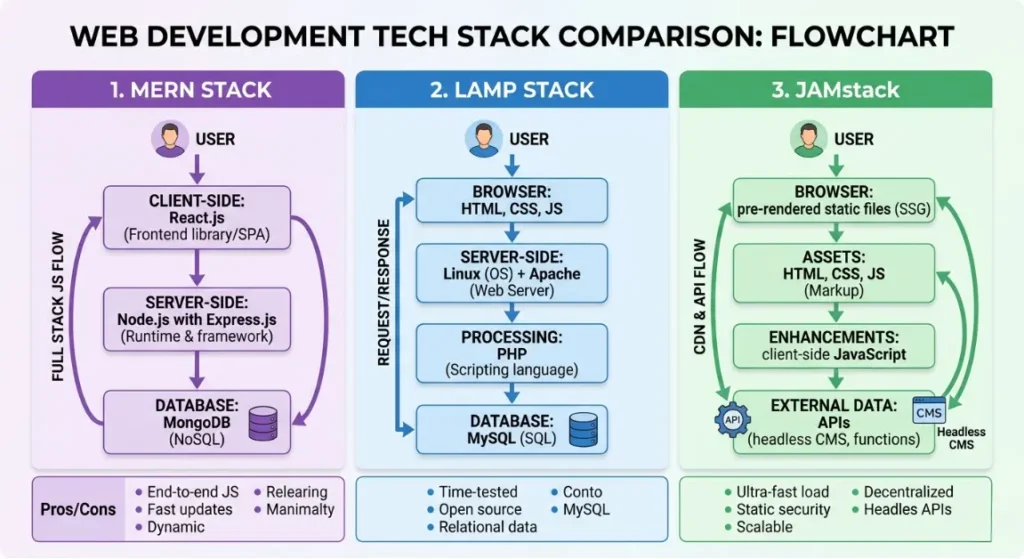
When building a product, forms don’t live in isolation. They are part of a larger ecosystem called a “Tech Stack.” If you are planning a project this year, you want to make sure your entire stack, including the best form validation libraries for react 2026, works perfectly together. Here are three realistic examples I recommend to my clients.
Stack 1: The Startup MVP (Minimum Viable Product)
If you have a brilliant idea and $10,000 to get a prototype built quickly to show investors, this is what you want. It’s fast, modern, and keeps costs down.
- Frontend: React
- Form Management: React Hook Form (using uncontrolled react form components for speed)
- Backend: Node.js
- Database: MongoDB
- Hosting: Vercel
- Estimated Cost: $20 – $50/month for hosting
- Best For: Bootstrapped founders, MVP startups, testing an idea in the market.
Stack 2: The Service Business Dashboard
If you own a local plumbing company, a law firm, or a real estate agency, and you need a custom portal for your clients to log in, upload documents, and book appointments.
- Frontend: Next.js
- Form Management: Conform (This is the best react form validation for server actions 2026, making the portal snappy and secure)
- Backend: Node.js
- Database: PostgreSQL (Incredibly reliable for customer data)
- Hosting: DigitalOcean
- Estimated Cost: $40 – $100/month for hosting
- Best For: Service businesses, internal employee tools, client portals.
Stack 3: The Scalable Enterprise SaaS
If you are building the next big software platform and expect thousands of users a day, you need rigorous architecture. You need type-safe react form validation with tanstack form and zod to ensure absolutely no bad data breaks the system.
- Frontend: React
- Form Management: TanStack Form with Zod (Headless form management at its finest)
- Backend: Python (Django) or Go
- Database: PostgreSQL
- Hosting: AWS (Amazon Web Services)
- Estimated Cost: $150+ /month for hosting
- Best For: High-growth SaaS startups, enterprise applications, fintech.
Cost Breakdown
How much does this all actually cost? Business owners always ask me this, and the truth is, “It depends on who builds it.” Choosing the best form validation libraries for react 2026 will save you money on maintenance, but the upfront build cost varies wildly.
Here are realistic ranges for building a standard web application (like a custom booking system or a small SaaS tool) in 2026:
- Freelancer (Junior/Mid-level): $2,000 – $10,000
- Great for simple projects. Riskier for complex logic. Make sure they understand progressive enhancement react forms so they don’t build something fragile.
- Freelancer (Senior Architect): $10,000 – $25,000
- You get what you pay for. A senior developer will properly evaluate a react form bundle size comparison and build an app that runs like a Ferrari.
- Boutique Agency: $25,000 – $75,000+
- You get a whole team (designer, project manager, developers). Best for companies with a budget who want a hands-off experience.
Ongoing Costs to Remember:
- Hosting: $20 – $200+ a month.
- Maintenance: Expect to spend 15-20% of your initial build cost per year on updates and bug fixes.
- Third-Party APIs: Things like sending emails (SendGrid) or processing payments (Stripe) will take a small percentage or monthly fee.
Related Articles You Might Like
If you found this guide on the best form validation libraries for react 2026 useful, check out our article on how to choose a tech stack for your web development project, where we break down frontend frameworks and backend databases for startups. You might also enjoy our deep dive into the hidden costs of software maintenance, where we explain how to budget for your app long after the launch day is over.
The Complete Web Application Development Guide for Small Businesses (2026)
Frequently Asked Questions
How long does it take to build a custom web application?
A basic MVP (Minimum Viable Product) with simple user logins and a few forms usually takes a good developer 4 to 8 weeks. A more complex SaaS platform with payment processing and advanced dashboards can take 3 to 6 months. It all depends on the complexity of your features and the size of your development team.
What is the best framework for beginners?
If you are trying to learn to code yourself, or you are hiring a junior developer, standard React paired with React Hook Form is the easiest and most practical starting point. It has the largest community, the most tutorials, and is widely considered one of the best form validation libraries for react 2026 for getting up and running quickly.
How much does a small business web app cost?
For a small business needing a custom internal tool (like a quoting system or inventory tracker), expect to pay between $10,000 and $25,000 if you hire an experienced freelance architect. Agency prices will start closer to $30,000. Beware of quotes under $5,000, as they usually result in poorly built, buggy software.
Should I hire a developer or an agency?
If you have a tight budget and the technical knowledge to manage a project (or you read guides like this one!), hiring a senior freelance developer is highly cost-effective. If you have a larger budget, no technical background, and need design, marketing, and development handled together, an agency is the safer, albeit more expensive, route.
What is the best database for web applications?
For 90% of small businesses and startups in 2026, PostgreSQL is the undisputed king. It is a highly reliable, open-source relational database that can handle almost anything you throw at it. If your app handles very unstructured data, MongoDB is a popular alternative, but PostgreSQL is usually the safest long-term bet.
Final Thoughts
Building a web application for your business can feel like navigating a minefield of technical jargon. But at the end of the day, it’s just about making smart, practical choices that protect your users’ experience and your wallet.
How Much Does It Cost to Build a Simple Web App (2026 Guide)
When your users try to give you their data whether it’s a contact request, a catering order, or a credit card payment that experience needs to be flawless. A laggy screen or a confusing error message will literally cost you money. By understanding the tools available, and ensuring your development team is utilizing the best form validation libraries for react 2026, you are building a solid foundation for your digital business.
The Ultimate best frontend framework for beginners 2026 ranking Guide
Don’t let developers over-engineer your app with heavy, outdated tools. Ask them about their approach. Mention things like schema-based validation and performance. When you speak a little bit of their language, you ensure your project stays on track, on budget, and delivers a product your customers will actually love using.
Call To Action
Are you planning to build a web application this year? Have you had a nightmare experience with buggy forms or runaway development costs in the past? I’d love to hear your story.
How to Implement AI in Small Business Complete Guide (2026)
Drop a comment below to share your experience, or feel free to ask any questions about your specific project. If you want more plain-English, practical advice on building software for your small business, make sure to subscribe to our blog and follow us on social media for weekly technical insights!
How to Deploy Web Application for Free 2026 (Beginner Guide)
Leave a Reply